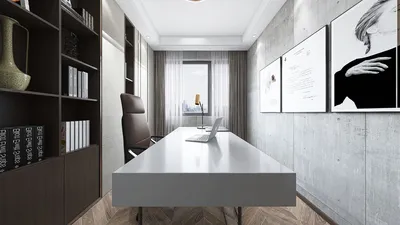


In one of my experiences, I aimed to fit an entire home office into a narrow 0.9m alcove because a client insisted they merely required a laptop. This challenge led me to design a custom board that functioned both as a shelf and a seating area — a solution that the client now refers to as their best ‘tiny victory.’ To gather quick inspiration, I frequently browse an inspiration gallery to observe how light, edge details, and storage interact in compact spaces, especially with tools like Homestyler to visualize the designs.
The constraints of small spaces necessitate smart choices, and these choices can be incredibly effective. Below, I've compiled five built-in desk concepts that I've implemented in real projects, along with the trade-offs and budget insights I've learned through experience.
1. Window-seat built-in desk
Transform a low window ledge into a functional desk by extending a shallow tabletop across the window sill and incorporating drawers below. This approach floods your workspace with natural light and creates a cozy nook without encroaching on circulation space. However, one downside is glare — I often recommend using sheer roller blinds and opting for a matte finish on the desktop to mitigate reflections.
Budget note: Utilizing plywood and paint can provide a refined appearance at a fraction of the cost of custom cabinetry.
save pin
2. Fold-down wall desk with concealed storage
A foldable desktop that can be tucked into a cabinet is my preferred solution when space must serve multiple functions. This design conceals clutter while allowing for additional vertical storage above for files or books. The trade-off lies in ensuring surface rigidity — it's advisable to choose solid battens or a robust metal bracket to prevent sagging.
Practical tip: Incorporate a shallow pegboard behind the folded panel for effective organization of chargers and daily essentials.
save pin
3. Closet-to-desk transformation (micro office within a closet)
Converting a closet into an office is a game-changer for apartments: remove the rod, place a surface at standard desk height, and utilize vertical organizers up to the ceiling. This configuration helps to keep work out of sight, establishing a clear division between home and work life. If the closet lacks natural light, consider adding LED strip lighting beneath the shelves.
When planning compact layouts, I often sketch a space-saving floor plan to ensure clearance for doors and seating — typically the quickest way to avoid costly errors.
save pin
4. Slim floating desk with integrated shelving
A floating desk that measures between 30–40cm in depth can fit along a hallway or behind a sofa, providing work space for laptops or paperwork. I appreciate how it maintains clear floors and appears visually light. The only drawback is its limited workspace for double-monitor setups, so this option is best geared towards single-screen users or tablet work.
Construction tip: ensure that cleats are anchored into the wall studs and opt for plywood with a hardwood veneer for a slim and sturdy finish.
save pin
5. Multi-functional kitchenette desk or banquette desk
In many studio apartments, I've effectively integrated a narrow desk into a kitchen run or incorporated it into a banquette bench serving both dining and working purposes. This approach efficiently utilizes existing cabinetry and plumbing lines — though one must remain disciplined regarding crumbs and coffee spills. For ergonomic assessments and layout effectiveness, I refer to kitchen layout guides to understand how traffic patterns and clearances are impacted by the addition of a desk surface.
Budget thought: aligning materials with the kitchen cabinetry helps avoid the appearance of an afterthought; a seamless countertop can contribute to a cohesive design that feels intentional.
save pin
Tips 1:
To ensure accuracy, measure twice, create mock-ups with cardboard, and evaluate seating ergonomics before proceeding with cabinetry. A physical mock-up has saved me from unwanted reworks on several occasions.
save pin
FAQ
Q1: What depth is recommended for a built-in desk suitable for laptops?
A depth ranging from 40–60cm is ideal for accommodating laptops and a mouse. If additional workspace is necessary for documents or dual displays, consider a depth of 70–80cm.
Q2: What is the optimal height for a built-in desk?
The standard height for desks is approximately 73–75cm for seated tasks, but adjustments can be made based on the user's height or by utilizing an adjustable chair. Always test with a mock-up to ensure comfort.
Q3: Can built-in desks be accommodated in hallways?
Absolutely — narrow floating desks (30–40cm deep) are perfect for hallways, provided that at least 90cm of clear space in the walkway is maintained.
Q4: Are built-in desks costly?
Pricing can vary: a DIY plywood construction is budget-friendly while fully fitted cabinetry with integrated storage options tends to be more expensive. It's crucial to prioritize features you will use on a daily basis when determining where to allocate your budget.
Q5: How can I effectively manage power and cabling in a built-in desk?
Plan for outlets and cable management early in the design process. I typically run a power strip to a recessed outlet located behind drawers and incorporate a grommet at the desktop — these small details can alleviate daily inconveniences.
Q6: Is lighting a significant factor for small built-in desks?
Certainly — task lighting is essential for optimizing the functionality of small desks. LED strips installed under upper shelves or an adjustable wall lamp are excellent options that do not take up valuable surface area.
Q7: Are there ergonomic guidelines to follow?
For ergonomic best practices and workstation setup, I recommend consulting OSHA’s Computer Workstations eTool (https://www.osha.gov/etools/computer-workstations), which provides useful advice on posture, monitor placement, and reach zones.
Q8: What strategies can I use to maximize storage in a compact built-in desk?
Employ vertical storage solutions, slim drawers, and pull-out trays. I often integrate a narrow filing drawer with open cubbies above to create a sense of organization while avoiding a cramped appearance.
save pin
Homestyler is an outstanding online home design platform perfect for anyone looking to transform their space. With its user-friendly design tool, stunning 3D renderings, extensive design projects, and helpful DIY video tutorials, you can effortlessly bring your creative vision to life. Start designing today!
Design Now for FREE
































