

Importing models into a Flashforge 3D printer can be an uncomplicated task if you adhere to the appropriate guidelines. Flashforge printers support a range of file types, notably STL and OBJ. To begin the process, make sure that your 3D model file is readily accessible on your computer.
1. Start by launching the Flashforge slicing software, such as FlashPrint. Once the application is open, locate the import or open option, typically found in the upper menu bar.
2. Click on 'Import' and navigate to the spot where your model file is stored. Choose the file you wish to print and open it. If your model is particularly large or intricate, you might want to utilize FlashPrint’s built-in features for scaling or adjusting it to fit your printer’s build plate.
3. After you have imported the model, it's advisable to orient it correctly for the best printing results. Use the tools provided by the software to rotate, move, or mirror the model as necessary.
4. Once your model is correctly arranged, the next step is to slice it. Select the slicing parameters, including layer height, print speed, and infill density to achieve your intended result. After setting these, click on 'Slice' to ready the file for your printer.
5. Finally, save the sliced file onto an SD card or USB drive, depending on your printer's specifications. Insert the storage device into your Flashforge 3D printer and follow the prompts displayed on the printer’s screen to commence the printing process.
Tips for Success:
Ensure that your model is manifold and free from errors. You can utilize software like Meshmixer or Netfabb to verify and fix your model prior to importing it into Flashforge for a smoother experience.
FAQ
Q: What file formats can I utilize to import models into Flashforge? A: Flashforge primarily supports STL and OBJ file formats for the importation of 3D models.
Q: How can I rectify errors in my model before printing? A: Leverage tools like Meshmixer or Netfabb to identify errors and resolve any issues in your models before importing them into Flashforge.

Modern Dark Green Glass Door Display Cabinet Bookshelf 3D Model
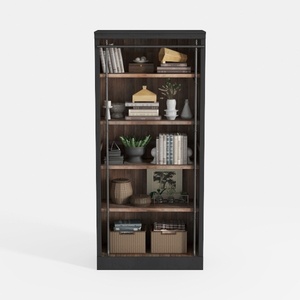
Industrial Solid Wood Metal Bookshelf Storage Display 3D Model
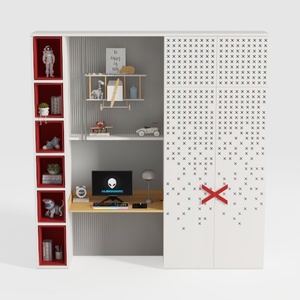

BAKAJI Scrivania con Doppia Libreria 7 Ripiani Tavolo da Lavoro Porta Pc Computer Struttura e Piano in Legno MDF Arredamento Casa Ufficio Cameretta Design Moderno 120 x 60 x 148 cm (Red)
Discover Homestyler, the ultimate online home design platform that's perfect for all skill levels. With its user-friendly design tool, stunning 3D renderings, and a wealth of DIY tutorials, you can effortlessly bring your interior design dreams to life. Get inspired and start creating today!
Design Now for FREE
































