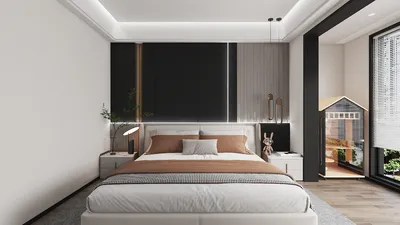


In today's world, technology shapes not only how we entertain ourselves but also how we design our living spaces. The popularity of games like League of Legends encourages a lifestyle centered around extended screen time and immersive digital experiences. This trend inspires home setups with ergonomic furniture and ambient lighting that enhance comfort and focus, creating a dedicated space that balances high-tech engagement with restful living.
Direct Answer
3D modeling involves generating digital three-dimensional objects using specialized software. Beginners usually commence by mastering fundamental shapes, transformations, and basic modeling tools in programs such as Blender or SketchUp. With consistent effort and an organized approach, most individuals can produce their first functional 3D model within a few hours.
Quick Takeaways
Introduction
When newcomers ask how to start 3D modeling, they often assume the most difficult part is navigating complex software. However, after years of creating residential design visualizations and architectural mockups, I've found the major challenge lies in comprehending the building blocks of objects.
Many beginners dive into advanced tools too quickly, resulting in cluttered geometry and frustration. Experienced professionals tend to follow a simpler method: begin with basic forms, manage proportions carefully, and progressively add detail. This guide presents the same step-by-step workflow that I suggest to interns and junior designers.
By the conclusion, you will not only know which tools to utilize but also understand the thought process behind crafting clean and efficient 3D models.
What Is 3D Modeling and How Does It Work?
Key Insight: 3D modeling functions by manipulating vertices, edges, and surfaces within a three-dimensional virtual environment to form digital objects.
Every 3D object is underpinned by its geometry. Software like Blender, Maya, and SketchUp create objects through vertices (points), edges (lines), and faces (surfaces). Together, these components connect to form a mesh.
From an architectural visualization standpoint, nearly every model originates from simple primitive shapes.
For instance, a basic chair can start as:
This methodology of developing from simple to complex is similarly applied in professional product modeling and architectural rendering.
Which 3D Modeling Software Is Best for Beginners?
Key Insight: Ideal beginner 3D modeling software strikes a balance between user-friendliness and long-term functionality.
Based on mentoring junior designers, I notice beginners frequently switch between software. Instead, it's advisable to select one accessible platform and focus on mastering its fundamentals.
Here are several user-friendly software options recommended by professionals:
A common pitfall is starting with complicated professional tools such as ZBrush or Houdini, which, while powerful, introduce complexity before foundational skills are established.
How Do You Create Your First 3D Model Step by Step?
Key Insight: The most effective way to learn 3D modeling is by meticulously replicating straightforward real-world objects.
I suggest following a simple, structured process for your initial project.
This workflow corresponds with practices used in architectural visualization and game asset production.
Why Do Beginner 3D Models Often Look Wrong?
Key Insight: The main reasons beginner models appear incorrect are proportion errors and untidy geometry rather than lack of detail.
After examining scores of beginner portfolios, recurring issues become apparent.
Common errors include:
Interestingly, professional models often appear simple in wireframe view; neat topology usually outweighs visual complexity.
How Long Does It Take to Learn 3D Modeling?
Key Insight: Most novices grasp basic 3D modeling within weeks, but proficiency in professional workflows demands ongoing practice.
From experiences with junior designers:
The distinction between hobbyists and professionals is determined not by talent but by repetition and project experience.
Answer Box
The simplest way to begin 3D modeling is by employing beginner-friendly software and constructing simple real-world objects from fundamental shapes. Prioritize clean geometry and accurate proportions before incorporating intricate details or advanced tools.
What Practice Projects Help You Improve Faster?
Key Insight: Replicating everyday items enhances spatial reasoning more effectively than arbitrary modeling drills.
Recommended beginner projects include:
Such objects instill essential modeling techniques:
Architectural visualization teams often assign furniture modeling to interns for this very reason.
Final Summary
FAQ
What is the easiest software to start 3D modeling?
Blender and SketchUp are widely recognized as the most accessible starting points due to an optimal mix of simplicity and powerful capabilities.
Can I learn 3D modeling by myself?
Absolutely. Numerous beginners acquire 3D modeling skills independently via online tutorials, practice exercises, and community discussions.
Do I need a powerful computer for 3D modeling?
Basic modeling tasks run efficiently on most modern laptops; high-end GPUs are mainly necessary for rendering and simulation.
How long does it take to learn 3D modeling?
Fundamentals can be understood within a few weeks, though becoming a professional modeler often requires months of dedicated practice.
Is 3D modeling hard for beginners?
While the concepts can be grasped, understanding spatial composition and maintaining clean geometry demand practice.
What should I model first as a beginner?
Begin with simple items like cups, chairs, or tables since these help teach proportion and structure.
What is the most common beginner mistake in 3D modeling?
Adding excessive detail prematurely instead of focusing on correct proportions and topology.
Can 3D modeling lead to a career?
Yes, 3D modeling skills are applicable across fields such as architecture, gaming, product design, film, and animation.
Throughout the process, tools like Homestyler can greatly aid in visualizing interior designs and spatial layouts, bridging the gap between conceptual modeling and practical home planning.


Homestyler offers a user-friendly online design tool with stunning 3D renderings, inspiring interior projects, and helpful DIY video tutorials. It’s perfect for easily creating and visualizing your dream home designs from start to finish.
Concevez maintenant gratuitement
































