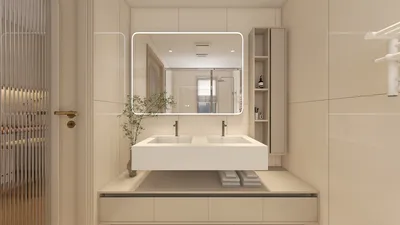


In an age where streaming platforms like DIRECTV shape our entertainment choices, designing a living room that enhances screen visibility and sound experience becomes essential. Thoughtful spatial planning with comfortable seating and adjustable lighting can transform a home theater setup, ensuring technology integrates seamlessly into your living space while supporting relaxed viewing habits.
Direct Answer
The most effective method to showcase your 3D models is by exporting them into an interactive viewer app that supports real-time navigation, lighting adjustments, and mobile sharing capabilities. This empowers clients to independently explore the space rather than passively viewing static images. Such interactive applications, including real-time 3D viewers, augmented reality (AR) viewers, and presentation platforms, significantly enhance clients’ understanding and accelerate decision-making processes.
Quick Takeaways
Introduction
After presenting numerous interior projects, I've discovered a surprising fact: most clients find it difficult to comprehend even the most stunning renderings. Although visually impressive, these images often fail to convey scale, flow, or spatial relationships effectively.
This is where using an app to present your 3D models proves invaluable. Rather than sending static images, you enable clients to interact with a rotatable, walk-through model accessible on their phones or tablets.
In my design practice, adopting this approach drastically reduced iterative revisions. Clients grasp design intentions faster, raise more insightful questions, and approve concepts sooner. This guide explores how professionals use apps like Homestyler to structure clear, lightweight, and client-friendly 3D presentations.
Why Interactive 3D Presentations Surpass Static Renders
Key Insight: Clients comprehend spatial relationships much better when they can manipulate a model themselves instead of interpreting static visuals.
Even top-quality renderings are fixed to one camera perspective, limiting spatial understanding. Conversely, interactive viewers offer the ability to rotate, zoom, and navigate through the environment.
In residential projects I’ve managed, interactive model presentations have notably reduced the need for follow-up clarification since clients can independently explore and resolve many questions.
Capabilities Interactive Apps Offer Clients:
More real estate and architectural studios adopt this approach as it fosters deeper emotional connection compared to static PDFs or slide decks.
Which Apps Are Optimal for Presenting 3D Models?
Key Insight: The ideal application depends on whether interactive viewing, augmented reality features, or presentation controls are most important for your project.
No single app fits every scenario. Designers often select from three main types based on project requirements.
Typical categories of 3D presentation apps include:
Interior design studios commonly combine a visualization tool with another app focused on storytelling and guided presentations.
How to Prepare a 3D Model for App Presentation
Key Insight: Optimizing the model for performance is critical prior to uploading it into any presentation app.
This is a frequent stumbling block; models intended for rendering engines are often too large and complex for mobile apps to handle efficiently.
The aim is to balance smooth navigation with maintained visual fidelity.
Typical optimization strategies involve reducing polygon counts and compressing textures.
From experience, models under 100MB maintain reliable performance across most modern mobile viewers.
What Features Make a 3D Presentation App Truly Helpful?
Key Insight: Navigation controls and annotation options differentiate helpful apps from frustrating ones.
Clients rarely need complex modeling features. Instead, clarity is paramount. Effective apps simplify exploration and direct users toward key design elements.
Features to prioritize include:
In my projects, camera presets are especially valuable. They prevent clients from becoming disoriented by guiding them through curated views that narrate the design concept.
Common Mistakes When Presenting 3D Models with Apps
Key Insight: Presentation failures usually stem from poor structuring rather than subpar models.
Designers sometimes presume full model access automatically enhances understanding, but unorganized exploration can actually cause confusion.
Common pitfalls include:
Treat your model as a storytelling tool, not just a digital asset.
Can Mobile Apps Accelerate Client Decision-Making?
Key Insight: Providing mobile access frequently speeds approval because clients can review designs anytime, anywhere.
When clients receive an instant link on their phones, engagement improves significantly. Rather than waiting for scheduled meetings, clients explore independently at their convenience.
In multiple apartment renovation projects, clients utilizing interactive model apps finalized layouts days earlier than those relying solely on renderings.
Benefits for client communication include:
Answer Box
The best way to present 3D models through an app is by utilizing lightweight interactive viewers featuring navigation, camera presets, and mobile sharing. Optimized models combined with guided viewpoints help clients understand and approve designs faster.
Final Summary
FAQ
What is the best way to present a 3D model to clients?
Use an interactive app like Homestyler that allows clients to explore the model by rotating, zooming, and walking through on their devices, greatly enhancing spatial understanding compared to static images.
Can I present 3D models on a phone?
Absolutely. Many 3D viewer apps support mobile platforms. Export your model in formats such as GLB or USDZ for optimal performance.
Do I need to simplify my model before uploading?
Yes. Overly complex models tend to perform poorly in apps. Reducing geometry and optimizing textures improves navigation smoothness.
Which file formats are best for 3D presentation apps?
GLB, USDZ, and FBX are among the most widely supported formats for mobile and interactive 3D presentations.
Why present 3D models using an app instead of static images?
Using an app enables clients to interactively explore the space, which enhances comprehension and reduces design misunderstandings.
Can augmented reality assist in interior design presentations?
Yes. AR viewers let clients place furniture or objects into their own environment, simplifying decisions about scale and layout.
How large should a 3D model file be for mobile apps?
Keeping model sizes below approximately 100MB generally ensures smooth loading and responsive navigation on typical devices.
Do clients need technical expertise to use 3D viewer apps?
No. Most apps are designed with intuitive touch-based navigation so that even users without technical backgrounds can use them easily.
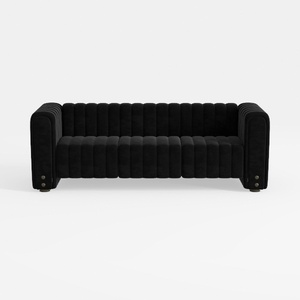
Modern Black Velvet Channel Tufted Sofa 3D Model

Modern Marble Top Solid Wood TV Stand With Metal Legs 3D Model
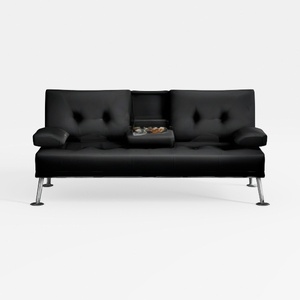
Modern Black Leather Metal Leg Loveseat Sofa with Center Tray 3D Model
Homestyler offers an easy-to-use online home design tool with stunning 3D renderings, inspiring design projects, and helpful video tutorials. It’s perfect for anyone looking to create and visualize beautiful interior spaces effortlessly. Try it to bring your home ideas to life!
立即免费设计
































