

In designing conference rooms, my primary focus is on people, followed closely by the technology that supports their interactions. Factors such as capacity, sightlines, acoustics, and lighting play a more significant role in defining the layout than any individual measurement. Interestingly, a smaller room, when designed with appropriate chair spacing and visual angles, can vastly outperform a larger one that is poorly configured.
Choosing the right size for spaces is essential and should be guided by concrete data. The Workplace Survey by Gensler indicates that effective collaboration spaces are correlated with having a clear purpose and sufficient resources—rooms that are appropriately sized for both the team and their tools significantly enhance productivity. According to WELL v2, it is crucial to keep the background noise in enclosed areas around 35–45 dBA and manage reverberation, which directly influences the perceived quality of the room and determines its necessary size to accommodate a conversation's sound energy. Additionally, the Illuminating Engineering Society (IES) suggests that conference rooms should aim for a horizontal illuminance of approximately 300–500 lux, which can help dictate ceiling height and the number of fixtures as the design expands (according to IES standards).
The concept of right-sizing also hinges on user behavior. Research from Steelcase establishes a connection between meeting effectiveness and the proper alignment between room type and intended activity: collaboration, particularly in hybrid setups, requires more depth, strategic camera positioning, and unobstructed sightlines compared to brief discussions. By integrating these insights with real-world project evaluations, I can determine specific layouts and ergonomic spaces that minimize distractions.
Fundamental Dimensions and Capacity Ratios
To begin, I analyze seating arrangements. A typical participant needs about 30–36 inches (760–915 mm) in width and 18–24 inches (460–610 mm) from the edge of the table to the back of the chair, in addition to a circulation space of 36–48 inches (915–1220 mm) behind. This translates into common capacity estimates:
• Standard footprint: 10' x 12' to 12' x 14' (3.0 x 3.7 m to 3.7 x 4.3 m).
• Table dimensions: 72–84 inches long, 36–42 inches wide (183–213 x 91–107 cm).
• Clearances: A minimum of 42 inches behind chairs; preferably 48 inches for accessibility.
• Display size: 55–65" with the first row positioned approximately 1.4–1.6x the diagonal size of the screen.
• Standard footprint: 14' x 18' to 16' x 20' (4.3 x 5.5 m to 4.9 x 6.1 m).
• Table dimensions: 108–144 inches long, 42–48 inches wide (274–366 x 107–122 cm).
• Clearances: 48 inches around the perimeter; include an additional 60 inches behind the primary entry zone to prevent congestion.
• Display size: 75–86"; cameras should be centered at a height of 42–48 inches, maintaining a 7–9° downward angle towards the far end to create natural eye contact.
• Standard footprint: 18' x 24' to 20' x 26' (5.5 x 7.3 m to 6.1 x 7.9 m).
• Table dimensions: 168–216 inches long, 48–54 inches wide (427–549 x 122–137 cm); consider using boat-shaped edges to enhance sightlines.
• Clearances: Minimum of 60 inches behind chairs along the long sides; ensure 72 inches at doors and service stations.
• Display size: Utilize dual 86–98" screens or one large screen plus a side content monitor; maintain seating in the first row at a distance of 1.5–2.0x the diagonal size for optimal viewing.
• Standard footprint: 22' x 30' to 24' x 36' (6.7 x 9.1 m to 7.3 x 11.0 m) influenced by chair count and AV requirements.
• Table dimensions: 240–300 inches long, 54–60 inches wide (610–762 x 137–152 cm).
• Clearances: 72 inches around the perimeter for service circulation; require 36 inches of space between banquette seating and surfaces.
• Display: A multi-display setup; ensure camera-to-face distance is balanced so remote participants can read micro-expressions distinctly.
Ergonomic Clearances and Human Considerations
The spacing of chairs plays a crucial role in comfort. I allocate 24 inches center-to-center for compact stacking chairs, between 28–30 inches for standard task or conference chairs, and 32 inches for executive chairs. The ADA mandates a clear path of at least 36 inches; however, I suggest using 42–48 inches for genuine usability, particularly when individuals need to stand and pass behind seated participants. The typical table height of 28–30 inches works well for most tasks, paired with chairs having seat heights between 17–19 inches. Providing elbow space is vital for participation: I recommend allowing a minimum of 20 inches per person at the table's edge.
Sightlines, Screen Dimensions, and Camera Arrangement
Visual ergonomics is paramount on the front wall. I place the top of the main display approximately 15–20 degrees below the average seated line of sight for the back row to prevent neck strain. For clarity, I generally follow a rough formula: the distance for the front row should be 1.4–1.6 times the screen's diagonal, with the last row sitting at 4–6 times the diagonal based on the complexity of the content. Cameras should ideally be positioned at eye level and aligned with the main display to minimize "gaze angle" issues during hybrid calls. Research from Steelcase and Herman Miller on hybrid setups reinforces the notion of centering cameras for improved equitable participation.
Lighting Levels, Color, and Glare Management
The IES recommends horizontal task lighting levels of 300–500 lux in conference settings, alongside vertical illuminance on attendees' faces to enhance video quality. I aim for a balanced environment with 300–350 lux overall, complemented by vertical lighting of 150–250 lux on faces. Utilizing indirect pendant lighting and perimeter coves helps reduce veiling reflections on screens. Light color temperatures between 3500–4000K ensure natural skin tones and readable documents. Emphasizing glare reduction and flicker-free drivers per WELL v2 influences my selection of fixtures. I avoid glossy surfaces for tables; opting for mid-sheen matte wood or Fenix NTM-style laminates to minimize glare.
Acoustics and Speech Clarity
Successful meeting rooms maintain a low background noise level and controlled reverberation. Guidance from WELL v2 suggests a target range of NC/LAeq in the mid-30s to mid-40s dBA; this can be achieved through the use of absorbent ceilings (NRC 0.70+), soft floor finishes, and cushioned seating to reduce RT60 to approximately 0.5–0.7 seconds at standard conference volumes. Acoustic panels should be placed at first reflection points along side walls; additional bass traps or thicker absorptive materials should be utilized in rooms exceeding 24 feet in length to manage low-frequency sound that can muddle voices.
Table Shapes, Configurations, and Circulation Paths
The shapes of tables convey behavioral implications. Rectangular setups favor clear leadership dynamics and linear sightlines; boat-shaped tables enhance peripheral visibility; while D-shaped or horseshoe arrangements support presentation dynamics. During the planning phase, I frequently use a room layout tool like Homestyler to prototype configurations, assessing reach, camera angles, and clearance for doors. It’s essential to maintain 48–72 inches of circulation space behind chairs on main paths, ensure doors are free from obstruction by chair backs, and avoid positioning the display wall directly opposite full-height glazing unless effective shades minimize reflections.
Hybrid AV Setup and Power Considerations
Install floor boxes or under-table power outlets every 2–3 seats. Proper cable management is critical; tripping hazards can severely compromise the layout. Microphones should be spaced 24–36 inches apart for optimal local sound clarity; while ceiling arrays require predictable RT60 levels and minimal noise from HVAC systems. Cameras deliver the best performance when positioned at a perpendicular angle to the table, with supplementary side cameras for longer tables to maintain visual engagement.
Ceiling Height and Spatial Proportions
The height of the ceiling directly impacts the room's volume and sound decay. I typically find that heights of 9–10 feet (2.7–3.0 m) work well for small to medium spaces; whereas 10–12 feet (3.0–3.7 m) are suitable for larger rooms outfitted with pendant lighting and acoustic clouds. Keeping a visual harmony through a ratio of 1:1.5 to 1:2 in width-to-length proportions helps avoid tunnel effects that can disrupt both sound and sightlines.
Material Choices and Sustainability
When selecting materials, I recommend using low-VOC finishes that ensure durability for meeting purposes: for instance, wool blends for upholstered panels, solution-dyed carpet tiles equipped with cushioning, and tables designed for high resistance to scratching. Soft materials in high-impact zones serve dual purposes for acoustics. Sustainable options not only mitigate long-term expenses but also contribute positively to well-being, a goal highlighted in WELL v2 and IFMA facility best practices.
Door Arrangement, Storage Solutions, and Auxiliary Zones
It’s best to position doors along the long side of the room, ideally in the back third, to safeguard the presentation wall. Incorporate a credenza behind the table—a console measuring 20–24 inches in depth with a clearance of 36 inches in front—for supplies and catering purposes. For spaces that frequently host workshops, incorporating wall-mounted whiteboards spanning 72–96 inches is advantageous, ensuring an 18–24 inches clearance at ends for maintenance access.
Common Dimension Mistakes I Encounter
• Using an oversized table for the space, restricting circulation.
• Displays that are too small, making it hard for the back row to see content.
• Doors swinging into chair backs or obstructing the main camera path.
• Glossy table surfaces that contribute to screen glare.
• HVAC vents directed towards microphones, raising background noise levels.
Quick Reference: Room Size Related to Capacity
• 4–6 seats: Approximately 120–168 sq ft (11–16 m²).
• 8–10 seats: Roughly 250–320 sq ft (23–30 m²).
• 12–16 seats: About 430–520 sq ft (40–48 m²).
• 20–24 seats: Around 660–860 sq ft (61–80 m²).
These estimates are based on standard table heights of 28–30 inches, circulation spaces of 42–60 inches, with AV located on one primary wall.
Frequently Asked Questions
Q1: What is the minimum clearance required behind conference chairs?
A1: I consider 42 inches as a practical minimum, with a recommendation of 48–60 inches along main circulation routes to ensure comfortable movement and adherence to ADA guidelines.
Q2: How do I determine the right screen size for a room accommodating 12 participants?
A2: An ideal dimension would be between 86–98 inches. The first seating row should be positioned at around 1.5x the diagonal size, while ensuring the last row does not exceed about 4–6x diagonal for optimal visibility of detailed information.
Q3: What are the optimal lighting levels to aim for?
A3: It’s advisable to have 300–500 lux on the surface of the table, with appropriate vertical lighting on faces. Maintaining a color temperature in the 3500–4000K range while minimizing glare is critical, per IES recommendations.
Q4: How wide should the table be designed?
A4: A width of 42–48 inches is suitable for most rooms, while larger boardrooms may benefit from widths of 54–60 inches. Careful placement of cameras is essential with wider tables to prevent distortion in distance.
Q5: How does the shape of the room affect acoustics?
A5: Rooms that are long and narrow often lead to flutter echo and uneven low-frequency responses. A ratio of 1:1.5 to 1:2 in width-to-length, combined with absorptive ceilings (NRC 0.70+), can significantly enhance speech clarity.
Q6: What is the most effective table shape for hybrid meetings?
A6: Tables with boat shapes or D-shapes facilitate better sightlines to both cameras and displays, giving remote participants a clearer view of everyone present.
Q7: Where should doorways be ideally placed?
A7: Doors should be located along the long wall towards the back third of the room, away from the display, to prevent interruptions and maintain clear sightlines while avoiding clashes with chair backs.
Q8: How much space should I plan for each person?
A8: Allocate between 24–30 inches for seat width and 20 inches for elbow room along the table edge, plus an additional 42–60 inches for circulation.
Q9: Are there any noise standards to consider?
A9: Background noise levels should ideally remain within the mid-30s to mid-40s dBA, in line with WELL v2 acoustic guidelines, to minimize fatigue and enhance clarity.
Q10: Is it necessary to have multiple screens in larger rooms?
A10: Yes, for rooms longer than 18 feet or accommodating 16+ seats, having dual displays or a large primary screen in addition to a side content monitor is advisable for maintaining visibility for participants seated in the back rows.
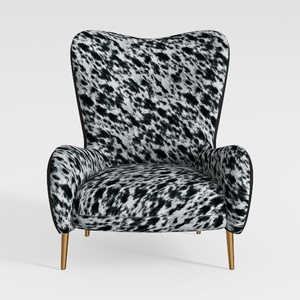


Modern Solid Wood Frame Fabric Upholstered Accent Armchair 3D Model
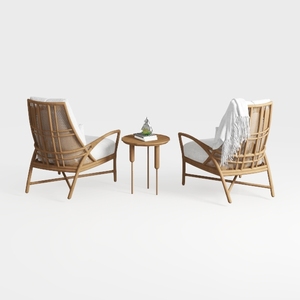
Bohemian Rattan Fabric Armchair and Side Table Set 3D Model
Homestyler is an outstanding online home design platform perfect for your creative needs. With its user-friendly design tool, stunning 3D rendering, diverse design projects, and helpful video tutorials, you can easily transform your home ideas into reality. Explore your design potential with Homestyler today!
立即免费设计
































