

There is a certain charm in hand-drawn house sketches—the pencil gliding across paper, free-flowing lines, and ideas that flow directly from the mind onto the surface. Legendary architects around the world often begin their projects with rough, annotated sketches. However, in today’s modern era, hand sketches as a design communication tool have a significant limitation: only the creator can truly envision the final outcome.
Different contractors might interpret the same sketch in vastly different ways. Family members unfamiliar with technical drawings often find it hard to visualize the design at all. Moreover, you might be surprised when the finished house doesn’t exactly match the image you had in your mind while sketching.
Limitations of Hand-Drawn Home Sketches Often Overlooked
While hand-drawn sketches are valuable as initial brainstorming tools, they have inherent limitations that are more apparent today with accessible digital visualization. Sketches cannot accurately depict depth and three-dimensional scale—two rooms that look similar on paper may feel entirely different once constructed due to unseen proportional differences in 2D views.
Sketches also fail to show how materials will appear—whether natural stone looks too heavy on the façade, if paint colors complement planned flooring materials, or how natural light entering from specific window placements will illuminate rooms throughout the day.
Perhaps most importantly, sketches are prone to miscommunication. What seems clear to the sketch artist may be ambiguous to others. Contractors reading unclear lines might interpret them incorrectly, causing costly construction errors.
From Sketch to Digital: Empowering Homeowners with Visualization
Hand sketches should not be discarded entirely—they remain essential for quick and free exploration of ideas. The issue arises when these rough sketches become direct references for construction without refined, verifiable visualization.
The optimal process involves starting with hand sketches as a foundation, then evolving them into precise 3D digital models with software like Homestyler before sharing with contractors. Digital models can be rotated from different angles, furnished to check scale, and rendered into photorealistic images that everyone—contractors, family members, and potential buyers—can understand.
How to Transform Hand-Drawn Sketches into Accurate 3D Digital Models
Converting hand-drawn sketches into precise digital representations is easier than many believe. Homestyler, available via browser or desktop apps for Windows and macOS, lets you input dimensions from your existing sketches to create digital floor plans.
Begin by entering the land and building dimensions from your sketch into Homestyler. Use its digital floor plan tools to draw walls, doors, and windows exactly as positioned, but this time with precision that hand sketches cannot provide. Once the basic structure is complete, Homestyler automatically generates a 3D model that you can freely explore.
From there, you can add interior furniture from a catalog of over 600,000 models, select materials and colors, and create 4K photorealistic renders that show the final look with exceptional accuracy.
Comparison: Hand Sketches versus Digital Visualization
Effective Hand Sketches as a Foundation for Digital Modelling
Although hand sketches are limited as final communication tools, a well-crafted sketch remains valuable for early idea exploration. Effective base sketches for digital modeling include approximate dimensions of each room, positions of doors and windows, indications of major zones and room relationships, and building orientation relative to cardinal directions.
With these basic details, the conversion to a digital model becomes efficient—you have a clear vision, and Homestyler helps bring it to life accurately and communicate it clearly to all stakeholders.
Conclusion
Hand-drawn house sketches are beautiful creative tools but unreliable as precise communication devices in modern construction requiring accuracy and visual clarity. By developing your initial sketches into detailed 3D digital models using Homestyler, you gain the best of both worlds—the creative freedom of sketching and the accuracy and universal understanding of digital visualization.
Convert your house sketch into an accurate 3D digital model with Homestyler today—available for free through browser or desktop apps on Windows and macOS.
Frequently Asked Questions
1. Are hand sketches still useful in the digital age?
Yes, hand sketches remain valuable for fast and uninhibited idea generation. The issue arises only when rough sketches are used as construction references without converting them into more accurate and universally understood digital representations.
2. Can I convert my hand-drawn house sketch into a 3D digital model?
Absolutely. With Homestyler’s browser or desktop apps for Windows and macOS, you can input dimensions from your sketch and develop precise 3D models that can also be rendered photorealistically in 4K quality.
3. How accurate are digital models compared to hand sketches?
Digital models are far more accurate because all dimensions are explicitly and precisely input. 3D visualization also shows scale, proportions, and materials that cannot be effectively represented in hand sketches.
4. Do I need drawing skills to create digital models in Homestyler?
Not at all. Homestyler features an intuitive drag-and-drop interface—no drawing skills, AutoCAD knowledge, or technical expertise required to produce accurate 3D models and photorealistic renders.
5. How long does it take to convert a house sketch into a 3D model using Homestyler?
For a house with 2-3 bedrooms, creating a digital floor plan and basic 3D model usually takes 1 to 3 hours. Adding interior furnishings and generating photorealistic renders can take an additional 2 to 4 hours, depending on the desired detail level.
6. Can 3D models from Homestyler be used to communicate with contractors?
Definitely. Homestyler’s 4K photorealistic renders are among the most effective ways to convey design vision to contractors—much clearer and more universally understood than hand sketches that can be open to interpretation.
7. Does Homestyler help optimize existing sketches?
Yes, by converting your sketches into 3D, Homestyler helps you detect proportion or layout issues unseen in 2D sketches—such as overly narrow corridors or rooms that are poorly proportioned for furniture.
8. What is the difference between Homestyler models and formal architectural technical drawings?
Homestyler models serve as highly useful visual tools for planning and communication, while formal architectural drawings are licensed documents required for building permits and official construction guidelines. Both complement each other in the home-building process.
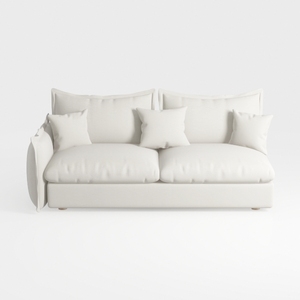
Minimalist White Fabric Loveseat Sofa with Throw Pillows 3D Model
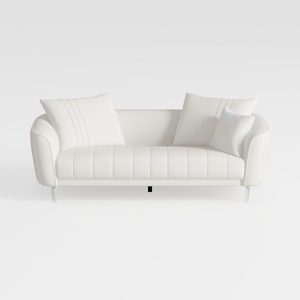
Minimalist White Leather Tufted Sofa With Throw Pillows 3D Model
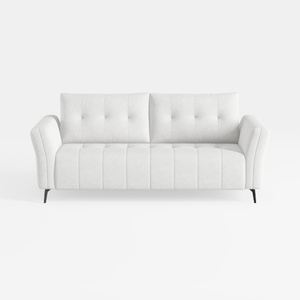
Minimalist Fabric Tufted Loveseat Sofa with Black Metal Legs 3D Model
Homestyler is an easy-to-use online home design platform that lets you create stunning 3D renderings, explore design projects, and learn through helpful DIY video tutorials. It's a great tool to bring your interior decoration ideas to life effortlessly.
Progetta ora GRATIS
































