


Extracting a 3D gun model from video games has gained popularity among modders and 3D artists. This undertaking includes determining the game engine, searching for model files, and utilizing specialized software to convert proprietary formats into widely used types such as .OBJ or .FBX. Many contemporary games encapsulate their assets in archive files (like .pak, .wad, or .dat), requiring tools like asset unpackers or model viewers—Ninja Ripper and Unity Asset Studio are notable examples—to extract these models. Once you've accessed the raw 3D file, you may also need texturing software to extract and properly map the textures. Remember to adhere to copyright laws and extract models solely for personal, educational, or permitted purposes.
Suggestions for Best Practices
As a designer, I always ensure that the extracted models seamlessly integrate into my design workflow. For instance, after importing a gun model into my scene, I often turn to tools like Homestyler to visualize lighting, positioning, and material application. This method allows me to transform technical extraction into innovative integration for interior scenes or product visualizations.
Frequently Asked Questions
Q: Which software can I use to extract 3D models from video games?
A: Software such as Ninja Ripper, Unity Asset Studio, and AssetBundle Extractor are commonly utilized with various game engines.
Q: Is it permissible to extract 3D models from games?
A: Legality varies by the game's license. While personal, educational, or non-commercial use might be acceptable, always check the terms of service first.
Q: How can I change a proprietary game model format into OBJ or FBX?
A: You can employ model conversion tools or import the file into a 3D program that supports exporting, such as Blender.
Q: Where are 3D models typically stored in game files?
A: Models are often packed within archive files (.pak, .dat)—navigate the game directory or utilize asset unpackers for access.
Q: How can I ensure the imported game models function correctly in interior design renderings?
A: After importing, verify the scaling, texture mapping, and lighting setups within your rendering tool for best results.

Rustic Rectangular Coffee Table, 44.8 Inch

Minimalist Solid Wood Linen Fabric Extra Long Sofa 3D Model
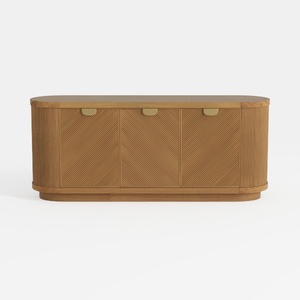
Modern Minimalist Solid Wood Fluted Sideboard with Brass Accents 3D Model
Discover the magic of home design with Homestyler! This intuitive online platform offers powerful design tools, stunning 3D renderings, and a wealth of inspiring design projects. Plus, you'll find helpful DIY video tutorials to guide you every step of the way. Transform your space effortlessly!
Desain sekarang Gratis
































