

Transitioning between dark mode and light mode in your device or application can significantly enhance your comfort and productivity levels. Light mode, which usually features a bright interface with darker text, can be especially preferable for users during daylight hours or in brightly lit settings. Here’s a straightforward guide on how to make this adjustment across various popular platforms:
Once you’ve adjusted your display mode, it’s important to consider how the lighting of your space and the emotional ambiance of your interiors affect your digital experience. As a design enthusiast, I recommend ensuring that your digital workspace’s aesthetics align with your physical environment for peak comfort and inspiration. For example, when I work in a bright, open-concept office or create mood boards for my upcoming projects, I tend to opt for light mode. This consistency between digital tools and ambient lighting conditions can enhance your overall workflow, particularly when utilizing design programs like Homestyler, where the interface’s design complements the visual clarity necessary for layout and color planning.
Tip 1:
If your devices offer scheduling options, consider setting dark mode to turn on automatically at night and light mode during the day. This practice synchronizes your digital ergonomics with natural lighting, reducing eye strain and enhancing the rhythm of your design workflow.
FAQ
Q: What are the benefits of switching between dark and light modes?
A: Alternating modes can minimize eye strain depending on the surrounding light conditions, enhance text readability, and align better with your design aesthetic or emotional state.
Q: Will switching to light mode impact my device’s battery performance?
A: Typically, dark mode can conserve battery life on OLED displays, while light mode may consume slightly more energy; however, this difference is usually minimal for laptops and desktops.
Q: Can I apply dark or light mode settings to individual apps?
A: Yes, numerous applications, including design tools like Homestyler, allow you to choose appearance settings that are separate from the general operating system theme.
Q: How does the choice of display mode influence interior design presentations?
A: Using light mode can help images and floor plans appear brighter and more true to color, which is crucial when presenting design concepts to clients or collaborators.
Q: Is there a preferred mode for design professionals?
A: The preferred choice often varies based on the type of tasks and individual comfort. For detailed work involving space planning and color accuracy, light mode may provide clearer visuals.
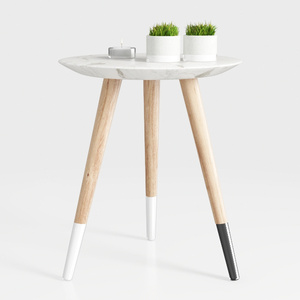
Modern Marble Top Solid Wood Legs Side End Table 3D Model

Minimalist Solid Wood Linen Fabric Three Seat Sofa 3D Model
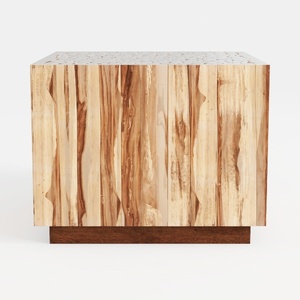

Minimalist Solid Wood Accent Cabinet with Textured Top 3D Model
Homestyler is your go-to online home design platform! With its user-friendly design tool, stunning 3D renderings, and a plethora of inspiring projects and video tutorials, transforming your space into a dream home has never been easier or more fun! Start designing today!
立即免费设计
































