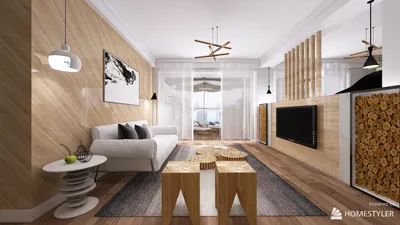


When considering office wallpaper, I see it as a dual-purpose element—both a design feature and a behavioral signal. The appropriate pattern can mitigate noise, direct movement, and enhance focus for various tasks. Recently, work teams have embraced hybrid models incorporating deep work sessions, brief stand-ups, and video calls, which means walls must fulfill more than an aesthetic role. Utilizing tools like Homestyler can aid in visualizing these design elements.
Data on workplace performance illustrates the significance of environmental cues. According to the Gensler U.S. Workplace Survey, the ability to concentrate is crucial for effectiveness, consistently ranking as a primary factor in performance across different fields. Research by Steelcase indicates that having control over one’s surroundings—such as light, sound, and visual settings—correlates with increased engagement and productivity. These insights influence my wallpaper selection, ensuring that patterns enhance sightlines, facilitate zoning, and minimize visual distractions, with tools like Homestyler providing helpful support in the design phases.
Comfort can also be quantified. The WELL v2 standard highlights glare reduction, lighting that supports circadian rhythms, and the health of materials as vital to overall well-being. Wallpapers with texture or matte finishes can diffuse light, lower reflections, and decrease eye strain, making a tangible difference in daily comfort. The aim is to create a unified color palette that complements task lighting, color temperature, and acoustic requirements rather than merely serving decorative purposes, and using Homestyler can simplify the planning of these elements.
Ensuring Clean Geometry for Focus Zones
For tasks requiring concentration, I prefer clean geometric designs—such as thin grids, soft chevrons, or micro-dots—in subdued, low-contrast color schemes. These geometric patterns establish a visual rhythm without clashing with screens or whiteboards. It's important to maintain gentle contrast ratios to reduce visual jitter when shifting focus between monitors and walls. In open office layouts, I recommend applying geometric wallpaper solely to a single accent wall behind workstations to prevent overstimulation, which can also be easily planned out with Homestyler.
Embracing Soft Neutrals with Texture
Lightly textured wallpapers with a matte finish—like linen weaves, plaster textures, or faux grasscloth—are visually soothing and introduce tactile richness. They perform well under different light conditions and minimize glare. Pairing them with 3000–4000K lighting ensures maintaining a consistent neutral tone throughout the day. To effectively design room spaces, consider using a room layout tool to quickly assess sightlines and visualize how different textures interact with furniture and screens.
Integrating Biophilic Motifs for Restorative Spaces
Patterns inspired by nature—gentle fronds, soft mossy gradients, or abstract stone textures—can create calming micro-zones in quiet areas or lounges. Opt for muted greens and soft grays to keep the design understated. Strategically wrapping designs around corners can create a visual 'embrace' for seating areas, aiding in psychological relaxation between meetings. Keeping the scales small ensures these motifs do not overcrowd compact environments, and visualization tools like Homestyler are beneficial for planning.
Implementing Brand-Focused Color Blocking
Using large color fields in brand-specific tones can establish a strong identity without the complexity of patterns. Two-tone blocks—a more muted base with a brighter band—can guide navigation and communicate spaces' functions, such as areas for focus versus collaboration. It’s effective to place color edges along natural pathways to subtly direct movement. For walls designated for video conferencing, selecting mid-value, low-saturation shades can enhance skin tones and minimize camera distortion.
Utilizing Acoustic-Assist Wallcoverings
In spaces like meeting rooms and phone booths, choosing sound-absorbing wallpaper or fabric-backed wall coverings can significantly improve acoustic comfort. While they are not a substitute for sound panels, they can help mitigate flutter echo and soften issues with mid-high frequencies. Patterns featuring microtextures or tonal speckles can effectively conceal wear and serve as an elegant backdrop for presentations. Coordination with ceiling acoustics and rug density can ensure a balanced acoustic environment, and tools like Homestyler can help visualize these arrangements.
Adopting Monochrome Minimalism in Tech-Heavy Areas
In environments dominated by AV equipment and numerous screens, using monochromatic wallpapers in soft gray or muted taupe tones can help stabilize visual contrast. High-contrast patterns, particularly in black and white, can create distractions similar to flickering, which hampers concentration. Wallpapers with a subtle mottled texture can hide reflections from glossy monitors, presenting a timeless aesthetic that pairs well with evolving technology.
Incorporating Warm Woods and Faux Veneers
Timber-like wallpapers introduce warmth without the upkeep associated with wood paneling. Lighter oak or ash hues harmonize effortlessly with neutral furnishings and brushed metallic accents. Employing vertical grain can create an impression of enhanced height, while ensuring seams align prevents visual disruption. In collaborative areas, a gentle wood pattern can frame whiteboards and brainstorming spaces, anchoring ideas and making them feel accessible and appealing.
Exploring Mid-Scale Patterns for Collaborative Areas
In project rooms, mid-scale designs—soft geometric shapes, gentle terrazzo patterns, or painterly stripes—can energize a space without overwhelming it. Balancing the pattern density with solid surfaces is essential: one wall can feature a pattern while the rest match with a matte-neutral surface. This balance supports focused conversation and alleviates fatigue during extended workshop sessions, which can also be effectively assessed using a design tool like Homestyler.
Understanding Color Psychology: Hues Aligned with Tasks
Cool blues and blue-grays are conducive to analytical tasks; muted greens are restorative, while soft terracottas and warm neutrals foster sociability. Aligning with insights from Verywell Mind’s color psychology, I observe in my projects that overly saturated reds can increase arousal and stress when deployed on large surfaces. It’s advisable to restrict striking colors to narrow bands or strategic entry points for impactful yet stress-free design outcomes.
Evaluating Lighting, Glare, and Wallpaper Finishes
Lighting and wallpaper are inherently intertwined. Under the 3500–4000K lighting range, neutrals appear accurate, and skin tones present naturally for video interactions. Employ matte or eggshell finishes to minimize sharp highlights. Adhering to IES guidelines for task lighting ensures proper balance between vertical and horizontal illumination, preventing walls from overshadowing work areas. It's essential that pattern sheen stays lower than desk surfaces to avoid fatigue from contrasting visuals.
Choosing for Durability, Cleanability, and Material Health
Select commercial-grade vinyl or PVC-free options with high scrubbability ratings for areas with heavy foot traffic and workstations. Using stain-resistant finishes in kitchens or print spaces can significantly reduce maintenance effort. For those pursuing WELL certifications, prioritize materials that are low in VOCs and have transparent ingredient lists. To ensure longevity, it’s advisable to steer clear of sharp white wallpapers in high-contact zones, opting instead for warm grays or textured neutral designs that camouflage scuffs effectively.
Establishing Zoning with Subtle Transitions
Wallpaper can effectively delineate areas—using lighter tones for circulation paths and deeper shades for focus zones. A soft transition in color shades along adjacent walls can indicate purpose without the need for signage. In open office settings, aligning these transitions with acoustic treatments can create coherent, recognizable spaces.
Strategizing Placement and Visualization
Prior to installation, it is crucial to map sightlines from main desks, entry points, and camera angles. It's best to keep busy patterns out of the direct line of sight of monitors. Testing large fabric samples under varying light conditions throughout the day is advisable. When developing your design, utilizing an interior layout tool helps visualize wallpaper boundaries, furniture placements, and scale perspectives from different viewpoints—such as Homestyler, which can enhance your design confidence.
Citing Authoritative References
For insights on workplace behavior and focus, consider exploring the research archives from Gensler and the studies conducted by Steelcase regarding engagement and environmental factors. WELL v2 provides recommendations on lighting, material health, and comfort strategies that resonate with your wall finish selections. You may find useful summaries within Gensler Research and Steelcase Research.
Common Questions
What type of wallpaper design should be used for focus zones? Low-contrast, small-scale geometric patterns like thin grids or micro-dots work best. They provide rhythm without contributing to visual distraction and complement matte finishes effectively to alleviate glare.
Which hues are ideal for video conferencing settings? Mid-value, desaturated tones such as warm grays, slate blues, and muted sage flatters skin tones and minimizes sensor-related noise. It's best to steer clear of stark white and high-contrast patterns that sit behind the camera.
Can wallpapers aid in sound absorption? Yes, fabric-backed or microtextured wall coverings can provide modest sound absorption and help reduce echo. Pairing them with rugs and ceiling treatments can significantly enhance the overall acoustic experience.
What finishes are recommended for minimizing glare? Matte or eggshell finishes are ideal as they diffuse specular highlights, especially under lighting of 3500–4000K. Glossy surfaces tend to amplify glare and contribute to visual fatigue.
How can color and texture differences zone areas? Adjusting color value and texture by area—utilizing lighter shades for pathways and darker tones for focus areas—can indicate different functions without the need for signage. Bold patterns should be limited to collaboration areas while keeping monitor-facing walls subdued.
Are commercial wall coverings easy to clean and durable? Many PVC-free commercial wall coverings offer robust cleanability and durability. Always check for scrub ratings and low-VOC certifications, particularly for projects driven by WELL standards.
What patterns are suitable for a single accent wall? Small to mid-scale motifs with subtle contrast are ideal. Incorporate one patterned wall to prevent visual overload, while maintaining neutral, matte surfaces elsewhere.
What adjustments can be made to optimize light and wall interactions? Opt for matte textures, orient patterns away from direct light sources, and balance vertical illumination when designing to ensure walls do not overwhelm workspaces.
How can soft brand colors be implemented? Consider using softened brand tones in color-blocked bands or narrow accent areas. Maintain moderated saturation and pair them with neutral textures to foster warmth and accessibility.
What are effective methods for visual testing before purchase? Order large samples and evaluate them under real lighting conditions throughout the day. Utilize a room design visualization tool like Homestyler to assess sightlines, pattern scale, and camera angles in advance.
Homestyler is your go-to online home design platform. With its user-friendly design tool, stunning 3D renderings, diverse design projects, and informative DIY video tutorials, you can easily create your dream space and explore endless design possibilities—perfect for both enthusiasts and newcomers!
تصميم الآن مجانا
































