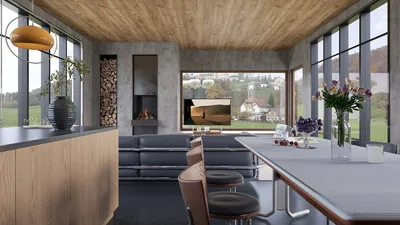


RGB light strips offer more than just vibrant colors on walls; they can delineate spaces, enhance ambiance, and improve visual comfort with strategic placement and tuning. In both my residential and hospitality designs, I utilize these strips to create seamless gradients, highlight architectural features, and designate activity zones while keeping the visual clutter to a minimum.
The Importance of Smart Ambient Lighting
Lighting significantly influences the atmosphere and functionality of a room. The WELL v2 guidelines suggest managing glare and promoting circadian lighting to enhance comfort and alertness, highlighting the necessity of layered, adjustable lighting solutions (refer to the WELL v2 Light concept). Research conducted by Steelcase has indicated that environments where users can manipulate light, temperature, and noise tend to report higher satisfaction levels and improved task performance—control is essential, and RGB strips provide precise dimming and color refinement.
Color psychology also plays a critical role in shaping behavior. According to an overview from Verywell Mind, cooler colors such as blues and greens tend to have a calming effect, while warmer shades or vibrant reds can invigorate. The versatility of RGB systems allows for calibration based on specific activities. I typically create ambient settings with neutral white tones while introducing colors as accents, ensuring the space remains adaptable.
Transforming Spatial Perception with RGB Light Strips
By using RGB strips in cove lighting, under shelves, and along base reveals, one can visually elevate ceilings, deepen alcoves, and clarify pathways. Installing strips at sightline edges softens boundaries and minimizes harsh contrasts, leading to improved visual comfort. My approach favors indirect light, often hiding strips behind surfaces or using diffusers to create gentle luminance washes in accordance with IES recommendations on glare management.
LED Specifications: Brightness, Color, and Control
Begin with a focus on output and color quality. For general ambient tasks, a range of 300-600 lumens per meter is adequate in smaller rooms; continuous accent lines may require less. It's essential to prioritize high color rendering (CRI 90+) for accurate representation of materials and skin tones. Opting for RGB+W, which includes a dedicated 2700-4000K white channel, allows for a comfortable everyday lighting experience without the complications of mixing color temperatures. Utilizing dimmable drivers and multi-zone controllers assists in maintaining equilibrium as various surfaces and finishes interact with the light.
Effective Placement Patterns
Perimeter Cove: Install strips in ceiling or wall coves to elevate the overall space, ensuring the LED is positioned 2-4 inches away from the edge to properly diffuse the light. Under-furniture reveals: Incorporating toe-kicks under cabinetry or bed frames creates a subtle floating appearance. Backlighting panels: Employ translucent diffusers behind media walls or headboards to produce a gentle halo effect, softening screen contrast. Accent shelves and niches: Mount strips towards the front edge and dim them appropriately to illuminate objects without casting harsh shadows.
For complex lighting layouts, a room design visualization tool can greatly assist in planning and spatial decisions, leading to a cohesive and effective design.
Customizing Color Scenes for Activities
For relaxation, maintain a white temperature between 2700-3000K, accompanied by low-intensity, desaturated blues and teals in cove lighting to promote tranquility. For focused work, a neutral white temperature around 3500-4000K supports clarity with minimal color, aside from soft, cool accents to alleviate visual fatigue. In entertainment settings, opt for vibrant color bands situated behind screens and speakers, ensuring a gentle warm white base to prevent abrupt contrast. For social occasions, establish a warm-white base with dynamically changing accent hues for a lively atmosphere, steering clear of pure red at high brightness to avoid tension.
Balancing Acoustic and Visual Comfort
The interplay between lighting and sound perception is significant. In media rooms, it’s best to keep RGB accents indirect and low to foster a quieter environment while avoiding glossy surfaces that may enhance glare. Utilizing matte finishes and textured fabrics can help diffuse light, enriching color presentation and minimizing reflective glare. Ensuring uniformity as emphasized by IES guidelines, by spreading strips across extended runs and bouncing light off ceilings or walls, leads to consistent luminance throughout the space.
Effective Use of Controls, Dimming, and Automation
Scenes become beneficial only when easily accessible. Multi-zone controllers facilitate differentiation between coves, reveals, and shelves, and integration with app or voice control enhances convenience. In bedrooms, I set a pre-sleep scene that lowers white light temperatures and reduces blue light exposure. Living areas benefit from a toggle scene for focused activities, characterized by brighter white output with subdued color accents. Timers and sunrise simulations can subtly influence circadian rhythms, provided the white channel is aligned with suitable color temperatures.
Installation Techniques to Mitigate Glare
Utilizing diffusers, such as opal lenses or silicone channels, can veil individual diodes and enhance comfort levels. It’s crucial to maintain a proper setback, positioning strips away from direct sightlines and angling them toward surfaces that will reflect the light. Prioritize clever cable management by concealing wiring within channels or furniture spaces. Ensure thermal management by using aluminum profiles to dissipate heat, which extends LED lifespan and maintains consistent color output.
Reflective Material and Color Accuracy
Highly reflective surfaces can distort perceived colors. Pair saturated RGB lighting with neutral, matte finishes to ensure color accuracy; aim for CRI 90+ for whites and skin tones. Warm-toned wood materials such as oak and walnut complement warmer white temperatures, while cool-colored paints and materials such as concrete harmonize well with cyan and magenta accents. Testing small areas under varying light conditions—both at night and during the day—is vital for achieving the desired balance.
Focus on Sustainability and Maintenance
Opt for LED options with verified lifespans and replaceable drivers to minimize waste. Utilizing modular channels allows for LED strip replacements without damaging existing finishes. Proper dimming capabilities can extend LED life and decrease energy consumption. Incorporate access panels in built-in structures and label zones for straightforward maintenance.
Example of a Real-World Setup: Living Room
I have recently integrated an RGB+W system into a compact living space, featuring a ceiling cove for ambient bounce, a halo around the media wall for enhanced screen comfort, and low-output toe-kick lighting beneath the sofa for nighttime navigation. The white channel addresses daily lighting needs, while color accents are reserved for the cove and media wall. I created two scenes—Focus (3800K, high ambient light, muted cyan halo) and Social (2900K, medium ambient, warm magenta lift)—which accommodate the majority of use cases while keeping glare low and sightlines pleasing.
Citations for Authority
For guidance on lighting comfort and circadian rhythm support, the WELL v2 Light concept offers valuable insights on glare management and tunable lighting solutions. For an understanding of how colors affect mood and behavior, consult the Verywell Mind overview on color psychology. These resources reinforce the significance of controllable, layered lighting when working with RGB strips.
Frequently Asked Questions
For ambient accent lighting, a lumens range of 300-500 per meter is generally sufficient. Utilize the white channel (2700-3000K) for everyday tasks, and keep colored light low and indirect to create a tranquil atmosphere.
RGB by itself does not fulfill the requirements. Opt for RGB+W that includes a tunable white channel (around 2700-4000K), allowing you to set cooler whites during focus periods and warmer whites before sleep, in accordance with WELL v2 guidelines for circadian-friendly lighting.
Position strips within diffused channels, ensuring a 2-4 inch setback from edges, and angle the light towards bounce surfaces. Avoid direct lines of sight to the diodes and maintain moderate brightness levels.
Saturated colors can alter perceived hues. Employ high CRI for the white channel and keep color accents less saturated when illuminating natural materials like wood and stone.
Utilize perimeter coves for ambient washes, create a halo effect behind media walls to soften screen contrast, and integrate low-output toe-kicks for safe nighttime circulation. You can visualize spacing with an internal layout planner: layout simulation tool.
Employ a hub or app-based controller that supports dimming functionality and separate channels for cove, reveal, and shelf lighting. Scene presets along with voice control can streamline daily use.
Absolutely—ensuring CRI 90+ on the white channel allows for true color representation for artwork, finishes, and skin tones. Remember, RGB primaries do not define CRI; it’s the white LED that primarily influences everyday lighting quality.
For relaxation, opt for warm white light paired with low-intensity cool accents. Focus areas benefit from a neutral white around 3500-4000K with minimal color distractions. For entertainment, integrate saturated accents behind screens and speakers while maintaining a dim warm base. Social settings gain warmth from a base combined with soft, varying hues.
Indirect lighting helps in decreasing harsh reflections, contributing to a more soothing environment. Coupling this with soft furnishings like rugs and curtains helps manage sound reverberation; while lighting doesn’t absorb sound, it can lessen sensory overload.
To manage thermal output, opt for aluminum channels, select modular drivers, and label distinct zones. Keep spare diffusers and connectors on hand, and plan for access points in built-in furniture to facilitate maintenance.



Homestyler is an exceptional online home design platform perfect for anyone looking to create stunning interiors. With its user-friendly design tool, impressive 3D rendering features, and informative video tutorials, you'll easily transform your home design ideas into reality. Dive into your next project with Homestyler!
Projete agora para LIVRE
































