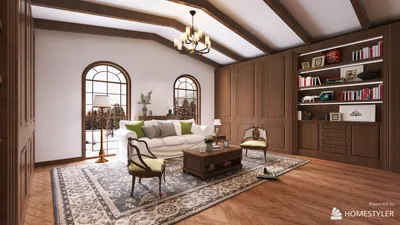


Creating a stylish living room centered around a television requires careful consideration of proportion, sightlines, and light management, which is crucial even before you select a media console. My design approach revolves around three key aspects: optimal viewing ergonomics, improved acoustic quality, and visual coherence with the existing architecture and furnishings. To align with the WELL Building Standard, it is essential to minimize glare and promote visual ease with appropriate luminance contrasts and viewing angles; positioning the TV at seated eye level can significantly reduce neck strain. Research from Steelcase indicates that lessening awkward neck movements and head rotations enhances focus and reduces fatigue during screen time—principles that seamlessly apply to entertainment seating and can be further enhanced with tools like Homestyler for layout simulations.
When it comes to TV distance, it's more about practical viewing rather than just size. A good rule to follow is to maintain a viewing distance of 1.3 to 1.6 times the screen's diagonal for 4K content, achieving a balance between immersion and clarity. For instance, a 65-inch TV is comfortably viewed from approximately 2.2 to 2.7 meters (7.2 to 8.9 feet) away. IES lighting guidelines stress the importance of managing veiling reflections and luminance ratios around displays in living areas, targeting ambient light levels of around 100 to 200 lux with adjustable lighting and focused task lamps for reading. Insights from Steelcase suggest that visual distractions and glare can significantly diminish comfort, which justifies the investment in layered lighting and soft materials surrounding the screen, all of which can be effectively designed using Homestyler.
Determine the Ideal Size, Height, and Viewing Distance
Select your TV size based on the depth of seating rather than the wall length. For rooms with multiple purposes, I like to keep the screen center at approximately 40 to 44 inches from the floor, which suits standard sofa heights (17 to 19 inches). If you're mounting higher, perhaps above a mantel, consider a slight tilt and use deeper cushions to maintain a neutral neck posture. Keep your viewing distance proportional: a 55-inch TV is best viewed from about 1.8 to 2.3 meters, a 65-inch at roughly 2.2 to 2.7 meters, and a 77-inch from 2.7 to 3.3 meters. In tighter spaces, opting for a slightly smaller set and enhancing the area’s perception with a wider media wall or additional storage can be a smart choice.
Plan the Room Layout Prior to Making Any Purchases
I start by charting out traffic routes, taking into account doors, windows, and natural pathways from the kitchen to seating. The TV positioning should be such that movement occurs behind the viewers. Ensuring a clear 36-inch pathway behind the main sofa avoids disruptions. If necessary, consider floating the seating to create a centered focal point on the screen while maintaining balance with architectural elements. To experiment with layout options quickly, utilize a room layout tool like Homestyler to visualize sightlines and distances, ensuring that the TV wall complements the windows and furniture dimensions.
Master Light Control and Minimize Glare Effectively
Glare is detrimental to comfort. I like to create layers in lighting: (1) dimmable ambient lighting that is soft and indirect, (2) wall washers or asymmetrical sconces that enhance vertical brightness around the TV, and (3) floor or table lamps positioned behind or beside viewers to aid in eye adjustment. It's best to avoid having the TV directly facing large windows; if this cannot be avoided, sheer shades can help diffuse light, while blackout options are ideal for movie nights. I suggest choosing a warm-to-neutral color temperature (2700–3500K) in living spaces, as cooler lighting can contrast uncomfortably during dark scenes. Following IES standards, it's important to ensure even luminance and avoid glossy finishes that cause reflection on the screen.
Achieve Acoustic Comfort and Optimal Speaker Placement
A great visual experience deserves equally great audio. Position the left and right speakers at ear height and ideally 22 to 30 degrees off center from the primary seating, while aligning the center channel with the screen's midline. Adding a rug, fabric-upholstered sofas, and curtains helps mitigate first reflections, while bookcases with varied depths assist in sound diffusion. Subwoofers are often most effective when placed near the front wall but not crammed into corners; employing a method known as 'sub crawl' can help find the optimal bass position. If a soundbar is part of your setup, ensure it is unobstructed by the TV stand and decouple it from any resonant cabinetry.
Conceal Clutter: Power, Cabling, and Ventilation Solutions
Plan to have outlets centered directly behind the TV as well as an additional lower outlet behind the console. It’s advisable to route HDMI and power cables separately to reduce interference, and include service loops to accommodate future additions. Ensure proper ventilation within cabinetry: leave at least 2 inches of clearance on the sides and rear for devices like receivers and game consoles to prevent overheating. If opting for wall mounting, select an articulating arm with integrated cable management that is securely anchored to studs or proper mounts.
Design the Media Wall with Style and Minimal Visual Distraction
Create a balance between mass and negative space. I generally center the TV on a soothing backdrop—such as a painted panel, slatted wood, or limewash—then complement it with asymmetrical storage to counterbalance rigidity. Maintaining a consistent color value between the TV and the surrounding wall area so that the black rectangle doesn’t stand out starkly is key. According to color psychology insights from Verywell Mind, deep blues and muted greens are associated with calmness; utilizing these tones near the media wall can diminish the perceptual distraction of the screen between viewing sessions. Devices can be concealed behind fabric doors that allow IR and sound through, and low-profile decor beneath the screen helps avoid visual clutter during scene pans.
Ergonomics in Seating and Multi-Use Comfort
Opt for sofas that provide good lumbar support with a seat depth that aligns with your household's stature—too deep will require leaning forward to read subtitles, while too shallow will cause slouching. It’s helpful to include a single upright “reading” chair slightly off-axis for casual conversations and sports nights. A coffee table height of 16 to 18 inches pairs well with most sofas, maintaining 16 to 20 inches of distance between the seats and the table edge. Side tables should be around arm height, making them convenient for drinks and remotes.
Take Into Account Windows, Fireplaces, and Asymmetry
When a fireplace captures attention, I often adopt a dual-focal strategy: mount the TV on an adjacent wall and angle the seating slightly to find a balance, or offset the TV placement and incorporate a decorative sconce or art piece to restore visual equilibrium. For areas with large windows, prioritize maintaining views by relocating the TV to a perpendicular wall; if that isn’t viable, consider recessing the TV or utilizing a low-gloss screen finish along with layered window treatments.
Materials, Sustainability Practices, and Maintenance Tips
Utilizing matte finishes around the TV aids in reducing reflections. Opt for low-VOC paints and sustainably sourced woods; well-ventilated cabinets can prolong the life of your gear, contributing to sustainability. Utilizing cable sleeves and properly labeled cords simplifies future upgrades. To ensure longevity, select hardware that includes standard VESA mounts and depth-sufficient consoles for anticipated equipment expansions.
Strategies for Small Spaces and Open Plans
In smaller rooms, consider wall mounting the TV to free up floor space, floating a compact sofa, and using a narrow console to create a visual anchor. In open-plan designs, define zones with rugs and ceiling-mounted lighting, making sure the TV area remains distinct from dining space illumination. Keep the placement of subwoofers and routers out of walkways. Employ a layout simulation tool to evaluate angles for multiple viewers and find a comfortable off-axis position.
A Comprehensive Setup Checklist
- Verify stud locations and central alignment; plan for high and low outlets including conduits.
- Choose the TV size based on the distance of seating; ensure wall space accommodates tilting or articulating mounts.
- Adjust the height to ensure the screen center aligns close to seated eye level (typically 40 to 44 inches).
- Create lighting layers: include dimmable ambient lights, wall washers, and task lamps behind seating.
- Arrange speakers at ear height and ensure appropriate toe-in positioning; treat first reflections with soft materials.
- Manage cables effectively with service loops and ensure ventilation in cabinetry.
- Design the media wall using matte finishes and balanced arrangements; keep decorative elements low-profile.
- Test various layouts through digital simulations to ensure effective traffic flow behind seating.
Frequently Asked Questions
Q1: What is the optimal height for mounting a living room TV?
A: The best practice is to aim for the screen center to be around seated eye level, typically 40 to 44 inches from the floor, depending on the height of your sofa. If mounting it over a mantel, remember to add a slight tilt to minimize neck strain.
Q2: How far should I be seated from a 65-inch TV?
A: For 4K content, aim for a distance of about 2.2 to 2.7 meters (7.2 to 8.9 feet). This allows clarity without overstating pixelation and supports relaxed eye accommodation.
Q3: How can I minimize screen glare without completely darkening the room?
A: Relocate the TV to avoid direct reflections from windows, add sheer curtains for light diffusion, and implement dimmable layered lighting. Opt for matte paints and low-gloss finishes surrounding the screen.
Q4: Do soundbars serve as replacements for surround speakers?
A: A good quality soundbar can enhance clarity and dialog, but separate left, center, and right speakers with a subwoofer will provide superior audio imaging and bass control. In smaller rooms, a soundbar paired with wireless surrounds can be an effective compromise.
Q5: What colors work best behind the TV?
A: Using muted, mid-to-dark shades (such as ink blue, charcoal green, or clay) can help reduce contrast against the black screen and impart a sense of calm—supporting color psychology theories linking cool, muted hues with lowered arousal.
Q6: How much ventilation is necessary for AV equipment?
A: Ensure at least 2 inches of space on the sides and rear for airflow, and avoid stacking heat-generating devices. Consider adding rear cutouts or grille panels for natural thermal circulation.
Q7: How can I arrange seating for both movies and conversation?
A: Position your primary sofa to be on-axis with the screen, and introduce a swivel or upright lounge chair positioned 20 to 30 degrees off-axis to enable face-to-face interaction without obstructing screen visibility.
Q8: What is the recommended color temperature for lighting?
A: Warm to neutral white lighting (2700–3500K) is comfortable for living environments and maintains natural skin tones on-screen, especially when combined with adjustable dimming for daytime or evening viewing.
Q9: Is it advisable to place the TV directly opposite a window?
A: If possible, avoid this setup; use low-gloss screens, layered window treatments, and slightly angle the TV so that the main viewing sightlines avoid direct sunlight reflection. Vertical lighting around the TV can also help diminish the perceived glare.
Q10: What is a good starting point for setting speaker angles?
A: Position your left and right speakers to create a total angle of 45 to 60 degrees in relation to the main seat (22 to 30 degrees each side) ensuring tweeters are at ear level, and then fine-tune their orientation to create a solid center image.
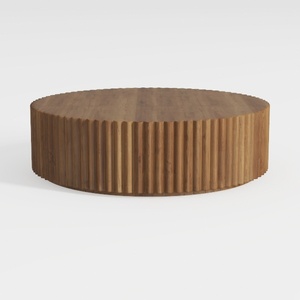
Minimalist Solid Wood Fluted Round Coffee Table 3D Model
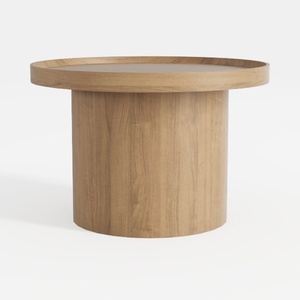
Minimalist Solid Oak Round Coffee Table 3D Model

Minimalist Solid Wood Linen Fabric Three Seat Sofa 3D Model
Homestyler is your go-to online home design platform! With its user-friendly design tool, stunning 3D renderings, and a wealth of design projects alongside helpful video tutorials, transforming your space into your dream home has never been easier. Get started and unleash your creativity today!
Design jetzt kostenlos
































