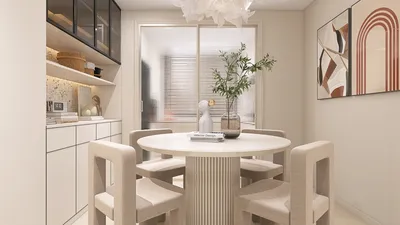


As I approach a central LCD wall, it serves as the visual focal point of the living space, seamlessly integrating comfort for viewing, effective storage solutions, acoustics, and smooth circulation. When optimally designed, this feature not only enhances tranquility in the room but also streamlines daily activities such as watching shows and enjoying social gatherings. Recent studies in workplace and home environments reveal a consistent link between visual comfort and overall satisfaction. Research from Steelcase indicates that issues such as glare and poor display positioning can lead to distractions and fatigue; by minimizing glare and improving sightlines, perceived comfort significantly improves. Furthermore, the WELL v2 standards underline the importance of managing luminance contrast and ensuring appropriate color rendering around screens for better visual health. Utilizing a tool like Homestyler can assist in creating this valuable space effectively.
Establishing the right scale and viewing distance is key. I adhere to a guideline: for a 65-inch LCD, the ideal viewing distance is about 8 to 10 feet, positioning the center of the screen close to eye level when seated (generally around 40 to 44 inches from the floor for standard sofas). The ergonomic recommendations from Herman Miller advocate for maintaining a neutral neck posture during extended viewing; positioning the screen too high can lead to added strain. When windows face the screen, either decrease luminance contrast or move seating to steer clear of direct reflections—IEEE standards advise managing brightness ratios between the display and surrounding areas to minimize glare.
Designing the Wall: Creating Zones, Storage Solutions, and Circulation
My approach to designing an LCD wall involves three distinct zones: the display area, equipment space, and soft storage. The display area should be visually uncluttered, concealing wiring behind panels or via a recessed channel. The equipment zone—housing devices like streaming boxes, consoles, and routers—requires ventilated spaces for easy access. Soft storage, ideal for items like books and game controllers, is best kept in drawers or flanking cabinets. In narrower or multipurpose rooms, a streamlined credenza with a slim upper panel can balance the aesthetics without creating visual bulk. For intricate living and dining combinations, I often utilize layout simulation tools, like Homestyler, to test traffic flow and ensure furniture doesn't obstruct movement around the media wall.
Lighting That Enhances the Display
Effective lighting design is crucial for an LCD wall. It's important to avoid downlights directly above the screen, as they can create highlights that wash out blacks. Instead, opt for dimmable wall washers or concealed coves that softly illuminate adjacent panels. Aim for layered lighting: ambient warmth at 2700 to 3000K, a high Color Rendering Index (CRI of 90 or above) for color accuracy, and low-glare task lamps in the seating area. The WELL v2 certifications support the need for adjustable lighting and glare control to safeguard visual health; I also adhere to the concept of balanced luminance—no single light source should dominate the visual landscape. Adding gentle backlighting behind the panel can mitigate contrast but should be kept subtle to avoid creating distracting halos.
Material Selection: Balancing Texture, Acoustics, and Longevity
Materials surrounding the LCD wall must effectively absorb sound and mitigate reflections. Options like upholstered panels, micro-perforated wood, or fluted medium-density fiberboard (MDF) can diffuse high-frequency sounds; a fabric rug and upholstered seating will enhance this effect. Glossy finishes near the screen can amplify reflections, making matte lacquers, satin laminates, or oiled veneers the preferred choice. Include cable channels and vent slots as part of the millwork design for continuity. For easy maintenance—especially in family environments—select durable, fingerprint-resistant laminates and sturdy, closed-grain woods. If stone materials are incorporated, choose honed finishes instead of polished to prevent glare.
The Impact of Color on Mood and Focus
Color has a significant impact on the perception of brightness and focus around a television wall. Cooler neutral shades, like soft grays or stones, can position the screen as the central focus, while deep, muted tones absorb light and conceal equipment. Insights from Verywell Mind indicate that blues and greens evoke calmness and sustained concentration; I frequently apply a blue-gray backdrop behind the display for prolonged viewing comfort. Warm hues—such as terracotta or ochre—can be introduced in adjacent shelving or on the top of the credenza to enhance comfort without sacrificing contrast.
Considerations for Mounting Heights, Ratios, and Cable Management
To achieve proper alignment with seating height, the center of the screen should be set near the average eye level when seated. If the installation requires placing the screen above a fireplace, consider tilting the mount and incorporating a heat deflector to protect the equipment. It’s crucial to keep a 2 to 3-inch gap behind the panels for effective cable management, routing power and data through a dedicated surge-protected line. Ensure adequate ventilation: 1 to 2 square inches of vent space per device to avoid overheating in enclosed cabinets.
Concealment vs. Open Display
There are two prevalent approaches for modern LCD walls. Concealment employs sliding panels or pivoting doors to hide the screen when it’s not in use—ideal for minimalist designs or spaces where art takes precedence during the day. In contrast, the expressionist approach embraces the screen as part of an artistic arrangement, featuring asymmetrical shelving, mixed materials, or a central frame that includes an integrated soundbar. In compact apartments, a slender media rail with floating shelves can keep the footprint lightweight while still providing for essential storage.
Acoustic Comfort and Optimal Speaker Placement
Design as if sound were as visible as imagery. Center speakers should be positioned directly below the screen, with flanking left and right speakers placed at ear height and angled toward the seating area. If a soundbar is preferred, suspend it on vibration-dampening pads to minimize cabinet resonance. Avoid placing subwoofers in corners if cleaner bass is desired; experimenting with speaker positions can help eliminate excessive booming. Soft finishes on opposite walls, like curtains or tapestries, contribute to absorbing initial sound reflections.
Creating Functional Spaces in Small Living Areas
In compact rooms, select a low-profile mount along with a shallow credenza that features sliding doors. Consider incorporating fold-down desks or hidden charging drawers to enhance functionality. Utilizing a vertical arrangement of narrow fluted panels can create an illusion of height, while light, matte finishes combined with ambient lighting (at 2700 to 3000K) help maintain an airy feel. If the seating distance is limited, opt for a smaller screen or adjust the seating slightly off-axis to preserve comfortable viewing angles.
Designing Family Rooms: Robust, Organized, and Child-Friendly
Investing in durable laminates, rounded edges, and soft-close hardware offers long-term value. Set aside labeled bins for controllers and chargers, keeping cable access behind removable panels. Introduce a washable rug and use stain-resistant fabrics around the viewing area. Installing task lighting with dimmer controls allows for smooth transitions from playtime to movie nights.
Designing for Open-Plan Spaces: Aligning Sightlines
In open concepts, the LCD wall should align with primary sightlines from areas like the kitchen and dining room. To avoid views from behind the screen, secure the wall on a solid surface or utilize a half-height divider that can double as storage. If glare from tall windows is an issue, consider employing side-shading options (like sheer curtains combined with drapes) and positioning seating to minimize direct reflections. To optimize circulation, I often utilize an interior layout planner like Homestyler to map out paths and ensure furniture placements are clear and functional.
Design Trends for 2024–2025
Emerging design trends highlight tactile materials (like fluted wood or ribbed plaster), muted mineral color schemes, and integrated ambient lighting strips with high CRI ratings. Sustainable veneers and recycled composite materials are more accessible; I prioritize low-VOC finishes and responsibly sourced timber. Incorporating hidden wireless charging stations and modular cable trays ensures technology remains unobtrusive and future-proofed.
Checklist for Installation
- Verify wall structure and blocking ahead of mounting.
- Provide specific power and low-voltage runs with surge protection.
- Assess optimal viewing distances and heights using blue tape mockups.
- Ensure dimmable, glare-free illumination around the screen.
- Plan ventilation for enclosed equipment areas.
- Use matte or satin materials to minimize reflections.
- Test speaker placement and acoustics before finalizing millwork.
FAQ
Q1: What’s the recommended viewing distance for a 55–75 inch LCD?
A: For a 65-inch screen, the ideal distance is between 8 and 10 feet. Adjust accordingly for screen size—around 7 to 8 feet for a 55-inch, and 9 to 11 feet for a 75-inch—while aligning the center of the screen with seated eye level to maintain ergonomic neck posture, as advised by Herman Miller’s guidelines.
Q2: How can I minimize glare on my television wall?
A: Avoid downlights positioned in front of the screen, utilize matte materials, and manage window reflections with layered shades. IES standards stress the importance of balancing luminance; wall washing or indirect lighting solutions are preferable to direct beams on the screen.
Q3: Is it advisable to mount above a fireplace?
A: It can be effective if you tilt the mount, implement a heat deflector, and ensure that mantle and insert temperatures remain within safe limits. Prioritizing neck comfort is essential; if the screen is mounted too high, consider relocating it to achieve a better viewing height.
Q4: Which colors work best behind the screen?
A: Choosing darker, desaturated neutrals can help reduce glare and maintain focus. Shades of blue and blue-gray are associated with calm, according to color psychology insights provided by Verywell Mind, enhancing the comfort of extended viewing sessions.
Q5: How can I maintain a tidy organization of cables and devices?
A: Design a 2 to 3-inch service void behind panels, incorporating grommets and Velcro ties for clean cable management. It’s essential to use ventilated compartments for consoles and streaming devices while routing power through a dedicated surge-protected circuit.
Q6: What is the ideal lighting for movie nights?
A: Opt for dimmable ambient lighting in the range of 2700 to 3000K, combined with low-glare wall washes and optional soft backlighting. Maintaining a high CRI ensures accurate color representation while managing contrast helps reduce eye strain, aligning with WELL v2 lighting quality recommendations.
Q7: How can I improve the acoustics around the media wall?
A: Combine absorptive and diffusive materials such as fabric panels, fluted wood, and rugs while positioning speakers at ear level. If subwoofers are placed in the corners, adjust their positioning to achieve a smooth bass response by eliminating any pronounced peaks in sound.
Q8: What’s a strategic approach for small living spaces?
A: Implement slim mounts, shallow credenzas, and discreet storage options. Choose matte materials and evaluate sightlines to avoid reflections. When seating is within close proximity, consider downsizing the screen to enhance comfort.
Q9: Can I conceal the TV while ensuring daily use isn’t complicated?
A: Utilizing sliding panels or pivoting doors can effectively hide the screen while maintaining ease of access. It's advisable to select hardware that incorporates soft-close mechanisms and dependable tracks, along with ensuring ventilation that accommodates remote usage.
Q10: How do I effectively plan an LCD wall in an open-plan layout?
A: Align the wall with main sightlines while managing glare from tall windows using layered shading solutions. Employ a room design visualization tool like Homestyler to validate circulation paths and furniture placements, ensuring traffic flows smoothly in the space.
Homestyler is the ultimate online home design platform for anyone looking to transform their space. With its user-friendly design tool, stunning 3D rendering, and a wealth of inspiring design projects and video tutorials, you'll have everything you need to create your dream home effortlessly.
Дизайн сейчас бесплатно
































