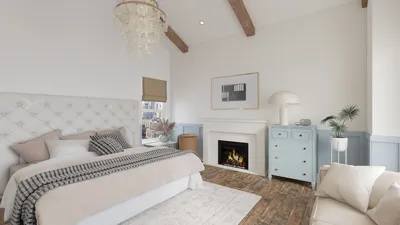


A contemporary TV unit serves a purpose beyond merely holding the television; it establishes the flow within the living room, facilitates movement, and enhances daily routines. With thoughtfully designed proportions, various storage options, and carefully considered lighting, the TV wall transforms into a serene and versatile backdrop perfect for socializing, working, or unwinding. I design these elements to appear deliberate from every viewpoint, ensuring a balance of display, acoustics, and cable management for a seamless experience.
Research consistently underscores the significant influence of well-conceived living spaces on comfort and behavior. Findings from Steelcase indicate that clutter and excessive visual stimuli heighten cognitive overload, hampering relaxation and concentration. A thoughtfully designed TV unit with concealed storage alleviates this burden by keeping cables, remotes, and gaming accessories out of sight. Furthermore, lighting plays an essential role: according to IES standards, ambient residential lighting should generally be between 100–300 lux in living areas, with task lighting reaching 300–500 lux in reading zones; such guidelines help me recommend dimmable, glare-free lighting across the TV wall (source: ies.org/standards).
The psychology of color is as critical as layout. Verywell Mind explains that muted shades like soft blues and greens can instill tranquility and alleviate stress, while warm accents contribute a sense of intimacy—ideal for making the screen feel less dominant during conversations. When it comes to selecting finishes, I prefer a neutral palette (matte oak, warm gray mineral paint, or soft-touch laminates) while reserving brighter colors for smaller accents or back panels. This approach maintains visual stability even when the TV is off (source: verywellmind.com/color-psychology).
Key Guidelines for a Contemporary TV Unit
• Proportions and positioning: Ensure the TV is at eye level when seated—generally 42–48 inches from the floor to the center of the screen, depending on seat height. Align shelves and doors on a consistent grid; a vertical ratio of 1:2 or 1:3 appears clean and timeless.
• Cable management: Employ access points to route power and data. I recommend using a removable back panel featuring 2–3 service points to prevent overheating and simplify upgrades.
• Ventilation for electronics: AV equipment requires ventilation. Using perforated backers or maintaining a 10–15 mm gap along the bottom of doors ensures stable temperatures without clutter.
• Acoustic design: Utilizing soft materials in areas prone to reflections can reduce echoes. Felt, ribbed wood slats, or textured fabric panels can enhance dialogue clarity and reduce auditory fatigue.
Design Approaches That Influence Behavior
Consider the TV wall as an integral part of the room's movement and interaction dynamics. Position the sofa to allow for passage behind it, and angle lounge chairs 10–15 degrees towards one another to encourage eye contact rather than screen fixation. Using a room layout tool can effectively simulate distances, viewing angles, and pathways if you're experimenting with various seating arrangements: a room layout tool.
Lighting Environment: Layered, Adjustable, and Glare-Free
I create three lighting layers surrounding the unit: ambient (indirect ceiling or wall washing), task (reading lamps by seating), and accent (LEDs in niches). Ensure that accent lighting remains at or below 2700–3000K for warmth, while keeping indirect ambient lighting at 3000–3500K to avoid bright harshness. Effective glare management is essential—avoid placing direct overhead lighting above the screen; opt for wall washers or ceiling coves to minimize reflections. Incorporate dimmers with scenes (for movie watching, reading, or socializing) to enhance the unit's adaptability for various daily activities.
Material Choice and Eco-friendliness
Materials should be visually understated yet durable against everyday use. I prefer matte, low-VOC finishes and FSC-certified veneers, complemented by soft-touch laminates to reduce fingerprints. Acoustically backed textiles in cabinet doors provide subtle noise reduction. For durability, I specify modular components and standard hardware spacing to allow the unit to adapt to evolving technology without necessitating a complete overhaul.
Efficient Storage Solutions That Remain Discreet
Combine closed and open storage options. Closed compartments can conceal consoles, routers, and chargers, while open niches can display books or art. An effective ratio is about 70% closed and 30% open. Utilize full-depth drawers for storing accessories and a shallow ledge (120–150 mm) for frequently used remotes or media items. If the TV is mounted on the wall, position a slim console below it to accommodate soundbars while ensuring easy accessibility.
Color Psychology and Visual Harmony
Modern units excel in uniformity. In smaller spaces, keep the cabinet and wall in similar tonal ranges to lessen visual edges. Introduce a single contrasting feature, such as a shadow gap or thin metal strip, to create visual flow across the unit. Reserve vibrant colors for artwork or specialized niches, as they serve better as focal points than total facade colors.
Comfort and Ergonomics
Optimal viewing distance typically ranges from 1.5 to 2.5 times the screen's diagonal measurement. For a 65-inch TV, this equates to approximately 8 to 13 feet. Position center speakers near ear height, and ensure remote shelves and console doors operate with soft-close mechanisms to avoid startling noises. For homes with children, position the lowest shelf at least 18 inches from the floor to deter climbing and protect devices.
Acoustic Comfort Without Heavy Treatments
Strategically placed soft furnishings can significantly improve acoustics. Utilizing a thick-pile rug, fabric-wrapped panels behind shelving, and mid-weight lined curtains can mitigate echo. Place the subwoofer away from corners to reduce excessive bass resonance; an isolation pad underneath can help minimize vibrations.
Trends for Fresh Designs in 2024–2025
• Slim ribbed wood accents that provide texture without overwhelming the space.
• Integrated cable management trays with modular components for future device compatibility.
• Media shelves featuring wireless charging surfaces and hidden power access.
• Micro-textured matte finishes that diffuse light and conceal fingerprints.
• Edge-lit glass shelving for a gentle illumination around displayed items.
Space-Saving Solutions
In smaller rooms, consider wall-mounting the TV and using a floating cabinet to maintain floor space. Limit the unit's depth to 300–350 mm and select sliding doors to eliminate clearance issues. Installing a nearby mirrored panel can reflect light and create an illusion of greater room width; however, avoid positioning mirrors directly across from the screen to prevent distracting visual double imagery.
Installation Guidelines I Adhere To
Before committing to installation lengths, confirm wall structure and stud placement. Distributing weight with a continuous cleat while ensuring the top line is perfectly level is crucial—any misalignment will be highly visible against the screen's sharp lines. Maintain a service cavity of at least 60–80 mm behind the back panel for cable management and airflow. Test all lighting configurations prior to completing the installation.
Styling That Enhances, Not Competes With the Space
Favor larger decorative pieces over many small items—two art pieces and a single sculptural element will contribute to a more serene atmosphere than an overwhelming collection of knickknacks. Arrange books by height or color to alleviate visual clutter. Introduce greenery with matte-finished plants, such as rubber figs or ZZ plants, to soften edges and avoid glare near screens.
Frequently Asked Questions
Position the screen approximately 42–48 inches from the floor, adjusting according to seating height. The objective is to align the center of the display with the viewer's eye level when seated.
Aim for a distance between 1.5–2.5 times the diagonal measurement of the screen: roughly 8 to 13 feet. This distance promotes immersive viewing while minimizing eye strain.
Utilize soft ambient light, wall-mounted washers, and adjustable accent strips. Refrain from placing downlights directly above the screen and contemplate using soft curtains to diffuse reflections from windows.
Consider a 70% closed storage to 30% open display mix to maintain a curated yet breathable space that conceals devices while showcasing select items.
Opt for matte laminates, soft-touch surfaces, and veneered wood panels that resist fingerprints and wear. Embrace low-VOC finishes to ensure better indoor air quality.
Incorporate a removable rear panel featuring a cable chase and grommets. A service cavity of 60–80 mm will facilitate airflow and simplify upgrades.
Absolutely. Using acoustic panels, a plush rug, and window curtains can mitigate noise. Position the subwoofer away from corners and include an isolation pad to dampen vibrations.
Employ neutral, muted tones for the unit and wall while adding small warm touches. Cooler shades encourage calmness, while warmer hues enhance intimacy.
Angle lounge chairs towards one another by 10–15 degrees, float the sofa sufficiently to allow movement, and ensure sightlines don't become dominated by the television.
Yes—mount the TV on the wall and use a floating unit with a depth of 300–350 mm to maximize floor area and improve overall spaciousness.


Homestyler is an amazing online home design platform that simplifies the design process for everyone. With its user-friendly design tool, stunning 3D renderings, and a wealth of DIY video tutorials, you can effortlessly bring your creative home visions to life! Explore endless design possibilities today!
تصميم الآن مجانا
































