


Transforming video game characters and objects into models suitable for 3D printing is a wonderful way to bring your beloved digital creations into reality. This process involves multiple stages, from extracting 3D assets to preparing them for effective printing. To start, you'll need to "rip" or extract the 3D models from your selected game using tools like NinjaRipper, 3D Ripper DX, or AssetStudio, depending on the game's engine. Be sure to review the licensing and copyright regulations to avoid any potential legal troubles, as game models are usually under copyright protection.
After obtaining the raw model files, import them into a 3D modeling application such as Blender or Autodesk Meshmixer. In this software, you can refine the geometry, repair any faulty meshes, incorporate missing textures, or reduce complex details for better printability. It is also essential to ensure that the model is manifold or "watertight" and to optimize the mesh to minimize printing errors. Finally, export the refined model in either STL or OBJ format, as these formats are widely supported by slicing software.
The next stage is slicing the model using applications like Cura or PrusaSlicer. During this process, you can modify print settings, infill structures, supports, and scale adjustments. Understanding your printer’s specifications and the desired dimensions of the final print is crucial at this step. Once slicing is complete, transfer the G-code to your 3D printer and commence the printing process.
As a designer, I always consider how the 3D-printed model will integrate into an interior environment, whether it serves as decorative art, functional pieces, or customized touches in a gaming room. Achieving a cohesive aesthetic that aligns with the room's decor is just as critical as mastering the technical aspects of 3D printing. This comprehensive approach mirrors the use of advanced digital tools for interior design, such as a 3D Floor Planner—tools like Homestyler can help visualize and strategically place objects before executing any real-world changes.
Tips 1:
Before you start printing, always determine if the 3D model needs structural supports or if it should be divided into smaller sections for the best outcome. Utilizing 3D modeling software, you can hollow out larger models or add pegs and sockets to facilitate easy assembly post-printing.
FAQ
Q: What software do I need to extract models from video games?
A: Tools such as NinjaRipper, 3D Ripper DX, or AssetStudio are commonly utilized, depending on the game engine and file type.
Q: Is it legal to 3D print models from video games?
A: Many game assets are protected by copyright, so personal printing is usually acceptable, but selling or distributing these models may violate copyright laws.
Q: How can I repair and optimize video game models for 3D printing?
A: Employ 3D modeling tools like Blender or Meshmixer to correct mesh issues, simplify the geometry, and ensure the model is watertight.
Q: In what format should the model be sent for 3D printing?
A: The most common formats for slicing programs are STL and OBJ, which are widely accepted by 3D printers.
Q: Are all 3D printers equipped to handle detailed video game models?
A: Not all printers can manage high-detail models; intricate designs may necessitate resin printers, while simpler versions can generally be printed using most FDM printers. Always take your printer's resolution and material capabilities into account.
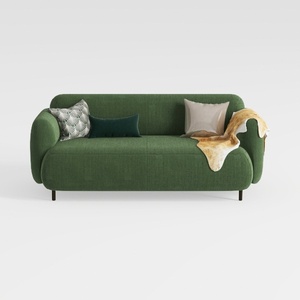

Minimalist Dark Green Fabric Loveseat Sofa with Decorative Pillows 3D Model

Minimalist Black Solid Wood Irregular Coffee Table 3D Model
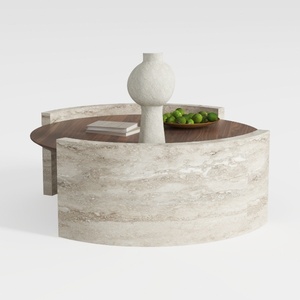
Round Coffee Table,29.52IN Wooden Coffee Table,Mid
Looking to revamp your space? Homestyler is the ideal online home design platform for you! With its easy-to-use design tool, stunning 3D renderings, and a wealth of DIY video tutorials, you can transform your ideas into reality—no prior experience needed!
立即免费设计
































