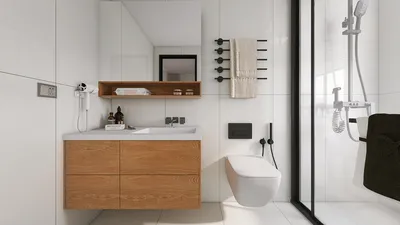


Once, while designing a starter home bathroom in Sims 4, I attempted to include a full double-sink vanity after a player insisted their sim "needed counter space for mood-enhancing candles." The result was humorous and taught me an important lesson: small bathrooms necessitate smarter choices. Such compact spaces can ignite immense creativity, not only in the real world but also in The Sims. In this article, I'll present five design inspirations I've employed (and rigorously tested on some finicky sims) to optimize tiny bathrooms using Sims 4 bathroom CC.
1. Vertical Storage and Slim Vanities
When floor space is limited, I always think vertically. Tall medicine cabinets, stacked shelves, and slender vanities can free up floor space while maintaining bathroom functionality. Sims 4 bathroom CC includes numerous narrow vanity mods that exude sophistication without overcrowding the area. The benefit is enhanced storage without hindering movement; however, vertical organization can become cluttered if not properly managed.
save pin
2. Pocket Doors and Sliding Panels
In one small Sims house, I replaced a conventional swinging door with a sliding panel, and it instantly opened up the space. Pocket doors not only conserve swing clearance but also introduce a contemporary feel. There are various CC options that can complement different design aesthetics. As a practical tip, ensure the door track is aligned to avoid interfering with towel hooks or light switches.
save pin
3. Walk-in Shower with Glass Dividers
Using clear glass can visually expand the area and impart a spa-like ambiance without altering the layout. Implementing frameless glass CC from the Sims 4 bathroom CC collection allows even a compact 4x3 bathroom to feel more open. The only downside is privacy; therefore, consider using frosted glass strips or half-walls for more modest sims.
save pin
4. Monochrome Palette with Accent Textures
I enjoy utilizing a limited color palette—think whites, charcoals, or subtle blues—enhanced by textures like tile, wood slats, or matte fixtures. In-game CC that mimics authentic tile patterns can significantly elevate a basic construction. The advantage is a cohesive and soothing look; however, a palette that is too flat can seem cold, so incorporating warm metal or wood elements is essential.
save pin
5. Smart Lighting Layers and Mirrors
Incorporating layered lighting (ambient, task, accent) alongside a sizable mirror can greatly enhance visual depth. I often place sconces next to mirrors coupled with a soft overhead light. Within Sims 4 bathroom CC, many fixture packs replicate recessed and wall lighting styles. Mirrors with built-in trim can reflect more light, but be cautious of glare if employing bright overhead sources.
If you're looking for layout ideas and planning tools to prototype these concepts, consider using a room planner that allows you to rapidly sketch various configurations and assess circulation within a virtual grid.
save pin
Tips 1:
Budget consideration: High-quality CC items might appear premium but can also inflate the download size. My strategy is to combine a few standout CC pieces with in-game structures to manage file sizes effectively. Additionally, always back up your saves before making significant CC updates—I learned this the hard way when a mod update temporarily disrupted fixture placements in a beloved legacy household.
save pin
FAQ
Q: What does Sims 4 bathroom CC entail? A: Sims 4 bathroom CC refers to custom content—mods and assets created by players—that introduces new bathroom furniture, fixtures, tiles, and decor that are not included in the base game. This allows players to enhance stylistic options and realism.
Q: Is it safe to use Sims 4 bathroom CC? A: Most CC is safe provided it is downloaded from reputable creators and websites. Always check comments, look for recent updates, and scan the files with antivirus software before installation.
Q: What are the steps to install Sims 4 bathroom CC? A: Generally, you download the package or ts4script files and place them into The Sims 4 Mods folder (Documents/Electronic Arts/The Sims 4/Mods). Afterward, enable Mods and Script Mods in the game settings and restart the game.
Q: Can using CC influence game performance? A: Yes, a large quantity of high-detail CC items can lead to longer load times and increased memory usage. It's advisable to selectively install CC and remove unused items to maintain stable performance.
Q: Where can I find realistic bathroom fixtures for Sims 4? A: Many creators focus on realistic designs; checking curated websites and creator pages are excellent starting points. For planning, I often arrange new fixtures within a mock room using a 3D floor planner to verify scale before making permanent decisions.
Q: Are there legal considerations regarding CC? A: It’s important to respect creator licenses: some CC may be free for personal use but not for commercial redistribution. Always give credit to creators when sharing screenshots and adhere to their usage guidelines.
Q: How do I address CC conflicts or broken items? A: Identify conflicts by removing recently added CC, consulting creator notes for compatibility, and keeping mods up to date. The Sims community forums are a valuable resource for troubleshooting; for authoritative modding assistance, refer to the official Sims 4 modding documentation at https://www.ea.com/games/the-sims/the-sims-4/news/mods-and-custom-content-policy.
Q: Can I integrate CC with in-game items seamlessly? A: Yes—thoughtfully considering scale, color palette, and lighting can help CC blend harmoniously with base-game content. I typically choose one CC focal piece and construct the remaining elements using stock items to maintain visual cohesion.
save pin
Homestyler is an amazing online home design platform that makes your decorating dreams a reality. With its user-friendly design tool, stunning 3D renderings, and a wealth of DIY video tutorials, you can effortlessly create and visualize your perfect space. Start designing today!
Concevez maintenant gratuitement
































