


Incorporating the charm of instant photography with devices like the Instax Mini Evo Cinema can inspire creative home office or studio setups. Designing spaces that accommodate technology and encourage artistic hobbies often involves blending functional furniture with aesthetic appeal, creating zones where inspiration flows freely and memories are captured not only digitally but tangibly within your living environment.
Quick Summary
- Homestyler, Floorplanner, and Planner 5D allow creating room designs in 2D and 3D with drag-and-drop furniture and high-quality visualizations.
- Most of the mentioned apps offer free versions, with premium features requiring payment.
- These apps support small space solutions by providing layouts that maximize space.
If you're looking to rearrange your furniture for a more functional or aesthetically pleasing space, various apps are designed to assist you in this process. These applications provide a platform to visualize your room layout, experiment with different arrangements, and see how new furniture pieces will fit into your existing setup. Let’s delve into some of the best apps available for effectively arranging furniture.
1. Homestyler: Your Comprehensive Design Tool
Homestyler is an excellent choice for anyone looking to arrange furniture online. This user-friendly platform offers a room planner that lets you create 2D and 3D designs effortlessly. You can drag and drop furniture items, experiment with layouts, and visualize your space in high-quality renderings. Plus, Homestyler includes a vast library of furniture options to choose from, making the design process exciting and creative.
2. Floorplanner: Easy and Intuitive
Another great app is Floorplanner. It offers a simple interface that allows you to generate detailed floor plans in minutes. You can easily arrange furniture and even alter wall colors and textures to fully customize your design. This flexibility helps you envision the final look of your space. Floorplanner caters to both casual users and professionals due to its versatility and ease of use. You can check it out at Floorplanner.
3. Planner 5D: 3D Visualization Made Simple
Planner 5D is another fantastic app that enables users to design their spaces in both 2D and 3D formats. This tool is great for visualizing how different furniture pieces will coexist harmoniously in your space. With an extensive catalog of items and a straightforward drag-and-drop interface, you can create stunning designs that reflect your personal style. Their community feature also allows you to share your projects and gain inspiration from others.
Tips for Using Furniture Arrangement Apps
To optimize your experience with these apps, consider the following tips: Start with accurate measurements of your space, explore various layouts before finalizing decisions, and seek inspiration from online design communities like Homestyler’s design community.
FAQ
Q: Can these apps help with small spaces? A: Absolutely! Many of these apps are designed with small space solutions in mind, providing tips and layouts that maximize every inch.
Q: Are these apps free to use? A: Most of the mentioned apps offer free versions, but premium features may require payment.
Welcome to Homestyler
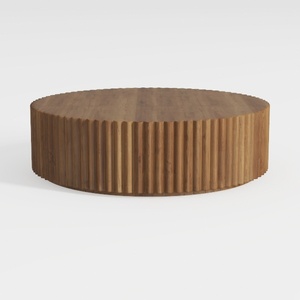
Minimalist Solid Wood Fluted Round Coffee Table 3D Model

Modern Minimalist Fabric U Shaped Sectional Sofa 3D Model

Minimalist Brown Leather L-shaped Sectional Sofa 3D Model
Discover your creative side with Homestyler, the ultimate online home design platform! Featuring an easy-to-use design tool, stunning 3D renderings, a wealth of design projects, and helpful DIY video tutorials, you can effortlessly bring your dream home to life.
Design Now for FREE
































