

Obtaining a three-dimensional model of an entire city can be incredibly beneficial for architects, urban planners, game developers, and design aficionados. There are various methods available, each tailored to different skills and intended applications. Some of the most popular strategies include utilizing open-source datasets, purchasing models from established vendors, or creating your own model using dedicated software along with satellite imagery.
Numerous cities and local governments offer open data platforms where GIS and 3D assets are made available for free. Resources such as OpenStreetMap, Google Earth, or municipal repositories (like NYC Open Data or Berlin 3D) often provide downloadable models in diverse formats such as OBJ, FBX, or CityGML. If you need higher quality or customized models, online marketplaces like TurboSquid or CGTrader feature professionally crafted city models that can sometimes include intricate street-level details.
For designers, integrating such data into visualization tools marks just the start of the process. Coupling it with a 3D Floor Planner enables you to dynamically organize, furnish, or analyze city blocks and individual buildings, making urban renewal and neighborhood development scenarios far more engaging and collaborative.
Tip 1:
Before you proceed to download or purchase a city model, ensure that the level of detail (LOD) aligns with your requirements. LOD varies from basic building shapes (LOD1) to intricate facades and interiors (LOD4). It's also vital to review the licensing conditions for commercial or public utilization.
FAQ
Q: Is it feasible to create a 3D model of a city from the ground up?
A: Absolutely, by employing techniques like photogrammetry, satellite imaging, or using 3D modeling programs such as Blender or SketchUp. However, this process can be time-intensive and may necessitate programming abilities.
Q: Are there no-cost resources available for city 3D models?
A: Indeed, many cities make their models accessible through GIS or urban planning divisions, and platforms like OpenStreetMap and Google Earth can serve as excellent starting points.
Q: What are the common formats for city 3D models?
A: Typical formats include OBJ, FBX, CityGML, glTF, and COLLADA. Your selection should align with your intended software and workflow.
Q: How can I visualize and modify a city 3D model?
A: Using 3D modeling or BIM tools is essential. Integrating with a 3D Floor Planner allows you to place furniture, analyze spaces, and create realistic renderings, utilizing tools like Homestyler for an enhanced experience.
Q: Can I achieve photorealistic renders of city models?
A: Yes, by importing the model into rendering software and applying high-quality textures, lighting, and materials, photorealistic visualizations are entirely attainable.
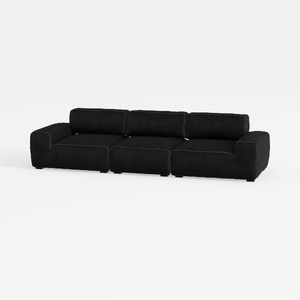

Minimalist Black Fabric Modular Sofa 3D Model

Minimalist Solid Oak Round Coffee Table 3D Model
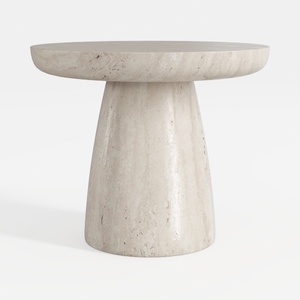
Minimalist Travertine Round Side Table 3D Model
Discover your design potential with Homestyler! This user-friendly online platform offers a powerful design tool, stunning 3D renderings, and a wealth of DIY video tutorials. Whether you're a beginner or a seasoned designer, you can easily create beautiful, personalized spaces that reflect your style.
지금 무료로 디자인하세요
































