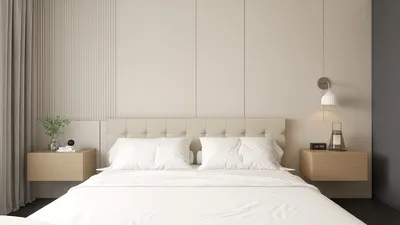


I've had the pleasure of designing numerous compact home theaters for clients who desire a cinematic experience without compromising on style or comfort. When carefully executed, a small space can offer an exceptional viewing experience by thoughtfully addressing sightlines, acoustic considerations, lighting arrangements, and ergonomic seating. The key lies in achieving visual balance, prioritizing quiet systems, and crafting a lighting setup that maintains contrast while eliminating glare, all of which can be effectively planned with tools like Homestyler.
Comfort starts with informed choices based on evidence. The WELL v2 standards recommend that background noise levels in living areas remain around 35 dBA to ease cognitive load and stress; in practice, I aim for noise levels of 30-35 dBA, and under 40 dBA for device racks, ensuring that dialogue remains clear and the environment feels serene. Regarding lighting, guidelines from IES suggest maintaining low ambient light in audiovisual spaces—typically between 2–10 footcandles—combined with directed accent lighting to minimize reflective glare. These insights are instrumental in establishing design criteria that resonate once you hit play, and integrating your design with Homestyler can enhance this process.
Strategic Planning for Sightlines and Dimensions
In compact settings, calculating sightlines is essential. For a single row of seats, I aim for a viewing distance of 1.2-1.6 times the diagonal size of the screen for optimal immersion and clarity, especially with 4K content. In narrower rooms, a slightly smaller screen can help alleviate eye strain by keeping the viewing angles within limits. Establish a centerline: align seats with the acoustic center of the screen and adjust ear height to approximately 40-44 inches while seated, which aligns well with common center channel speaker placements. For effective layout experimentation, using an interior design tool like Homestyler can help simulate seating arrangements, spacing, and screen heights before making any physical adjustments.
Ergonomics in Seating for Extended Viewing
Long-term comfort relies on appropriate lumbar support, head alignment, and armrest positioning. I avoid overly reclined postures that elevate the chin; instead, I aim for a 100-110° recline with lumbar support that contours to the natural back curvature, and armrests that match elbow height for relaxing shoulders. It's vital to maintain a clear space of 24-30 inches behind seats for easy access. For two slender loveseats, placing a 20-inch wide table in the center for snacks and remotes or designing a slim upholstered ledge behind the back row ensures the floor stays uncluttered.
Achieving Acoustic Comfort Without Excessive Measures
Small home theaters thrive on strategic acoustic treatments rather than a blanket of foam. Treat first reflection points on side walls with 1-2 inch acoustic panels, and consider adding discreet bass traps or limp-mass membranes if low frequencies are problematic. Including a soft rug will help diminish initial reflections from the floor, and fabric-wrapped doors or perimeter seals can enhance sound isolation. Target an RT60 of around 0.3-0.4 seconds for smaller rooms; this will sharpen dialogue clarity while avoiding a dull sound. For subwoofer placement, use an asymmetric approach, starting with one in the front corner and another at the mid-side of the room, to optimize performance.
Layered Lighting for Contrast Preservation
I categorize lighting into pre-show, intermission, and playback stages. Pre-show requires 150–300 lux in task areas using warm-white LEDs ranging from 3000-3500K. During intermission, dimmable wall grazers and step lights should provide 20-50 lux without direct visibility to the sources. Playback is focused on low, indirect lighting; opt for concealed coves or toe-kick lights producing 1-5 footcandles, ensuring high color rendering to maintain visual integrity, with no fixtures aimed towards the screen. Installing dim-to-warm drivers can keep skin tones flattering at dim levels, and employing black or micro-baffle trim can minimize glare. Balance reflectance values by choosing matte finishes around the screen, eggshell for sidewalls, and low-sheen ceilings to enhance image sharpness.
Utilizing Color Psychology and Material Selection
Color significantly influences perceived contrast and atmosphere. Utilizing dark, muted blues, charcoals, and earthy browns can help minimize peripheral brightness, allowing the image to stand out while retaining a cozy feel. A neutral, low-reflectance front wall is also beneficial in avoiding illumination halos around bright scenes. According to research on color psychology, cooler tones can encourage focus, whereas warmer hues create an inviting ambiance; blending both can be achieved by implementing cool, low-sheen wall colors alongside warm accents in textiles. Additionally, select tactile, breathable fabrics for upholstery and steer clear of glossy finishes near the screen.
Crafting Intelligent Layouts for Limited Spaces
In smaller rooms, positioning seating slightly off-center can enhance sound dynamics. Adjust the sofa away from the center of the room to mitigate dominant acoustic modes. If two rows of seating are necessary, construct a modest 6-8 inch riser for the back row, incorporating a non-slip edge and concealed cable pathway. Ensure clear circulation by leaving 28-32 inches unobstructed on the primary path between the entrance and seats. For L-shaped spaces, consider orienting the screen along the shorter wall to minimize lateral reflections and effectively position surround speakers, thus fostering a cohesive sound environment. Homestyler’s layout simulation capabilities are invaluable for visualizing these arrangements prior to implementation.
Integrating Technology: Keeping It Quiet and Efficient
Ideally, place the equipment rack outside the designated viewing area; if impractical, design a ventilated cabinet equipped with rear exhaust and sound-insulating features. Secure projector installations, ensuring they're decoupled from structural joists to prevent vibrations. For compact environments, lightweight projectors or ultra-short-throw options paired with ambient light rejecting screens can help manage excessive brightness. Proper cable management is crucial: separate power and signal pathways and utilize low-noise fans fitted with rubber grommets wherever airflow is necessary to maintain serenity.
Balancing Acoustics and Furniture Design
To ensure a harmonious sound experience, visual rhythm should complement acoustic design. Alternate between soft and hard surfaces with a ratio of 60/40—soft materials on the side walls and floor, and harder surfaces on the ceiling and rear wall employing selective diffusion to avoid sound issues. Build symmetry where beneficial; keeping left and right speaker distances uniform and angling them slightly towards ear height can enhance sound focus, while selectively breaking symmetry with furnishings can help soften room modes.
Choosing Sustainable Options for Enhanced Comfort
Select low-VOC paints and formaldehyde-free MDF for cabinetry to promote a healthier environment. You might also consider employing recycled polyester acoustic panels or natural fiber felts. LED lighting solutions with high efficiency can lower heat production, which is especially important in compact rooms where equipment adds warmth. Thick, washable curtains serve a dual purpose: controlling light and enhancing sound absorption.
Final Touches for Daily Usability
Incorporate concealed storage within armrest compartments or slim media consoles to keep clutter at bay. Opt for remotes with distinctive textures to facilitate operation in low-light settings without needing to look. Adding a cozy throw blanket, a small snack tray, and a silent, rubber-footed stool can provide additional functionality. Keeping a micro-cleaning kit readily available—complete with anti-static cloths for lenses and screens—will help maintain image quality.
Frequently Asked Questions
For an optimal 4K viewing experience, aim for a distance of approximately 1.2-1.6 times the screen's diagonal size. In compact theaters, this typically allows for a screen size of 75-100 inches without straining the eyes during immersion.
It’s essential to maintain very low ambient light levels—around 1-5 footcandles with indirect sources—to ensure strong contrast and controlled glare, as supported by IES guidelines for audiovisual spaces.
For optimal clarity without an overly sterile feel, manage first reflections with 1-2 inch absorbing materials, include a rug, and apply selective diffusion on the rear walls with a target RT60 of around 0.3-0.4 seconds.
A gentle recline of 100-110° supports lumbar comfort while promoting neutral head alignment to prevent strain during extended film sessions.
Start with asymmetric placements: one in the front corner and one towards the mid-side or rear quarter of the room. This method helps in smoothing out modal peaks; fine-tuning can be done through careful listening or acoustic measurement.
Utilize matte or ultra-matte finishes on the screen wall to prevent reflections, choose eggshell for sidewalls for durability without glare, and maintain low-sheen ceilings to preserve image clarity.
Certainly—utilize compact seating with a 6-8 inch riser for the back row, maintaining a clearance of at least 28-32 inches in the aisle, and ensuring sightlines are clear so the head of the back row does not obstruct the screen view.
If feasible, shift the equipment rack outside the viewing area. If not possible, design a ventilated, lined cabinet, decouple fans using rubber grommets, and aim for a background noise level of around 35 dBA according to WELL v2 standards.
While not a requirement, using low-reflectance, muted tones surrounding the screen can enhance perceived contrast. Combining cool, low-sheen walls with warm textile accents provides a balanced and inviting atmosphere.
Utilize a room design visualization tool to model seating arrangements, sightlines, and speaker angles, helping to assess clearances, viewing angles, and passageways before finalizing construction decisions.


Looking to transform your home? Homestyler is your go-to online design platform! With its easy-to-use design tool, stunning 3D renderings, and a wealth of video tutorials, you can effortlessly visualize your ideas and embark on creative interior projects. Unleash your inner designer today!
지금 무료로 디자인하세요
































