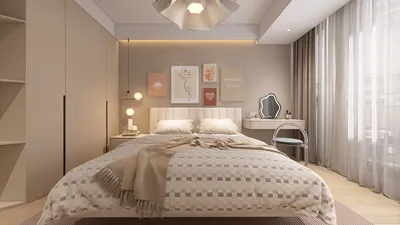


I create meeting spaces designed to foster clear communication and seamless collaboration. The table serves as a central element: it dictates sightlines, establishes personal zones, and influences workflow. In contemporary offices, selecting the right table shape and size can significantly lessen eye fatigue, enhance sound quality, and create a more natural atmosphere during hybrid meetings, especially with tools like Homestyler to visualize layouts.
Through various client engagements, I've observed tangible improvements when the geometric design and access routes of tables are tailored to actual usage. According to the Gensler U.S. Workplace Survey, environments that encourage focus and teamwork often lead to better performance outcomes, with meeting areas playing a crucial role. Additionally, WELL v2 suggests maintaining background noise at around 35–45 dBA for optimal speech recognition, which directly impacts the selection of materials and designs for tables, especially when paired with sound management solutions. I frequently use WELL v2 (Performance) and Gensler Research as essential guides for my planning standards.
Human-centric factors are important. Research from Steelcase indicates that varying postures can enhance comfort and engagement during extended meetings; pairing the standard table height (28–30 inches) with adjustable seating and ensuring a minimum knee clearance of 24 inches can help mitigate fatigue. I also aim for the recommended vertical illuminance, which ranges from 150–300 lux for task lighting and 300–500 lux for ambient light, particularly crucial for video conferences to avoid shadows—ensuring table surfaces are designed to minimize glare in cameras and prevent distractions.
Choosing the Right Shape for the Table
The shape of a table influences communication dynamics. Rectangular tables are ideal for structured meetings with clear leadership, while rounded rectangles enhance sightlines and traffic flow. Boat-shaped tables, which are wider in the center, promote equality by keeping all participants equally visible in both physical and virtual formats. In smaller rooms, round tables foster an equal atmosphere and help mitigate territorial behavior; in medium-sized spaces, racetrack oval tables balance seating and mobility effectively.
Ideal Dimensions and Seating Layouts
I typically allocate around 30 inches for each seated individual for laptop usage, or 24 inches for those taking notes. The depth should span 42–48 inches to accommodate dual-laptop setups and effective cable management. For eight attendees, a 96 x 42-inch boat-shaped or racetrack table maintains natural eye contact without requiring strained voices. It's crucial to allow 36–48 inches of clearance around the table for effective movement; in tighter spaces, 36 inches can suffice, though 42 inches minimizes chair collisions during entry or exit.
Ergonomic Features and Edge Design
Edge design plays a larger role than commonly appreciated. Employing rounded or chamfered edges can alleviate wrist pressure and decrease visual mass. I tend to avoid harsh square edges that can reflect direct lighting unfavorably. Slightly negative-curved edges promote a neutral wrist angle while typing. If frequent sketching is expected, a flatter edge will help align documents neatly. Ensure that each seat allows for at least 24 inches of knee clearance and an under-table height of 25 inches, free from obstructions.
Choosing Finishes and Managing Glare
Matte or low-sheen finishes effectively reduce glare that can distract both participants and cameras. When utilizing high-output downlights, micro-textured laminates or open-pore wood finishes help to diffuse reflections. In terms of color, softer mid-tones—such as warm greys and muted greens—create a serene environment and minimize visual dominance, while soft wood grain finishes add warmth without making the table the visual focus. Very dark surfaces may exacerbate eye strain under bright lighting; aim for an LRV (light reflectance value) of 20–40 for optimal visual comfort on camera.
Sound Comfort Around the Table
Hard surfaces can reflect sounds; therefore, pairing table design with acoustic enhancements is essential. Using felt placemats, micro-perforated wall panels, and fabric-wrapped credenzas can maintain clear conversations. Boat-shaped tables tend to diffuse sound reflections better than perfectly rectangular designs. In hybrid meetings, incorporating directional ceiling microphones and minimizing table-mounted equipment helps to reduce reflective distractions. Adhering to WELL v2 acoustic guidelines, it’s important to keep background noise low and ensure speech clarity is maintained over the longest diagonal of the table.
Incorporating Power, Data, and Hybrid Tools
Power outlets should be installed within 18 inches of the average seated individual's reach, staggered every two seats for accessibility. Opt for flip-top or low-profile grommets featuring brush seals to keep cables tidy. If cameras will face the longer sides, it’s advisable to avoid tall center outlets that can obstruct sightlines. Wireless charging options are practical but should be positioned near edges to avoid cable tangles. Make sure that video bar hardware and table dimensions do not push people outside of the optimal camera view, generally around 120 degrees, with primary speakers seated within this field.
Seating Arrangement and Visibility
For brainstorming sessions, I recommend shapes that facilitate quick visual connections without necessitating more than a 30-degree head turn. Boat-shaped and rounded rectangles are advantageous in these settings. If a screen is present, arrange the table so that most seats face the display within a 45-degree angle to prevent neck strain. For frequently changing layouts, considering modular tables that can adapt from rectangle to U-shape is practical. Utilizing an interior layout planner is beneficial for ensuring sightline checks and testing circulation; tools like Homestyler can simulate configurations to validate clearance quickly.
room layout tool usability
Material Choices and Environmental Responsibility
Robust laminates with edge-banded cores are not only cost-effective but also hold up well in busy areas. Choosing FSC-certified veneers promotes warmth while supporting responsible sourcing. Powder-coated steel bases are resistant to scuffs, whereas wood frames must have protective glides to prevent floor damage. For environments expecting high usage of markers or frequent cleaning, opting for chemical-resistant finishes is advisable to preserve color integrity over time. Sustainability considerations should include lifespan aspects, such as repairable surfaces, modular bases, and replaceable power supplies, ensuring longevity amid evolving technology.
Lighting Strategies for Table Areas
Achieving balance between vertical and horizontal lighting is crucial to keep individuals visible and free from harsh shadows. I target 300-500 lux for ambient light with controlled downlighting and 150-300 lux directly on the table surface. Utilizing wide-beam fixtures or indirect lighting avoids overly bright patches. If pendant lights are chosen, diffusers with low UGR (Unified Glare Rating) should be selected, and mounting heights should be adequate to prevent thermal discomfort or glare in camera angles. Following IES standards for task and ambient illumination, it's essential to customize dimming scenes tailored for presentations, discussions, and video conferences.
Sizing for Various Room Dimensions
For smaller spaces (4–6 seats): dimensions of 72–84 x 36–40 inches work well, preferably in round or rounded rectangles for smoother circulation. In medium workspaces (8–10 seats): dimensions of 96–120 x 42–48 inches, utilizing boat or racetrack shapes ensure balanced visibility. Larger environments (12–16 seats): dimensions should range from 144–192 x 48–54 inches with dual power strips. For extra-large setups, consider splitting into two tables with a central aisle to uphold acoustic clarity and fair participation.
Accessories for Collaboration and Behavioral Dynamics
Low-profile whiteboard rails, personal storage trays, and slim center runners help manage clutter. Opt for table bases that allow foot movement—T-legs or sled bases can reduce instances of toe collisions. Subtle body language cues are essential: gently rounded corners can lower defensive postures, while slightly tapered edges assist leaders in maintaining their presence without visually overwhelming the table.
Emerging Design Trends for 2024–2025
Dominant trends include hybrid-first shapes like boat and rounded rectangles, softer matte finishes, integrated cable-free charging solutions, and adaptable configurations. Aesthetic touches that emphasize soft-tech—flush power modules and fabric-integrated cable management—help maintain clean surfaces suitable for video calls. Incorporating biophilic elements through natural looking veneers and subdued greens enhances tranquility without distracting attention during presentations.
Tips 1: Selecting Between Table Shapes
Choose boat shapes for hybrid sessions, round tables for small egalitarian groups, and rectangular designs for focused agenda control and streamlined workflows.
Tips 2: Power and Cable Organization
Install power modules within easy reach, utilize low-profile grommets, and clearly define cable paths to maintain visual cleanliness above the table surface.
Tips 3: Edge Design and Finishes
Opt for soft edges to safeguard wrists; low-sheen finishes effectively minimize glare on screens and for participants.
Tips 4: Creating Lighting Scenarios
Program dimming options for distinct settings—presentation, discussion, and video conference modes. Test using a camera to confirm proper skin tone representation and shadow balance.
Tips 5: Improving Acoustic Quality
Incorporate soft surfaces, underlays, and wall treatments to manage sound reflections around the table effectively.
Tips 6: Dimensions and Space Clearance
Aim for around 30 inches of space per individual, maintain 36–48 inches of modern clearance around the table, and depth near 42–48 inches for laptop comfort.
Tips 7: Hardware for Hybrid Engagement
Minimize table-mounted equipment, ensuring cameras effectively capture all attendees within a ~120-degree view without tall central modules causing vision obstructions.
Tips 8: Flexibility in Design
Consider modular tables equipped with locking casters for easy transitions between boardroom, workshop, and U-shape layouts as needed.
FAQ
Q1: What is the most effective table shape for hybrid meetings?
A boat-shaped or rounded rectangle table allows for equal sightlines and ensures all participants are visible to the camera without isolating corners.
Q2: How much space should be allotted per participant?
Allocate about 30 inches of edge length per person for laptop users, or about 24 inches for lighter note-taking tasks. Ensure a surrounding circulation space of 36–48 inches.
Q3: What is the ideal height for a meeting table?
A standard seated height ranges between 28–30 inches, ideally paired with adjustable chairs and maintaining at least 24 inches of knee space for comfort.
Q4: Which finishes help minimize glare during video conferences?
Low-sheen matte laminates and open-pore wood finishes are effective at reducing reflections. It’s best to avoid overly shiny surfaces under direct lighting.
Q5: How can I integrate power sources without creating visual clutter?
Use low-profile flip-tops or grommets with brush seals. Organize modules in a staggered manner every two seats and ensure cables are routed through defined channels underneath the table.
Q6: What lighting levels should be aimed for?
Target 300–500 lux ambient lighting and 150–300 lux illumination on the table itself, ensuring vertical brightness is balanced across participants' faces for camera appropriateness.
Q7: What methods can enhance acoustics around a hard table?
Implement plush wall panels, fabric front furnishings, and felt accessories to manage reflections. It's also essential to maintain low mechanical sounds and strategically position microphones to capture speech throughout the longest table diagonal.
Q8: What materials are ideal for high-traffic areas?
Sturdy laminates with edge banding are an excellent choice for durability. FSC-certified wood selections offer warmth while ensuring responsible sourcing. Powder-coated steel bases resist wear and maintain quality through frequent reconfigurations.
Q9: Should modular tables be a consideration?
Definitely; modular segments provide quick reconfiguration options between boardroom and U-shape or workshop styles, accommodating a variety of meeting formats.
Q10: How do I determine the correct table size for a small meeting space?
For rooms seating 4–6 individuals, selecting dimensions of 72–84 x 36–40 inches and opting for round or rounded rectangles promotes better flow.
Q11: Are rounded corners beneficial?
Rounded edges help minimize collision risks, soften the visual presentation, and can subtly encourage more open body language among participants.
Q12: How should cameras be positioned relative to the table?
Cameras should be mounted in a manner that ensures the majority of seats are within a ~120-degree field of view, avoiding tall center outlets that obstruct visibility.
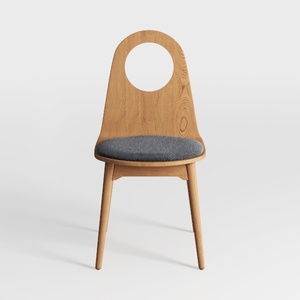

MILCIL Swivel Accent Chair Living Room Chair with
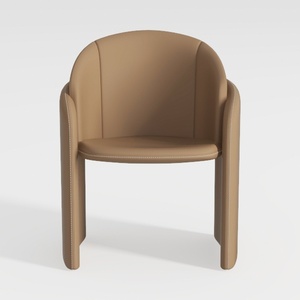
Minimalist Tan Leather Upholstered Armchair 3D Model
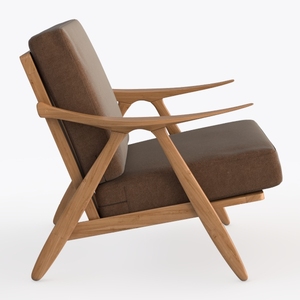
Lexicon Mid Century Modern Accent Chair, Faux
Looking to transform your home? Homestyler is your go-to online design platform! With its user-friendly design tool, stunning 3D renderings, and a wealth of inspirational projects and video tutorials, you can easily create your dream space—no design experience needed!
تصميم الآن مجانا
































