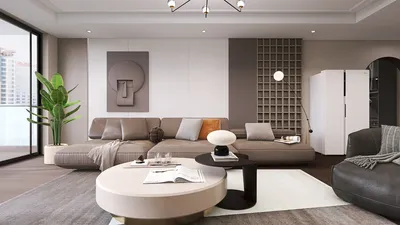


I specialize in designing solutions that cater to limited spaces and technology-centric lifestyles. A compact side table equipped with a charging station adeptly addresses two contemporary issues: eliminating clutter and ensuring easy access. When designed effectively, it can keep your phones, earbuds, tablets, e-readers, and even compact laptops charged without letting a mess of cords invade your living area or bedroom. Utilizing platforms like Homestyler can enhance this design process by visualizing the integration of such furniture in your space.
The importance of scale cannot be overstated. The typical American living room measures around 340 to 400 square feet, while solo apartments in busy metropolitan areas commonly range from 500 to 650 square feet. In tighter living situations, integrated power options conserve essential space and lower the risk of tripping. Ergonomically, positioning the phone on a flat surface at a height of 24 to 28 inches reduces the strain of reaching and encourages a neutral wrist posture, aligning with fundamental human factors regarding reach zones. The WELL v2 standard also prioritizes reducing both visual and physical clutter to promote mental well-being, while studies compiled by Herman Miller showcase productivity improvements when readily used items are kept within a primary reach zone of 20-25 inches.
Two critical design principles guide my approach to small charging tables: hidden cable management and easy access to power sources. Research from Steelcase indicates that interruptions from looking for power sources and managing cords can disrupt focus; in residential settings, this results in minor distractions during leisure activities, reading, and remote work. By positioning outlets on the edge or beneath the table and incorporating a shallow tray for adapters, we can prevent the unsightly and hazardous cable clutter. For living rooms and reading nooks, I also ensure light levels are balanced to prevent glare on screens, in alignment with IES recommendations for ambient lighting, which suggest about 100-300 lux in living areas and focused task lighting to minimize reflections.
Advantages of a Compact Side Table Featuring a Charging Station
• Clutter management: Built-in power sources and cable channels remove the need for visible extension cords, ensuring clear floors.
• Improved ergonomics: A compact surface that accommodates devices within arm's reach minimizes the need for repetitive bending and awkward twisting poses.
• Flexible spatial design: Slender profiles can easily fit beside sofas, chairs, or beds without hindering movement.
• Safer electrical management: Using surge-protected outlets and cord anchors mitigates cable strain and reduces fall risks.
• Multi-device compatibility: USB-A, USB-C, and tamper-resistant outlets accommodate various devices including smartphones, tablets, and small lamps.
Dimensions, Proportions, and Positioning
My target measurements for tabletop diameter range from 16 to 20 inches (or 14 to 18 inches square) in confined areas, with heights ranging from 22 to 28 inches. The design should allow the table to slide under a sofa arm or align flush with a mattress for effortless access to devices. For those planning to read or journal, a somewhat larger surface (20–22 inches) can provide adequate space for a lamp and a book without overcrowding the charger area.
While organizing the layout, consider accommodating space for feet and bags, especially near entryways or heavy foot traffic zones. A compact base that remains stable prevents wobbling during charging. If you're designing digitally, employing a room layout tool like Homestyler can help visualize cable positions and proximity to electrical outlets.
Power Sources and Charging Specifications
Modern tables should ideally feature at least one USB-C port (preferably with PD technology supporting 18–30W) for quick phone charging, alongside a 60W USB-C for lightweight laptop charging. USB-A remains a viable option for traditional cables. Including a couple of standard outlets provides power for smaller task lamps or speakers. I recommend a power cord length of 6–9 feet with an angled plug for wall hugging, along with a strain-relief grommet below the tabletop to safeguard connections.
To streamline use, ports mounted on the front or sides facilitate easier access compared to reaching under the table. Features such as a shallow lid or flip panel can conceal adapters while allowing ventilation to avoid overheating. In family homes, I ensure that UL-certified components are specified and consider child-resistant shutters on the outlets.
Managing Cables and Ensuring Aesthetic Calm
Cables create visual disturbances. I direct the main cord through a channel in the table leg and out towards the floor. A slim tray positioned beneath the tabletop can hold chargers with short leads, while velcro ties and labeled clips maintain organization. The aesthetic goal is to achieve a clean design, avoiding dangling lines that catch the eye or the vacuum cleaner.
Materials, Finishes, and Longevity
Durability is key where devices are used. I prefer materials like compact laminates, oak, or ash coated with a durable finish, and powder-coated metal surfaces. While leather insets offer comfort, they can trap heat beneath devices; therefore, ventilated wood or composite materials perform better during continuous charging. For humid settings, using sealed edges prevents deformation from moisture. Rounded edges and beveled corners help to reduce pressure on forearms, enhancing safety while moving around the table.
Lighting Synergy and Screen Comfort
If the table is situated next to a reading chair, incorporating a small lamp with warm 2700-3000K LEDs can mitigate the blue-light glare. Adjustable lamp shades help prevent hotspots on shiny devices. Following the IES's ambient lighting guidelines, adding task lighting with a focused beam at 300–500 lux is essential for reading without straining the eyes. Dimmers are advantageous in multifunctional rooms—lower light for movie sessions and brighter settings for notes and creative work.
Color Perception and Design Aesthetics
The colors selected can significantly influence perceptions of order. Using subdued neutrals like warm gray, bone, or smoke allows surfaces to shine while making cables less apparent. A singular accent, such as terracotta or deep green, can enliven a corner without overwhelming it. In bedrooms, choosing calming shades can help the table fit seamlessly into soothing environments.
Acoustic and Textural Considerations
Hard surfaces often amplify minor sounds, like keys being dropped or phones being set down. Integrating a thin cork or rubber inset can dampen noise while enhancing grip. Felt pads beneath the base can prevent resonance on floors and protect surfaces, particularly on timber or tile materials.
Sustainability Insights
My approach involves sourcing FSC-certified wood, employing low-VOC powder-coated steel, and utilizing modular power units that can evolve alongside changing standards. Designing for ease of repair—removable tops and accessible cable routes—allows the piece to remain relevant as charging technology transitions from USB-A to higher-capacity USB-C and Qi2 wireless solutions.
Wireless Charging Benefits and Considerations
While wireless charging pads can reduce cable clutter, their positioning is crucial. Should you choose to include one, recess it slightly for stability and subtly mark the center for guidance. It's important to manage heat buildup: including ventilation gaps and selecting pads matched to your devices can prevent inefficient charging. In households with multiple users, pairing a wireless pad with a fast USB-C port ensures compatibility with varied usage patterns.
Safety Standards and Guidelines
Incorporating surge protection and current restraint is of utmost importance. I recommend using UL-listed components and tamper-resistant outlets, especially in homes with children. For cord management, abstain from routing cords under rugs; instead, low-profile cable covers can be employed for walkways. Regularly inspecting for frayed cords and dust buildup around vents is advisable.
Optimal Application Areas
• Adjacent to a sectional seating area where individuals frequently place their phones.
• In a bedroom setting as a compact nightstand, providing subtle power access.
• Within a reading corner where tablet, lamp, and notebook easily coexist.
• Next to an entryway bench for convenient charging prior to leaving.
Strategizing the Layout
Prior to making a purchase, assess outlet locations, paths for movement, and armrest heights of seating. Sketch potential cord routes to maintain safety and aesthetics. Should you wish to experiment with layouts around a sofa or bed, tools like the Homestyler interior layout planner can assist in visualizing reach zones and lamp placements.
Frequently Asked Questions
Q1: What height is ideal next to a sofa or lounge chair?
A table height of 22–26 inches usually aligns well with standard sofa armrests, maintaining devices within a comfortable range that avoids wrist strain.
Q2: Is a USB-C PD necessary, and what wattage should I consider?
USB-C PD rated at 18-30W is optimal for fast phone charging; for many thin laptops, a 60W rating is recommended. Pair with a USB-A for older devices.
Q3: Is adding wireless charging beneficial?
It's a convenient solution for daily charging needs. Install it at a slight recess for stability and maintain a fast USB-C port for larger power requirements.
Q4: How can I prevent cable clutter?
Select a table featuring an under-table tray, a channel within the legs, velcro straps, and an angled wall plug. Label short cables for specific devices and store adapters discreetly beneath a flip panel.
Q5: What materials are best for frequent device interactions?
Durable materials such as laminates, treated woods like oak or ash, and powder-coated steel can withstand daily use. Selecting rounded edges enhances comfort and safety in tight spaces.
Q6: How should I approach lighting the area?
Employ warm LED lighting in the 2700-3000K range and provide adjustable task lighting around 300-500 lux for reading. Adjust shades to avoid glare, adhering to IES ambience recommendations.
Q7: What safety regulations are essential to follow?
Always opt for UL-rated power supplies, ensure surge protection, and use tamper-resistant outlets in homes with young children. Maintain clear pathways from cords or utilize low-profile covers to prevent hazards.
Q8: What size works best for small rooms?
For cramped areas, a diameter of 16-18 inches (or an equivalent square shape) provides a balance of function and flow. Allow for several inches of clearance from seating to prevent collisions.
Q9: Can a compact charging table function as a nightstand?
Absolutely. A small side table with built-in charging capabilities can effectively replace a nightstand, particularly when paired with a drawer or shallow tray for managing cables and bedtime items.
Q10: How do I future-proof my charging setup?
Select modular components that accommodate replaceable ports, emphasizing USB-C PD capabilities, plus include at least one standard outlet for lamps or future technology needs.
Q11: Will this table produce noise?
Hard surfaces may amplify minor sounds. Incorporating a thin cork or rubber inset helps dampen noises and provides improved grip for devices.
Q12: Any tips on sustainability?
Focus on responsibly sourced materials, low-VOC finishes, and ensure power components are repairable. Designing for component swaps extends the product's lifecycle as technology standards advance.


Talataca Bookshelf Heart Shape Book Lovers Nerd

Minimalist Oak Wood Wall Mounted Floating Shelf 3D Model
Homestyler is your go-to online platform for effortless home design. Its user-friendly design tool, impressive 3D rendering features, and a wealth of DIY video tutorials empower you to unleash your creativity and perfectly visualize your dream spaces. Transform your ideas into reality with Homestyler!
Diseño ahora GRATIS
































