

Budget-friendly CAD software solutions are gaining traction among users and small teams looking for reliable tools to edit AutoCAD drawings. These free programs support editing of DWG and DXF files, ensuring they meet industry-standard requirements. Key options include LibreCAD for two-dimensional drafting, FreeCAD for both 2D and 3D modeling, and the complimentary version of DraftSight tailored for individual users. Each of these applications comes equipped with essential functionalities like layer management, snap tools, and export features, making them suitable for crafting architectural, engineering, or product design drawings.
As an interior designer professionally engaged in the field, I always pay close attention to the user experience and workflow of any design software. CAD tools can present a steep learning curve, hence, programs with user-friendly interfaces and intelligent design features—like built-in libraries or drag-and-drop room templates—are invaluable for simplifying the editing process. When selecting a software, it’s important to consider not only file compatibility but also features like customizable design interfaces or integrated modules that enhance functionality, such as room planners. This ensures the CAD solution complements the creative work in interior design, elevating it further with tools like Homestyler.
Tips 1:
Verify that the free CAD software can handle native AutoCAD formats such as DWG and DXF, as some may have limited compatibility or require file conversions. For designers, having seamless import and export functionalities is crucial to maintain the integrity of layers, linetypes, and dimension standards across different projects.
FAQ
Q: What is the best free CAD software for editing AutoCAD DWG files?
A: Among the top options, LibreCAD excels in 2D editing, while FreeCAD is recommended for comprehensive 3D modeling. Both programs are open-source and support DWG/DXF formats with varying degrees of compatibility.
Q: Can free CAD tools effectively open and save AutoCAD drawings without losing data?
A: Most free software can indeed open and export in DWG/DXF formats, although certain advanced formatting features or objects, such as dynamic blocks, may not be perfectly transferred.
Q: Is there free CAD software with a user-friendly interface suitable for interior designers?
A: Both FreeCAD and LibreCAD are relatively easy to navigate, but many designers find more value in software that includes specialized interfaces, like integrated room planners or design tools like Homestyler.
Q: Are free CAD alternatives appropriate for commercial interior design projects?
A: Many of the free tools are open-source and utilized in professional settings; however, it’s essential for users to review licensing terms if they plan to use them commercially.
Q: Do free CAD programs offer 3D modeling capabilities?
A: Yes, FreeCAD is well-equipped for robust 3D functionality, while LibreCAD is limited to 2D. Choose your software based on the level of 3D capability you require.

Houndstooth Fabric Rectangular Ottoman Modern Minimalist 3D Model
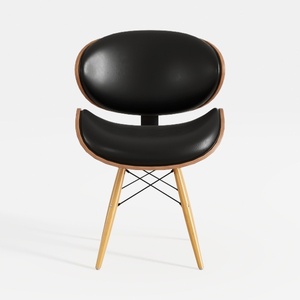
Mid Century Modern Black Leather Solid Wood Accent Chair 3D Model

Minimalist Solid Oak Fabric Upholstered Dining Chair 3D Model
Homestyler is your go-to online home design platform! Its user-friendly design tool, stunning 3D renderings, and diverse design projects make it easy to transform your space. Plus, with DIY video tutorials at your fingertips, you’ll gain inspiration and skills to create your dream home effortlessly!
Concevez maintenant gratuitement
































