


Direct Answer
AutoCAD excels in precise drafting and producing technical interior documentation for shelving projects, while SketchUp offers rapid 3D conceptual modeling. Revit is best suited for parametric cabinet designs within BIM workflows. Choosing the right software depends on whether your priority is drafting accuracy, fast visualization, or integrated building data management.
Quick Takeaways
Introduction
AutoCAD remains one of the most frequently used tools in professional interior design studios for shelving layouts. Over more than ten years working on residential storage, custom cabinetry, and retail shelving, I've observed that designers rarely rely on a single software anymore.
The pressing question clients and novice designers often ask is not "Which software is the best?" but rather "Which software suits this particular type of shelving design project?" For example, designing built-in shelves in a small apartment demands a very different approach than creating a modular retail display system.
In early-stage space planning, I frequently utilize quick tools reminiscent of simple online floor planning apps to rapidly generate accurate layouts. However, when advancing into detailed millwork documentation, AutoCAD usually becomes the cornerstone of the drafting process.
This article analyzes how AutoCAD stacks up against SketchUp and Revit specifically for shelving and cabinetry design based on real-world project experiences instead of mere feature comparisons.
save pin
Overview of Interior Shelf Design Software
Key Insight: Each software adopts a distinct philosophy towards shelving design—whether it's drafting precision, visual modeling, or building information modeling.
Many reviews treat these programs as interchangeable, but in practice, they address different challenges.
Here is a typical role they play in interior design workflows:
In numerous studios I've collaborated with, the phase workflow often includes:
Autodesk reports that Revit usage has surged among large architecture firms due to BIM coordination requirements, yet AutoCAD remains dominant in millwork documentation for interiors.
How AutoCAD Handles Shelf Drafting
Key Insight: AutoCAD continues to be the most dependable tool for creating construction-ready shelving drawings with exact measurements.
Contractors demand millimeter-level accuracy when building custom shelves, and AutoCAD meets this requirement effectively.
In my projects, AutoCAD becomes indispensable when generating:
Common AutoCAD shelving workflow
A frequently overlooked benefit is AutoCAD’s layer management, which allows designers to separate structures, shelving units, hardware, and annotations into organized layers. This greatly reduces confusion during contractor coordination.
The limitation? Visualization capabilities are restricted unless combined with rendering tools or linked with interior visualization workflows for presentations.
save pin
Shelf Modeling in SketchUp
Key Insight: SketchUp offers the fastest pathway to visually explore shelving concepts, though it sacrifices some technical accuracy compared to AutoCAD.
When speed is essential, SketchUp frequently outperforms alternatives.
I often rely on it in situations such as:
Its push-pull modeling system is extremely intuitive, enabling designers to quickly craft a shelving module and duplicate it across a wall.
However, SketchUp poses a common hidden issue: dimension drift.
When scaling is performed visually rather than dimensionally, minor inaccuracies can accumulate, causing problems during fabrication and installation.
For this reason, professionals usually conceptualize in SketchUp but finalize technical drawings using AutoCAD.
save pin
Revit for Parametric Cabinet and Shelf Systems
Key Insight: Revit shines when shelving designs need to integrate with the entire building model and update automatically as designs evolve.
Unlike line drafting or surface pushing, Revit uses parametric families to represent shelving.
This approach enables shelves to adapt automatically to room dimension changes.
An example of parametric shelving behavior
This is highly effective for expansive projects such as:
The trade-off involves complexity; crafting flexible cabinetry families in Revit demands significantly more time compared to SketchUp.
Accuracy, Workflow, and Learning Curve Comparison
Key Insight: The main distinction among these tools lies not in features but in the balance between workflow velocity and documentation accuracy.
Based on practical project workflows, the comparison is as follows:
From easiest to hardest to learn:
A common pitfall among new designers is opting for Revit prematurely in small interior projects. Unless the building is already modeled in BIM, this choice often hinders workflow speed.
Answer Box
For most interior shelving tasks, AutoCAD offers the best compromise between precision and efficient workflow control. SketchUp is preferable for early-stage visualization, while Revit is beneficial when shelving must be fully integrated into a building's BIM model.
Which Tool Is Best for Different Interior Projects
Key Insight: Software suitability depends more on project scale than raw capabilities.
Based on residential and commercial interior experience, this guideline proves reliable:
Spatial planning also influences choices. Many designers start shelving projects with layout tools resembling simple room planners to test furniture and storage arrangements before progressing to detailed CAD.
This hybrid approach often prevents hours of redesign work later on.
save pin
Final Summary
FAQ
Is AutoCAD effective for shelving design?
Absolutely. AutoCAD delivers excellent precision for dimensions, millwork design, and construction documentation.
Is SketchUp superior to AutoCAD for furniture modeling?
SketchUp is faster for visual modeling, yet AutoCAD provides higher accuracy for technical and fabrication drawings.
Do interior designers still rely on AutoCAD?
Yes. AutoCAD remains widely used for construction plans, cabinetry layouts, and detailed millwork specifications.
Can Revit be utilized for cabinetry design?
Yes. Revit supports creation of parametric cabinet families but requires more initial setup compared to AutoCAD or SketchUp.
Which software is optimal for interior shelf design?
The optimal software depends on workflow needs: AutoCAD for drafting, SketchUp for modeling, and Revit for BIM-integrated projects. Homestyler can complement these by offering user-friendly visualization and space planning options.
Is comparing AutoCAD and SketchUp common for shelving design?
Indeed. Many designers compare these since each supports different phases of shelving design.
Can beginners design shelves using SketchUp?
Yes. SketchUp’s intuitive interface is ideal for newcomers developing initial design ideas.
Do professionals use multiple design tools together?
Certainly. A common strategy involves SketchUp for concept visualization and AutoCAD for precise documentation, balancing speed with accuracy. Tools like Homestyler also assist by providing accessible 3D layout solutions.
References
Autodesk Architecture Documentation
SketchUp Modeling Handbook
American Society of Interior Designers Resources

Minimalist Solid Wood Hexagon Floating Shelf 3D Model
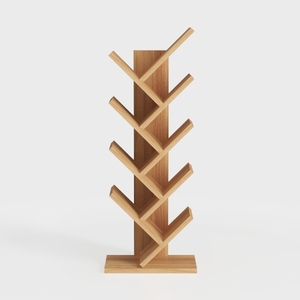
Minimalist Solid Oak Tree Shape Bookshelf 3D Model
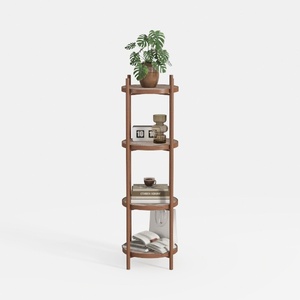

Minimalist Walnut Cane Round Tiered Display Shelf 3D Model
Homestyler is an easy-to-use online home design platform that offers powerful 3D rendering, a vast collection of design projects, and helpful DIY video tutorials. It’s perfect for turning your interior decorating ideas into stunning visual plans.
立即免费设计
































