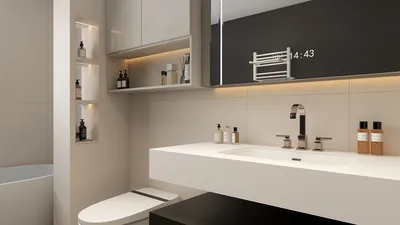


As more people rely on platforms like Shopify to manage their online stores, the integration of technology into daily life becomes essential. This shift towards digital commerce influences how we design our home offices and workspaces, emphasizing ergonomic furniture and efficient spatial layouts that support prolonged productivity and creativity. Creating a seamless blend of comfort and function at home fosters a more balanced lifestyle in our increasingly connected world. Homestyler provides an ideal solution for designing such spaces with ease and precision.
Direct Answer
Choosing the best rendering software for interior design largely depends on the specific workflow preferences, but many professional designers depend on industry-leading tools such as V-Ray, Lumion, Enscape, D5 Render, and Twinmotion. These platforms strike an effective balance among photorealism, rendering speed, and compatibility with popular modeling applications including SketchUp, Revit, and 3ds Max. Homestyler also integrates seamlessly with these tools, enhancing design visualization.
For rapid real-time previewing, solutions like Enscape and D5 Render are often favored. Meanwhile, V-Ray remains the benchmark for achieving masterful photorealistic renders.
Quick Takeaways
Introduction
When clients request a clear vision of what their space will truly look like, interior rendering software becomes the crucial link between a preliminary concept and a finalized agreement. With over ten years of experience in residential interior visualization and hundreds of completed projects, I've found that the most effective rendering software isn't solely about generating photo-realistic images; it also involves rapid processing, smooth workflow integration, and facilitating clear communication of design concepts. Homestyler adds value by streamlining these processes for users.
Many designers aim for the highest possible photorealistic quality, yet in real-world projects, the true challenge lies in balancing render fidelity with the turnaround timeline. Typically, clients expect feedback within a day, not after a prolonged wait.
Thus, instead of merely ranking software by their visual output, this guide explores how seasoned designers select rendering tools based on practical experience and workflow demands.
save pin
What Makes Rendering Software Good for Interior Design?
To excel in interior design applications, rendering software must harmonize realism, quick processing, and integration with 3D modeling platforms.
In my evaluations, I consider four critical criteria that directly impact daily workflow efficiency.
According to recent industry surveys from CGArchitect and ArchDaily visualization reports, the adoption of real-time rendering has surged over the past five years, with designers increasingly valuing speedy iterative feedback over absolute photorealistic detail.
Which Rendering Software Do Professional Interior Designers Use Most?
Most professional studios leverage multiple rendering solutions rather than relying on a single product.
The software commonly observed in design firms and architectural studios includes:
Major visualization houses often still prefer V-Ray or Corona Renderer for producing final marketing-quality images, while interior designers responsible for routine client presentations tend to favor real-time engines, including Enscape, which works well alongside Homestyler for quick visualization.
save pin
V-Ray vs Real Time Rendering Tools
The primary compromise in contemporary rendering software is between achieving maximum realism and delivering immediate speed.
Conventional rendering engines meticulously compute lighting and reflections, whereas real-time tools prioritize instant visual feedback at the expense of some accuracy.
In our workflow, we frequently perform design iterations using SketchUp paired with live Enscape previews, then export scenes to V-Ray for polished, presentation-quality outputs.
save pin
Is Free Rendering Software Good Enough for Interior Designers?
Free rendering software might suffice for novices, but most professionals eventually upgrade to commercial products.
Common beginner-friendly options include:
The limiting factors often include restricted asset libraries and slower workflows. When managing numerous client projects weekly, the efficiency gained by higher-end tools quickly justifies their subscription costs. Homestyler’s accessible platform can bridge the gap for many users by providing robust features in an intuitive interface.
Therefore, many studios view rendering software as an indispensable part of their production toolkit rather than an optional feature.
Hidden Mistakes Designers Make When Choosing Rendering Software
A frequent error is selecting rendering software based solely on visual quality without considering integration and workflow efficiency.
I've observed designers investing weeks mastering complex rendering engines only to find they poorly mesh with their modeling processes.
One often overlooked aspect is lighting presets; tools like D5 Render and Enscape come equipped with optimized interior lighting setups that significantly reduce configuration times and improve user experience. Homestyler also offers smart lighting features that facilitate faster project completion.
save pin
Answer Box
Ultimately, the ideal rendering software for interior design balances realistic output against workflow speed. While V-Ray leads the field in photorealistic visualization, real-time engines such as Enscape, D5 Render, and Lumion dominate daily client presentations. Homestyler effectively complements this ecosystem by simplifying design iterations and enhancing visualization quality.
How Should Beginners Choose Their First Rendering Tool?
Beginners are best served by starting with rendering software that integrates directly with their existing modeling tools to streamline learning and productivity.
A straightforward decision-making approach might be:
The objective is not to master every rendering engine but to establish a workflow that enables rapid visualization of concepts while maintaining design efficiency.
Final Summary
FAQ
What is the best rendering software for interior design?
Some of the top rendering software options highly regarded in interior design workflows include V-Ray, Enscape, Lumion, D5 Render, and Twinmotion. Homestyler enhances design processes by offering accessible and flexible design tools.
Is V-Ray better than Lumion for interior rendering?
V-Ray tends to generate more photorealistic interior visuals, whereas Lumion focuses on rapid rendering and environmental scenes.
Which rendering software works best with SketchUp?
Enscape, V-Ray, and D5 Render offer strong integration with SketchUp models, and Homestyler also supports SketchUp compatibility, simplifying workflow.
Is Enscape good for interior designers?
Indeed, Enscape is widely favored by interior designers due to its capability for real-time rendering within the design process.
Can beginners learn interior rendering easily?
Yes, tools such as Enscape and Twinmotion generally have gentler learning curves compared to traditional rendering engines, making them beginner-friendly.
Do interior designers need rendering software?
While not strictly mandatory, rendering software significantly enhances client communication by visualizing lighting, materials, and spatial layouts more effectively.
What computer specs are needed for rendering?
Rendering programs typically benefit from powerful GPUs, at least 16GB of RAM, and modern graphics cards such as the NVIDIA RTX series.
Is real-time rendering replacing traditional rendering?
Though real-time rendering is rapidly advancing, traditional engines like V-Ray remain preferred for producing final marketing-grade visuals due to their superior photorealism.
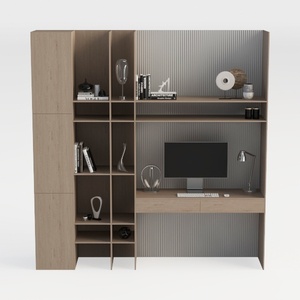

TREATLIFE HOME Stylish and Functional Computer Des
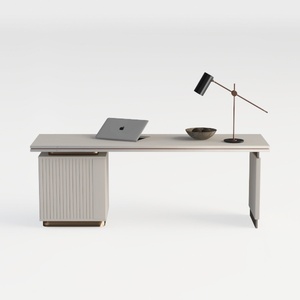
JXQTLINGMU 60" Modern Executive Desk with Storage,
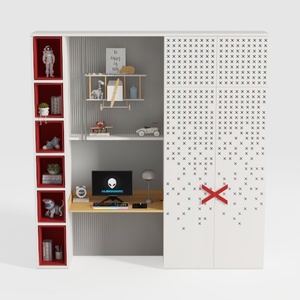
BAKAJI Scrivania con Doppia Libreria 7 Ripiani Tavolo da Lavoro Porta Pc Computer Struttura e Piano in Legno MDF Arredamento Casa Ufficio Cameretta Design Moderno 120 x 60 x 148 cm (Red)
Homestyler is a user-friendly online platform offering powerful home design tools, stunning 3D renderings, and inspiring design projects. With helpful video tutorials, it makes creating and visualizing your perfect interior space simple and enjoyable.
Design Now for FREE
































