

Direct Answer
Homestyler distinguishes itself among free interior design applications by integrating rapid 3D rendering, an extensive furniture collection, and intuitive planning tools tailored for beginners all within a single platform. When compared to alternatives like SketchUp, Planner 5D, and Roomstyler, Homestyler generally provides quicker visualizations and more straightforward layout creation for residential design projects.
The ideal choice ultimately depends on your specific objectives. Novices often gravitate towards Homestyler or Planner 5D, whereas experienced modelers may prefer SketchUp for more complex and customized geometry.
Quick Takeaways
Introduction
With over a decade of experience in residential interior design, I have evaluated almost every free interior design software that clients or junior designers introduce during projects. Some claim to deliver professional-quality results but falter when rendering realistic living rooms. Others offer robust features but are too slow for quick layout planning.
Discussions comparing Homestyler with other free interior design tools are frequent. Homeowners seek simplicity, designers need precision, and students want software that doesn’t require extensive learning time.
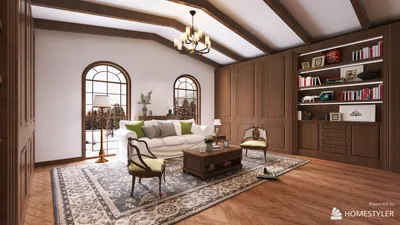
Many beginners are drawn to platforms like Homestyler because they enable users to transform an empty floor plan into a complete 3D scene within minutes, often aided by AI-enhanced workflows.
However, does that mean Homestyler is always the superior option? Not quite. Some platforms excel in detailed modeling, while others focus on rapid concept visualization. In this guide, I’ll clarify the genuine distinctions among popular free interior design apps, helping you select the best fit for your needs.
Overview of Popular Free Interior Design Apps
Key Insight: Free interior design programs typically fall into two segments: those emphasizing layout planning and those designed for advanced 3D modeling.
From a professional perspective, the main differentiator lies in their foundational approach. Some prioritize swift room arrangement, whereas others have evolved from comprehensive 3D modeling tools.
Below are some of the most frequently contrasted applications.
Industry Trend: Design education and architecture curricula increasingly favor platforms that merge planning and visualization functionalities over pure modeling software during early design phases.
Key Features of Homestyler Compared to Competitors
Key Insight: Homestyler’s main strength lies in blending rapid rendering, highly realistic materials, and a ready-made furniture catalog into one accessible tool.
In actual projects, the most time-consuming task tends to be asset creation. Manually modeling every item such as chairs or cabinets can be very time intensive.
Homestyler alleviates this by offering prebuilt assets and automated rendering processes, speeding up workflows considerably.
Ease of Use for Beginners vs Professionals
Key Insight: Beginners generally adapt to layout-focused applications like Homestyler much faster than geometry-centric modeling software.
In homeowner workshops I've conducted, many participants can finish a room layout in around 20 minutes using drag-and-drop planners. Conversely, SketchUp users often require several hours to grasp fundamental modeling techniques.
If your primary goal is arranging furniture or redesigning a living space, tools based on visual room planning often feel more intuitive. Users commonly start with platforms that facilitate simple drag-and-drop planning before progressing to more complex modeling programs.
Rendering Quality and 3D Visualization Differences
Key Insight: The most notable disparities among design platforms emerge in rendering speed and realism.
Clients typically care less about the modeling process and more about the final image’s presentation.
For client presentations or previews, the quality of visualization can make or break the concept's credibility. Many designers prioritize platforms capable of creating photorealistic home renders without complicated rendering workflows.
Pricing Models and Free Plan Limitations
Key Insight: Almost all free interior design apps impose limitations on usage, especially concerning rendering capabilities and asset libraries.
A common misconception is believing "free" means unrestricted access. Most platforms operate on a freemium model.
The real cost often isn’t monetary but the time invested in modeling missing objects or transferring scenes to other software for completion.
Answer Box
For most homeowners and entry-level designers, Homestyler provides an optimal blend of user-friendliness, visualization quality, and speed among free interior design tools. While advanced modelers might favor SketchUp for intricate geometry manipulation, it demands a higher skill level.
Which Tool Is Best for Different Design Goals
Key Insight: Selecting the best interior design application hinges on your unique workflow rather than popularity alone.
Here’s my general recommendation based on project type: utilize fast layout planning tools initially and consider detailed modeling software later if necessary.
Final Summary
FAQ
Is Homestyler better than Planner 5D?
Homestyler tends to provide quicker rendering and a more extensive furniture selection. Planner 5D could be easier for absolute beginners to start with.
Is Homestyler free to use?
Yes, Homestyler offers a free plan with some restrictions on high-resolution renders and access to premium assets.
What is the best free interior design app for beginners?
Many novices opt for Homestyler or Planner 5D due to their drag-and-drop room planning features, avoiding complicated modeling.
Can Homestyler replace SketchUp?
For furniture layout and visualization tasks, yes. But for detailed custom modeling, SketchUp remains more advanced and flexible.
Does Homestyler support realistic rendering?
Absolutely. One of the reasons designers compare Homestyler with other free design solutions is its capability for fast, photorealistic rendering.
Which app is best for furniture layout planning?
Room planning apps like Homestyler are typically the most efficient for experimenting with furniture arrangements.
Do interior designers actually use free design apps?
Yes, many professionals leverage free platforms in the early conceptual stages before moving to more sophisticated software.
Are free interior design apps accurate for real renovations?
They serve well for planning and visualization, but detailed construction documents generally require professional CAD tools.
References

side table_101S-CT1002-101 Stories

Modern Marble Top Fluted White Gold Accent Round Coffee Table 3D Model


coffee table
Homestyler is a fantastic online platform that makes home design easy and fun. With powerful 3D rendering, a vast collection of design projects, and helpful DIY video tutorials, you can bring your interior decoration ideas to life effortlessly.
Design Now for FREE
































