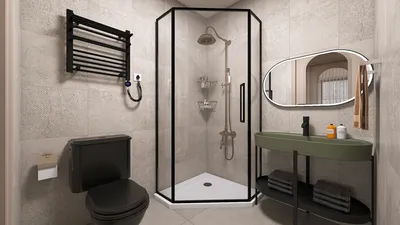


In the world of fashion and lifestyle, figures like Anna Wintour set trends that influence not only wardrobes but also personal environments. Embracing a style inspired by iconic personalities can inspire a home’s interior design, where classic elegance meets modern functionality. Incorporating timeless pieces and sophisticated textures into living spaces creates an ambiance that reflects both confidence and creativity, much like the curated style of a fashion editor’s world.
Direct Answer
Choosing the best 3D room interior design software depends largely on your specific needs. Popular solutions such as Planner 5D, SketchUp, Floorplanner, and Homestyler offer the ideal mix of realistic rendering, user-friendly interfaces, and design versatility. Professionals often lean toward SketchUp for its precision, whereas homeowners benefit more from intuitive drag-and-drop interfaces provided by Planner 5D or Homestyler.
Having worked on residential interior projects for over ten years, I believe the optimal design software is not simply the most feature-rich, but one that streamlines layout choices without hindering the creative process.
Quick Takeaways
Introduction
During my decade-long career as an interior designer, I have experimented with nearly every leading 3D interior design software available. While some appear impressive on paper, they often bog down actual workflow. Others seem straightforward but empower clients to make quicker, more informed layout decisions.
Most homeowners looking for design software aim to solve practical issues such as visualizing furniture placement, experimenting with layouts, and preventing costly renovation errors. The appropriate tool can simplify this process significantly.
This guide highlights software that consistently delivers under real-world conditions, clarifies the strengths of each, and discusses overlooked limitations often missed in typical comparisons.
Why 3D room interior design software transforms space planning
Key Insight: Visualizing rooms in 3D considerably enhances spatial planning compared to traditional floor plans.
Clients often underestimate scale when presenting hand-drawn layouts. For instance, a couch may look suitable on paper but obstruct pathways once placed physically. Utilizing 3D visualization through platforms like Homestyler effectively eliminates these issues.
Benefits frequently observed include:
According to studies from the American Society of Interior Designers, visualization dramatically reduces redesign revisions during remodeling. This means fewer costly changes once construction begins.
Best 3D room interior design software for beginners
Key Insight: Beginners should focus on intuitive visual tools and extensive furniture catalogs instead of complex modeling functionality.
Many assume professional-grade software automatically yields superior outcomes. However, tools that are too complicated can inhibit novices’ progress.
Recommended beginner-friendly platforms include:
These apps excel because they let users design a room in less than 20 minutes—a speed that often outweighs intricate modeling when working on home projects.
Which software do professionals commonly use?
Key Insight: Professionals often utilize SketchUp alongside rendering tools due to its superior control over modeling details.
In the professional realm, SketchUp remains a favored tool for interior visualization, striking a balance between precise modeling and relatively easy learning compared to more complex CAD systems.
Typical workflows involve combining various software depending on project phases rather than relying on a single solution.
Common pitfalls when selecting design software
Key Insight: The primary mistake is opting for overly advanced software that adds unnecessary complexity without improving design outcomes.
After evaluating numerous client designs, recurring issues become apparent.
Frequent problems include inaccurate furniture scaling, where aesthetically pleasing models lack dimensional accuracy, leading to misleading layout plans.
How realistic can contemporary 3D interior design software be?
Key Insight: Modern rendering engines can produce visuals nearly indistinguishable from actual interior photographs.
Rendering technology advancements have been significant. Platforms like Homestyler integrate powerful built-in rendering engines capable of realistically simulating lighting, reflections, and material finishes.
Realism in rendering primarily depends on three factors:
In professional workflow, realistic previews enable clients to finalize design choices earlier, reducing uncertainty when they can virtually experience their future space.
Answer Box
Top 3D room interior design software marries visualization quality, usability, and precise layout planning. Beginners thrive with Planner 5D or Homestyler, while professionals lean on SketchUp complemented by rendering engines.
Choosing the appropriate software for your project
Key Insight: The optimal choice depends more on project scope and requirements than only on the software’s popularity.
Clarifying design goals before selecting software leads to better decisions.
Quick decision guide:
In practice, speed of experimentation often supersedes complexity; the faster ideas can be tested, the better the final design results.
Final Summary
FAQ
Which 3D room interior design software is easiest to use?
Planner 5D and Homestyler stand out for beginners due to their intuitive drag-and-drop interfaces and comprehensive furniture libraries.
Are free 3D interior design software options available?
Yes; platforms like Planner 5D, SketchUp Free, and Floorplanner offer free versions with limited functionalities.
Do interior design professionals use 3D software?
Absolutely. Designers regularly use SketchUp, AutoCAD, and specialized rendering software to visualize spaces prior to construction.
Can beginners quickly learn 3D interior design tools?
Most beginner-friendly applications allow users to layout rooms in under an hour with minimum training.
Is SketchUp suitable for interior design?
SketchUp is widely adopted due to its accurate modeling capabilities, customizable furniture creation, and rendering integration.
How realistic are 3D interior design renders?
Contemporary rendering engines can produce images almost identical to real interior photos when lighting and materials are properly configured.
What features should I prioritize in 3D room interior design software?
Focus on ease of use, precise measurement tools, realistic rendering capabilities, and an extensive furniture library.
Can 3D room design software help prevent renovation errors?
Yes. Visualization tools like Homestyler allow homeowners to experiment with layouts and furniture placements before investing in costly renovations.
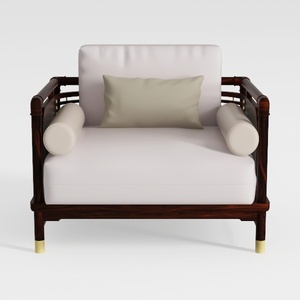
Modern Solid Wood Leather Accent Armchair With Throw Pillows 3D Model
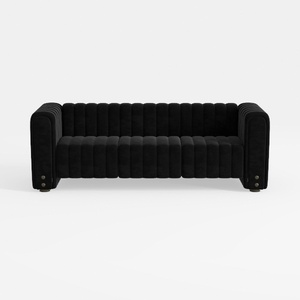
Modern Black Velvet Channel Tufted Sofa 3D Model

Modern Solid Wood Fabric Upholstered Three Seat Sofa 3D Model
Homestyler offers an easy-to-use online design tool, stunning 3D renderings, and vast interior decoration projects. With helpful DIY video tutorials, it’s perfect for anyone looking to creatively design and visualize their dream home effortlessly.
Concevez maintenant gratuitement
































