Homestyler logo
    • インテリアデザイナー向け

    • ブランドと e コマース ソリューション

    • 不動産ソリューション

    • 学校向け

    • オーナーソリューション

    機能

    デザイン

    • 設計ソフトウェア
    • カスタム家具
    • コラボレーション
    • モバイルアプリ
    • 資産市場

    視覚化

    • ビデオ レンダリング
    • バーチャルスタジオ
    • VR & AR 技術
    • 3Dビューア

    サービス

    • 3Dモデリング
    • 3D コンテンツの作成
    • お買い物
    • デザイナーを雇う
    製品
  • 価格
    • コミュニティ

      無限のデザインのインスピレーションを発見

    • 挑戦

      チャレンジに参加して自分の才能を披露しましょう

    • 資産市場

      何百万もの3Dモデルと素材を探る

    • AIDAアワード

      賞を獲得するための競争に参加する

    コミュニティ
    • チュートリアル

      ステップバイステップの説明と役立つヒント

    • ヘルプセンター

      詳細なドキュメントとサポートを見つける

    • フォーラム

      デザインについて話し合い、アイデアを共有する

    • ルーキートレーニングキャンプ

      最初の家を建てて、証明書 + ギフトを獲得しましょう!

    • 部屋Bootcamp

      マスター5ルームデザイン、3,000コイン + 証明書を獲得!

    新機能 全て表示
    • 新しい施工図の編集とエクスポート機能を追加しました。
    • 新しいパラメトリック ドアと窓はカスタム パラメータを許可し。
    • 複数階の DWG ファイルのインポートと床の位置合わせの設定のサポート。
    • Structure は、回転、床のタイル張りなどの機能をサポートします。
    • フロア プランにアーク ウォール図、ウォール アライメントなどを追加。
    • 同一機種のクイックリプレイス機能を追加 など
    • 4
    • 6
    • 5
    学習
  • ビジネス
    • ビジネス
    • ニュースルーム
    • descMdsKeyValue NEW

      フロアプラン生成:ワンクリックで自動作成

    • descMdsKeyValue

      イメージトゥイメージ:どんな空間も、どんなスタイルでもデザイン

    • descMdsKeyValue

      画像からムードボードへ:画像からスタイルボード作成

    • descMdsKeyValue

      画像/テキストを3Dに:どんな写真でも3Dモデルに変える

    • descMdsKeyValue

      画像をテクスチャに: 画像からテクスチャマップ作成

    • descMdsKeyValue NEW

      あなたの写真を数秒でアートに変える

    • さらに多くの内容が間もなく登場します

    AI
  • 設計業務 NEW
  • 今すぐ参加
  • サインイン
    無料のウェルカムギフト!
  • JA
    • English
    • Italiano
    • РУССКИЙ
    • العربية
    • Français
    • Polska
    • ESPAÑOL
    • PORTUGUÊS
    • Deutsch
    • 繁體中文
    • Indonesian
    • 日本语
    • 한국
    • 简体中文
設計を開始する

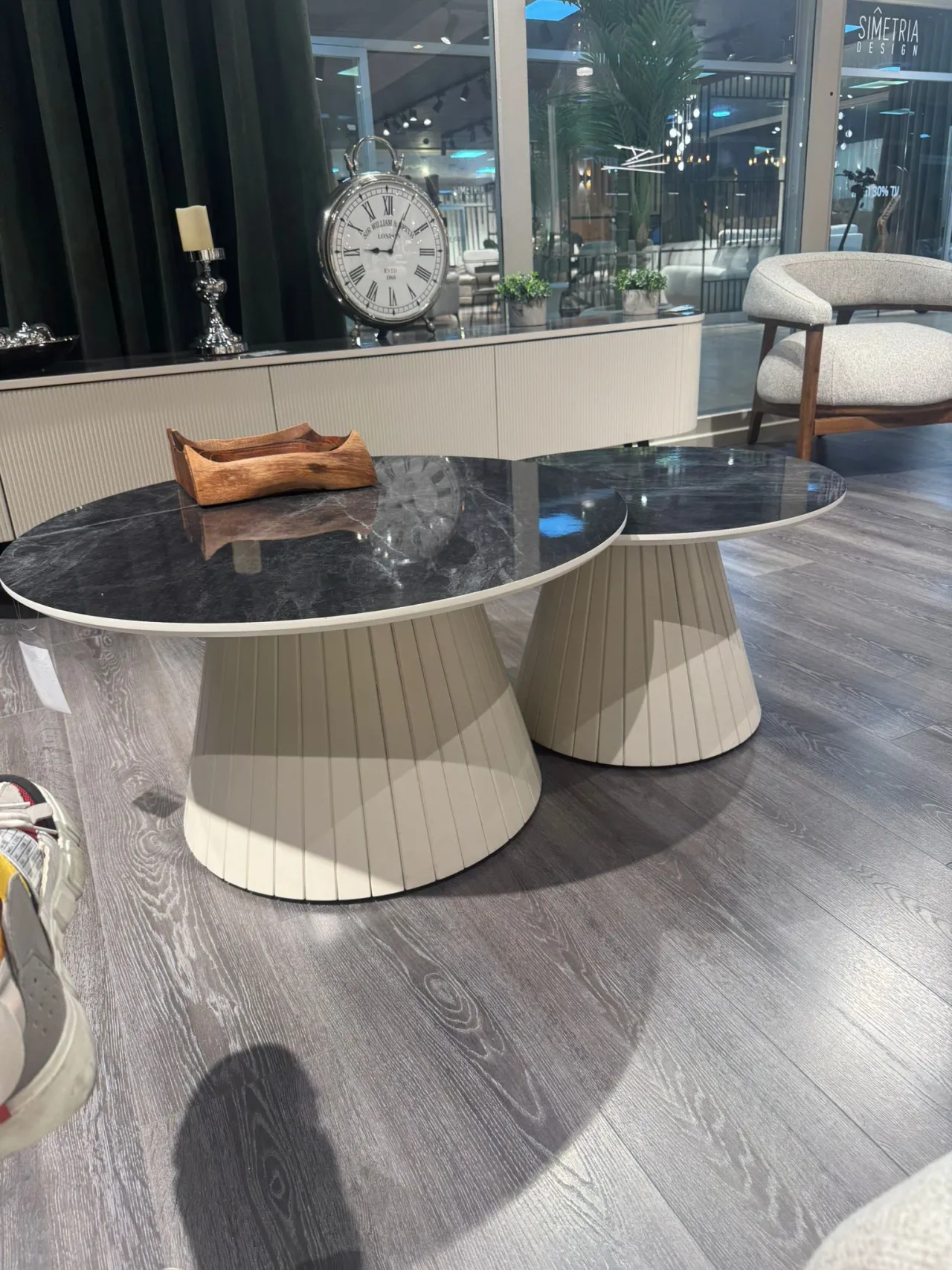
how to draw base of these tables/ I can make only sphere, but i can't make lines to be pushed a bit. inwards. PLease explain how would you do those legs

alja.kisik 1-11

デザインコミュニケーション
256 5

コメント(5)

head-img
詳しくはこちら
head

0 デザイン

0 いいね

Homestyler support 1-16
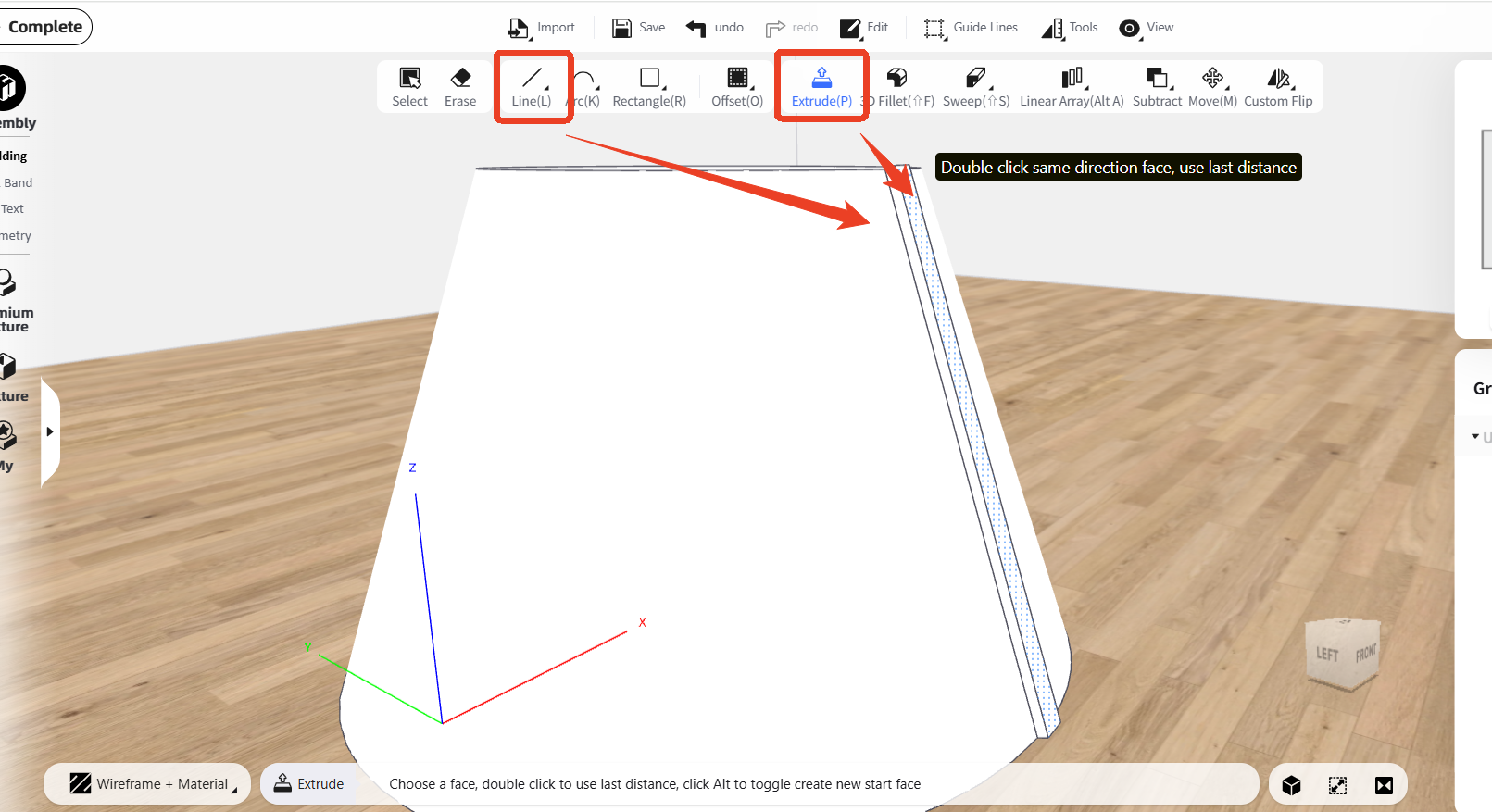
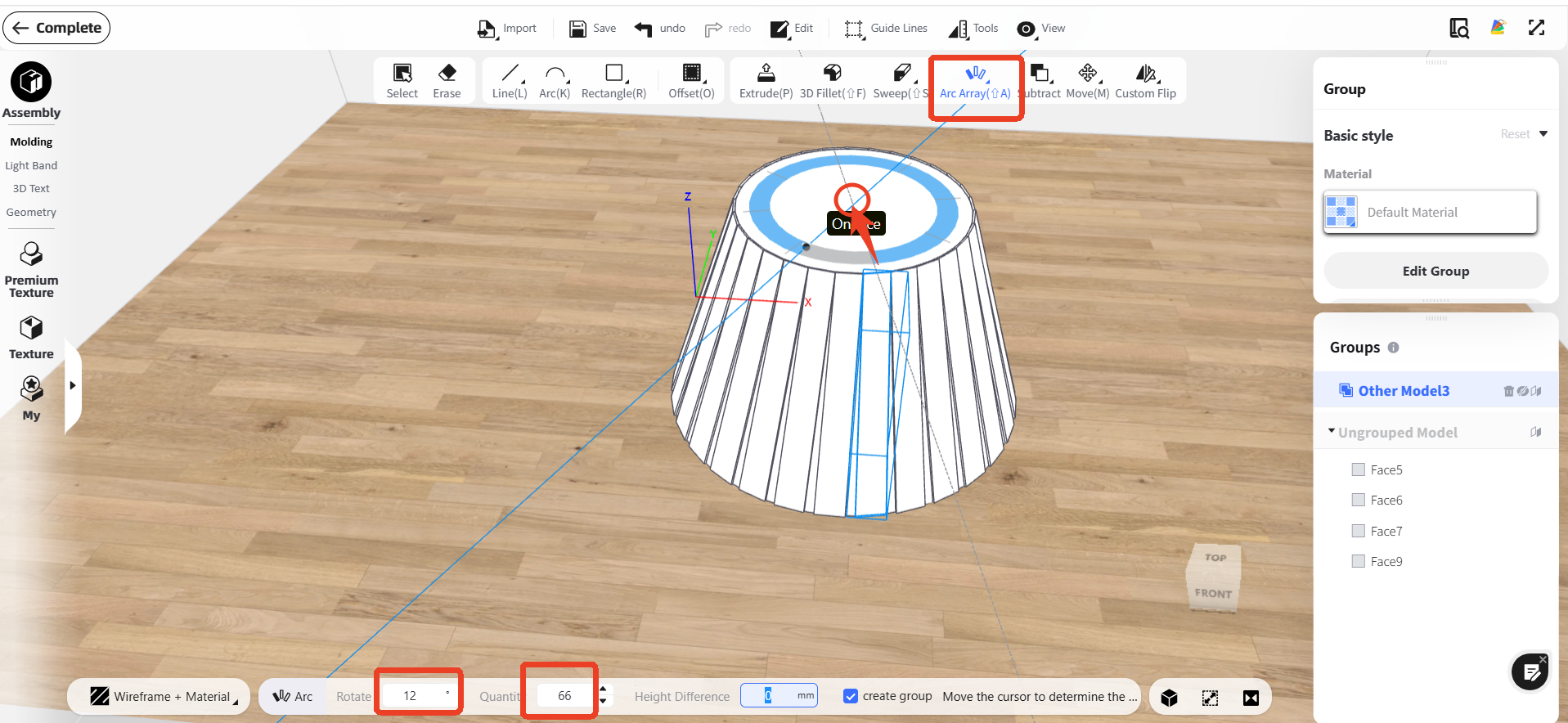
Finally, use ‘Arc Array’ to generate sticks around the base: click the base center, then set the rotation angle and stick count.:
attachment
コメントに返信する
head-img
詳しくはこちら
head

0 デザイン

0 いいね

Homestyler support 1-16
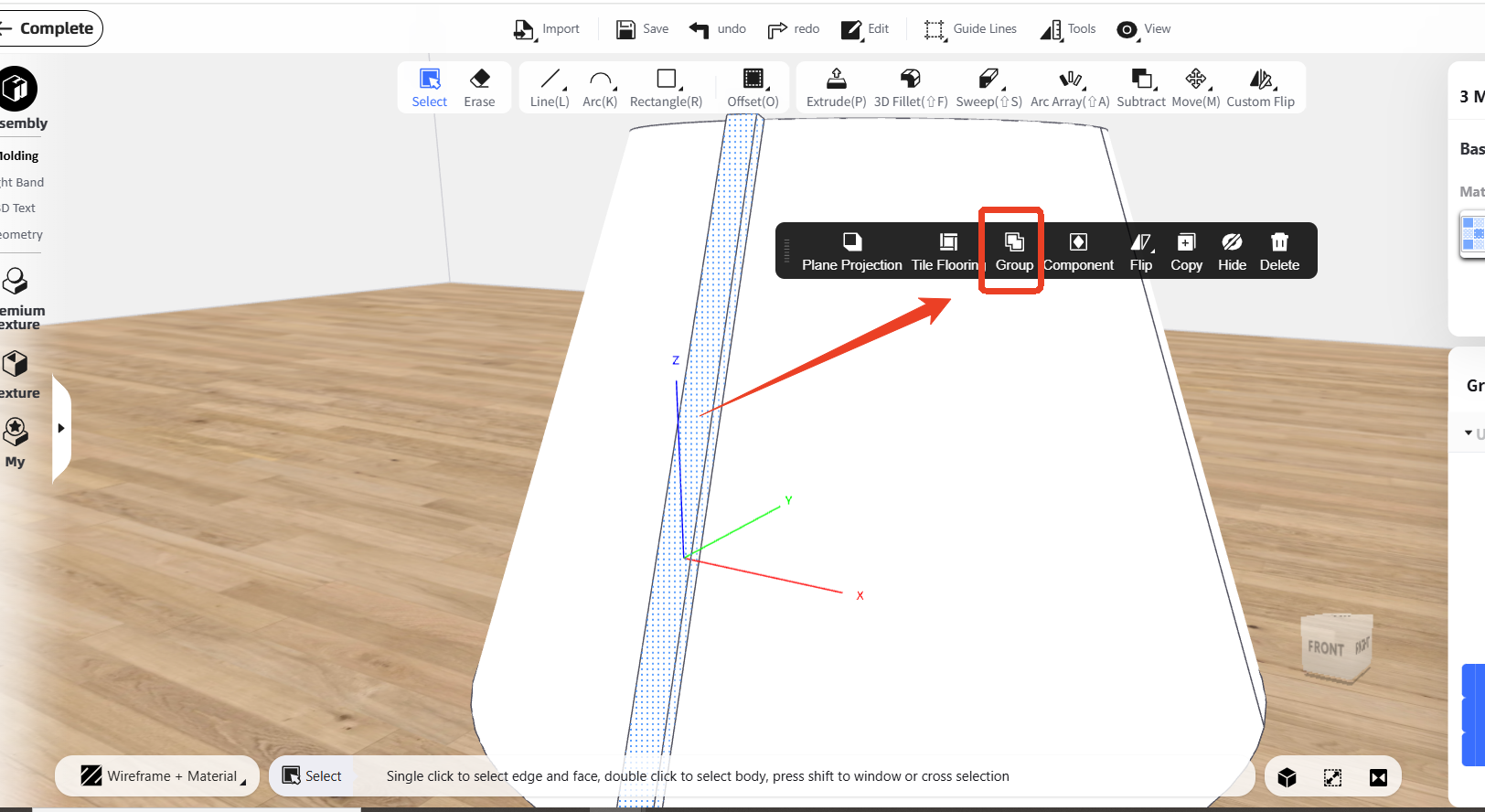
Then 'Group' the stick into one unit:
attachment
コメントに返信する
head-img
詳しくはこちら
head

0 デザイン

0 いいね

Homestyler support 1-16
Sure, you can firstly draw one stick on the base by using 'Line' function and 'Extrude' function, using the 'Line' function to draw the shape, and using 'Extrude' function to add thickness: @ alja.kisik
attachment
Thank you, but I already know how to model a cylindrical base. However, I am struggling to create the vertical slats on the cylinder — specifically the type that are not straight flat slats, but slightly convex / rounded outward, like on the attached reference image. My main difficulties are: • How to correctly draw evenly spaced slats around a cylindrical surface • How to give each slat a convex profile instead of a flat rectangular shape • How to make sure the spacing and curvature stay consistent around the whole cylinder • Which tools (Extrude, Spineline, Follow Path, etc.) are best
コメントに返信する
head-img
詳しくはこちら
head

0 デザイン

0 いいね

alja.kisik 1-16
Thank you, but I already know how to model a cylindrical base. However, I am struggling to create the vertical slats on the cylinder — specifically the type that are not straight flat slats, but slightly convex / rounded outward, like on the attached reference image. My main difficulties are: • How to correctly draw evenly spaced slats around a cylindrical surface • How to give each slat a convex profile instead of a flat rectangular shape • How to make sure the spacing and curvature stay consistent around the whole cylinder • Which tools (Extrude, Spineline, Follow Path, etc.) are best @ Homestyler support
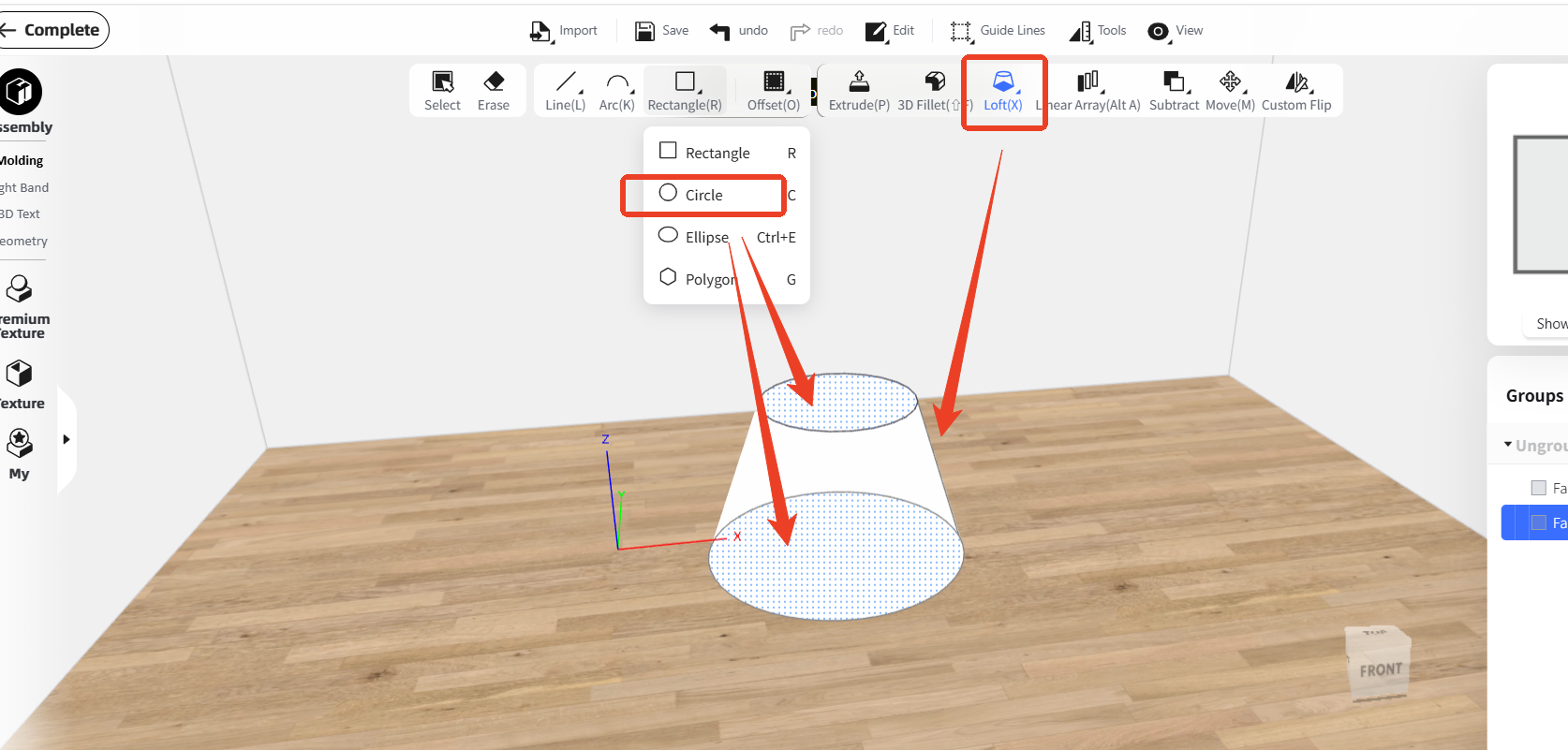
Hello, please enter the 'Interior Modeling' first, and you can use 'Circle' function to draw two circles, then use ' Loft' function to connect them:
attachment
コメントに返信する
head-img
詳しくはこちら
head

0 デザイン

0 いいね

Homestyler support 1-12
Hello, please enter the 'Interior Modeling' first, and you can use 'Circle' function to draw two circles, then use ' Loft' function to connect them:
attachment
コメントに返信する

私たちに関しては

私たちの物語

ニュース

ブログ

プライバシー

利用規約

更新

お問い合わせ

ISO/IEC 27001:2022

製品とサービス

3Dフロアプランナー

デザインのアイデア

モデルライブラリ

仮想写真スタジオ

価格とプラン

仕事

ビデオレンダー

コラボレーション

3Dモデリングサービス

ソリューション

インテリアデザイナー向け

ブランドと e コマース ソリューション

不動産ソリューション

学校・大学向け

オーナーソリューション

なぜHomestylerなのか

Homestyler vs 3Ds Max

Homestyler vs Floorplanner

Homestyler vs SketchUp

コミュニティ

ギャラリー

学ぶ&ヘルプ

フォーラム

動画チュートリアル

アフィリエイト プログラム

ダウンロード

ホームデザインアプリ

iOS用アプリ

Android用アプリ

デスクトップクライアント

Copyright © 2009 - 2026 居然设计家(上海)科技有限公司. All Rights Reserved

アンケートに記入して改善にご協力ください

自己紹介をして、コインセンターで20コインを請求してください!

タスク完了!コインを獲得しました!
受け取る
ストーリーを投稿
デザインのジレンマや発見を共有
デザインを投稿
デザインプロジェクトを共有