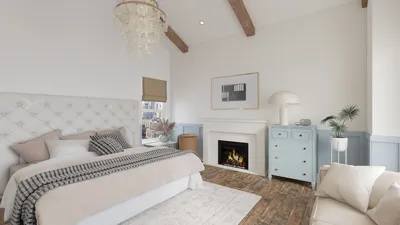


As new Xbox Game Pass games continue to expand the horizons of digital entertainment, many gamers are seeking comfortable and functional spaces that enhance their immersive experience. Creating a dedicated gaming nook with ergonomic seating and smart lighting can transform any room, blending technology seamlessly with home design to support extended play and relaxation.
Direct Answer
T20 software designed for 3D modeling encompasses specialized design applications that allow users to create, visualize, and manipulate three-dimensional objects for uses like architecture, product design, and digital visualization. Typically, designers rely on these programs to convert conceptual sketches into tangible spatial models, test various configurations, and produce presentation or production-ready files.
In essence, T20 modeling solutions facilitate the transition from initial design concepts to accurate digital prototypes that can be rendered, shared, or manufactured efficiently.
Quick Takeaways
Introduction
With over ten years of experience in residential interior design, I’ve witnessed how 3D modeling tools have revolutionized project development. Earlier in my career, we depended heavily on 2D plans and physical samples. Today, software suites—including platforms like Homestyler—enable designers to simulate entire spaces before a single item is physically acquired.
Interestingly, many users searching for these tools assume they serve primarily to create attractive renders. However, in actual projects, visual representation is only a fraction of their utility. The crucial benefits lie in spatial testing, verifying layouts, and accelerating decision-making processes.
This guide unpacks the true functions of T20 modeling software, highlights where they prove most beneficial, and clarifies common misconceptions encountered by first-time users.
save pin
What Is T20 Software for 3D Modeling Actually Used For?
Key Insight: The fundamental aim of T20 3D modeling software extends beyond mere visualization; it focuses on enabling spatial decisions prior to any physical construction.
These tools empower professionals to simulate spatial dimensions, materials, and proportions well before any building or manufacturing begins.
Common uses involve:
In my studio’s projects, rapid 3D mockups created early on help reveal issues that might not appear on flat layouts—for instance, what feels spacious on paper might become claustrophobic when furniture proportions are visualized realistically.
This simple insight alone can prevent costly errors during the build phase.
How Does T20 3D Modeling Software Work in a Design Workflow?
Key Insight: Productive use of T20 software follows a deliberate, step-by-step workflow rather than haphazard modeling.
A standard workflow typically involves:
A frequent beginner mistake is diving directly into detailed modeling. Seasoned designers often start with simple geometric representations to verify spatial relationships first.
This strategy significantly reduces the overall modeling time.
save pin
Why Are Designers Adopting T20 Modeling Tools Faster Than Traditional CAD?
Key Insight: Professionals gravitate toward 3D modeling tools because they streamline iterative decision-making, not merely because of aesthetic appeal.
While traditional 2D CAD remains indispensable for precise technical drawings, it falls short in conveying spatial experience effectively.
Frequently cited advantages include:
Industry reports from leading companies like Autodesk and Trimble indicate that visualization tools consistently minimize the number of design revisions, as clients can immediately appreciate spatial outcomes.
save pin
What Hidden Challenges Come With T20 3D Modeling Software?
Key Insight: The primary difficulties with T20 software concern mastering workflows and hardware requirements rather than modeling per se.
Tutorials often emphasize tool capabilities, but seasoned users realize that workflow integration and performance optimization present bigger challenges.
Typical obstacles include:
For example, during a residential project, our team completed a full apartment model in under two hours, but producing high-resolution renderings took nearly twelve hours.
Recognizing such trade-offs is vital when planning project timelines.
How Do Professionals Choose the Right T20 3D Modeling Software?
Key Insight: The optimal T20 modeling software aligns seamlessly with your existing workflow ecosystem, rather than simply boasting the most extensive feature set.
Professionals usually assess software based on criteria such as:
Interior design studios often rely on comprehensive platforms, with Homestyler being a notable example, to integrate modeling, rendering, and documentation.
Maximum productivity is achieved when modeling and visualization tools operate cohesively within one ecosystem.
save pin
Answer Box
T20 software for 3D modeling assists designers in converting ideas into spatially accurate prototypes prior to actual construction or production. Its greatest benefit lies in expediting decision-making processes through realistic visualization and precise spatial validation.
Final Summary
FAQ
T20 software for 3D modeling enables creation of digital three-dimensional objects and environments for architecture, interior design, product modeling, and visualization.
Some platforms cater to beginners, though most require an understanding of foundational modeling principles like geometry, scaling, lighting, and rendering workflows.
High-quality and complex renderings often demand powerful GPUs, adequate RAM, and rapid storage solutions to maintain smooth operations.
Fields such as architecture, interior design, gaming, product development, animation, and digital marketing typically use these tools.
These applications serve distinct purposes; CAD excels in technical blueprint production, whereas 3D modeling software enhances spatial comprehension and presentation.
Basic modeling skills can be acquired within weeks, yet mastery for professional workflows usually demands months of consistent practice.
Advanced rendering engines combined with effective lighting allow many T20 software solutions to generate photorealistic architectural and product visuals.
Definitely. Interior designers frequently utilize T20 software, including solutions like Homestyler, to experiment with furniture placements, lighting setups, and material palettes before final installation.
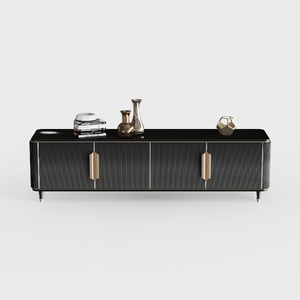
Modern Storage Cabinet, 94.4" Buffet Cabinet with

Modern Minimalist Fabric L Shaped Sectional Sofa with Throw Pillows 3D Model
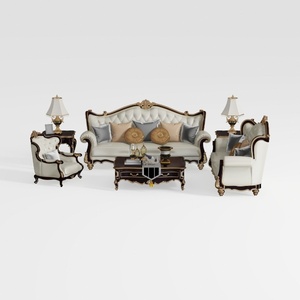
Classic Luxury Leather Wood Living Room Sofa Set with Side Tables Coffee Table 3D Model
Homestyler offers an easy-to-use online design tool with stunning 3D renderings, inspiring interior projects, and helpful DIY video tutorials. It’s perfect for quickly visualizing and creating your dream home design with professional-quality results.
Дизайн сейчас бесплатно
































