


In today’s tech-savvy homes, devices like the Nintendo Switch and games such as Animal Crossing have reshaped how we unwind and connect within our living spaces. Integrating cozy, multifunctional seating areas with dedicated gaming corners offers a harmonious blend of comfort and entertainment. Thoughtful space planning can enhance these leisure moments, turning a simple room into a personalized retreat that caters to both digital hobbies and relaxation.
Are you ready to unleash your creativity with Google 3D drawing techniques? In the current digital landscape, 3D modeling can significantly elevate your design projects, offering a visual impact that surpasses traditional methods. This guide will introduce you to some engaging techniques for navigating 3D drawing using Google’s robust tools.
Understanding 3D Drawing Fundamentals:
The key to mastering any skill is grasping its fundamentals. 3D drawing consists of crafting objects with depth, height, and width. Unlike 2D sketches, 3D illustrations add a degree of realism that can elevate your designs. Platforms such as Google SketchUp offer tools that enable you to easily visualize and manipulate these dimensions.
As you embark on this journey, take the time to familiarize yourself with the various tools available in the platform. For example, the push/pull feature can help transform flat surfaces into vibrant three-dimensional objects. Have you ever felt the excitement of watching a flat sketch come to life? Which object would you be eager to create first?
Exploring Techniques in Google SketchUp:
Google SketchUp stands out as one of the most accessible 3D modeling platforms available. Below are some techniques to enrich your experience:
1. **Utilizing Layers**: Structuring your design elements into layers can assist in managing intricate projects. This method allows for seamless editing and visualization. Reflect on how many layers would be beneficial for your project!
2. **Grouping Elements**: Grouping is vital when dealing with intricate designs. It guarantees that components move cohesively, making adjustments simpler. How do you maintain a tidy workspace while drawing?
Incorporating Textures and Colors:
Textures and colors enliven your 3D illustrations. Google tools provide an array of options to experiment with different finishes and hues. Envision turning a plain cube into an exquisite wooden box with just a few clicks. What textures might enhance your designs?
Incorporating authentic textures not only boosts aesthetic appeal but also conveys the properties of materials. Be sure to investigate the libraries available within Google’s tools, which offer textures tailored for various design needs.
FAQs
Q1: What is Google SketchUp and how can I utilize it for 3D drawing? A1: Google SketchUp is a web-based 3D modeling tool that enables users to effectively create, modify, and visualize 3D models through intuitive features.
Q2: Is Google SketchUp suitable for beginners? A2: Absolutely, Google SketchUp is crafted to be user-friendly, making it accessible for novices while also offering advanced features for seasoned users.
Q3: Are there resources available for learning 3D drawing techniques? A3: Yes! Google and various other platforms provide tutorials, forums, and community support to assist you in learning and honing your 3D drawing skills.

Natural Live Edge Solid Walnut Coffee Table Top 3D Model

Minimalist Pink Fabric L Shaped Sectional Sofa 3D Model
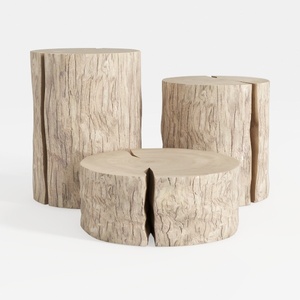

Rustic Solid Wood Stump Side Tables Set 3D Model
Homestyler is your go-to online home design platform! With its user-friendly design tool, stunning 3D renderings, and an array of inspiring design projects, you can effortlessly transform any space. Plus, the comprehensive video tutorials make it easy for anyone to create their dream home.
Design Now for FREE
































