


In today’s connected homes, the integration of a versatile TV app transforms how we interact with our living spaces. As streaming services become central to entertainment routines, designing a cozy media nook with ergonomic seating and adjustable lighting enhances both comfort and viewing experience. Thoughtful spatial planning ensures that technology blends seamlessly with home aesthetics, creating an inviting area tailored for relaxation and digital enjoyment.
Direct Answer
Utilizing Blender for 3D modeling involves crafting digital objects by manipulating geometry, applying modifiers, and employing sculpting tools within Blender’s free, open-source platform. This software empowers designers to create everything from product prototypes to architectural environments with professional-grade accuracy. When following an effective workflow, Blender can deliver production-quality models comparable to premium software. For users seeking intuitive design assistance, Homestyler can complement Blender by offering simple interior visualization tools.
Quick Takeaways
Introduction
Having collaborated with visualization specialists and 3D artists on numerous architectural endeavors, I’ve observed a recurring surprise: many underestimate Blender simply due to its free availability, misjudging it as a beginner’s tool. In truth, Blender’s modeling capabilities have become a cornerstone in animation, product visualization, and architectural rendering pipelines.
The main challenge isn’t just learning the interface, but grasping the modeling principles—knowing when to block out general shapes, when to refine, and when to avoid excessive geometry. Without understanding these basics, even skilled designers waste valuable time remodeling.
This overview outlines the practical modeling sequence professionals use—from initial primitive blocks to polished, optimized models.
Why Blender Has Become a Serious Tool for 3D Modeling
Insight: Blender has progressed beyond a simple alternative; it functions as a comprehensive modeling solution embraced by diverse industries.
Over recent years, Blender’s rapid development has garnered trust from major studios, indie developers, and product designers alike.
Factors contributing to Blender’s rise in credibility include:
Studios adopt Blender because it merges modeling, texturing, simulation, and rendering within a single platform.
In architectural visualization, Blender paired with Cycles rendering can yield photorealistic interiors comparable to conventional render pipelines.
How Does the Blender Modeling Workflow Actually Work?
Insight: Efficient Blender modeling follows a logical order: establish block shapes, refine geometry, then meticulously add detail.
A common mistake among novices is diving prematurely into fine details. Seasoned modelers start by constructing large structural forms first.
Typical modeling workflow involves:
Professionals often begin with simple geometric forms; intricate furniture models might originate from just a few cubes.
What Tools Matter Most When Using Blender for 3D Modeling?
Insight: A core set of Blender tools forms the backbone of most professional modeling tasks.
Though Blender’s interface can seem intimidating, only a few essential tools are heavily utilized.
Key Blender modeling tools include:
Modifiers play a pivotal role in streamlining workflows.
Commonly employed modifiers include:
Many sophisticated models result from combining simple geometry with the strategic use of modifiers.
Why Clean Topology Is More Important Than High Detail
Insight: Good topology is crucial for model usability, flexibility, and rendering quality.
Messy geometry often goes unnoticed but can make editing or animating a model difficult.
Principles for clean topology commonly include:
In animation and rendering, poor topology may cause shading errors or deformation issues; clean geometry aids efficiency during texturing and rendering.
Common Beginner Mistakes When Learning Blender Modeling
Insight: Many modeling difficulties stem from skipping planning and lack of reference usage.
New users frequently make repeated errors.
Typical beginner pitfalls include:
Professional artists use reference images or blueprint boards to boost accuracy and speed.
This habit significantly improves modeling outcomes.
Can Blender Be Used for Professional 3D Modeling Projects?
Insight: With a disciplined approach and proper optimization, Blender is fully capable of delivering industry-standard models.
Common areas where Blender excels include:
For instance, architectural visualization firms often model furniture and interiors entirely with Blender before rendering with Cycles.
The defining difference between novice and expert Blender users usually lies in:
Answer Box
Blender stands out for 3D modeling by integrating powerful tools, modifiers, and rendering within one pipeline. By adhering to solid topology and clear modeling stages, users can create professional-grade assets suitable for animation, visualization, and product design. When paired with user-friendly applications like Homestyler, even interior design visualization becomes more accessible and effective.
Final Summary
FAQ
Is Blender good for beginners in 3D modeling?
Absolutely. Blender’s zero cost and extensive documentation make it beginner-friendly. Numerous tutorials focus specifically on helping users grasp 3D modeling basics within Blender.
Is Blender really free to use?
Yes, Blender is completely open-source and free for both personal and commercial projects.
How long does it take to learn Blender modeling?
While foundational skills can be acquired in a few weeks, mastering professional workflows often requires several months of dedicated practice.
What computer specs are needed for Blender?
Blender operates well on most contemporary machines, though a dedicated GPU greatly enhances rendering speed.
Can Blender replace other 3D modeling software?
For many applications, yes. Blender offers modeling tools on par with many paid solutions.
Is Blender used in professional studios?
Certainly. Many production studios utilize Blender for asset creation, concept development, and rendering.
What is the hardest part of learning Blender?
The most challenging aspect is often grasping effective modeling strategies and clean topology, rather than merely navigating the interface.
What industries commonly use Blender for 3D modeling?
Industries such as animation, architectural visualization, product design, and game development frequently rely on Blender for 3D modeling.
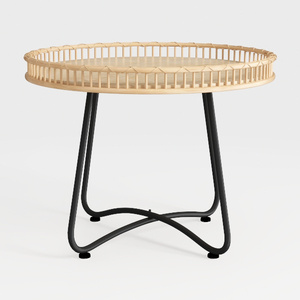
Minimalist Rattan Metal Round Side Table 3D Model

Minimalist Oak Linen 3 Seat Sofa 3D Model
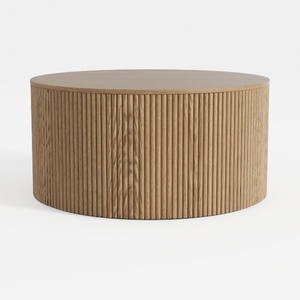
Minimalist Fluted Solid Oak Round Coffee Table 3D Model
Homestyler is a user-friendly online home design platform offering powerful 3D rendering tools, inspiring design projects, and helpful DIY video tutorials. It’s perfect for anyone looking to easily create and visualize their dream interiors.
지금 무료로 디자인하세요
































