


In today's smart homes, seamless integration of technology like the Nest app is key to managing comfort and security effortlessly. When the Nest app faces interruptions, it reminds us how crucial a reliable tech setup is in our living spaces. Designing furniture that accommodates smart devices while maintaining aesthetic harmony can enhance the overall functionality and atmosphere of any room, making technology a natural part of our home environment.
There are two types of furniture shopping experiences: one that ends with a return, restocking fee, and an empty spot on your wall where the wrong bookshelf once stood, and another where you already know—before making the purchase—exactly how the furniture will fit into your room, complement existing decor, and align with the room’s dimensions.
This clarity comes from using a room planner before buying furniture. Incorporating this step into your shopping routine can help avoid costly mistakes and ensure smarter choices.
The Costly Pattern Most Customers Follow
Shopping for furniture online often shortcuts the distance between browsing and buying. You see a piece you like and purchase it immediately, postponing the critical question—"Will this actually fit in my room?"—until delivery day.
At that point, options dwindle. Instead of making a thoughtful decision upfront, you’re faced with complicated return policies and restocking charges.
A worthwhile habit to develop is testing every major furniture purchase in a virtual room planner prior to ordering, avoiding surprises later.
Visual scale relative to your actual space matters. A sofa showcased in a spacious 40 sqm studio looks very different from how it would in a cozy 16 sqm living area. Mere dimensions don’t capture the feel of a room.
Compatibility with existing pieces is critical. A dining table may be stunning on its own but might clash with your current chairs, rug, or light fixtures. Viewing everything together prevents mismatched purchases.
Functionality of layout must be considered. For instance, a left-opening sectional could block hallways, or a bed with footboard storage might interfere with dresser placement.
Utilizing an online room planner like Homestyler allows you to place furniture in your exact room setting—including measurements and current furnishings—making decisions grounded in real spatial context rather than hope.
save pin
1. Measure your room first. Determine the maximum width available for sofas, ceiling heights affecting shelves, and floor space needed for rugs to anchor seating areas. Filtering options upfront prevents attachment to unsuitable pieces.
2. Create your room layout once in a platform such as Homestyler, inputting precise dimensions and existing furniture placements. This template can be reused every time you contemplate a new addition, saving time and promoting consistency.
3. Test new pieces before leaving the product page. Look up exact dimensions and add placeholders to your room plan. Visualize the item in 3D, check clearances, and only proceed if it fits seamlessly.
4. Compare alternatives within the same virtual room. Two sofas with similar sizes can produce drastically different effects based on their shape, height, and interaction with current room elements. Comparison in-room provides clearer insights than spec sheets.
5. Capture screenshots of your layout for reference when purchasing. Having a visual guide upon delivery ensures correct placement and smoother setup.
Begin by building your virtual room and use it as a reference throughout your furniture buying journey.
save pin
Clearances: Can doors open fully without obstruction? Are walking paths at least 90 cm wide? Do dining chairs have enough room to pull out without hitting walls?
Sightlines: From your usual seating positions, is the view obstructed? Will the new piece block windows or focal points you want to preserve?
Proportion: Does the furniture feel visually balanced with its surroundings? For instance, a sleek low sofa in a tall-ceiling room might feel diminished, while a bulky wardrobe in a small room might appear overwhelming. A 3D tool helps spot these nuances better than flat layouts.
The Entire Aesthetic: Assess how the new item meshes with all elements in the room. Does it feel cohesive or like an outsider?
Occasionally, a design’s incompatibility becomes obvious immediately—the size is off, the scale is mismatched, or the room’s vibe shifts unpleasantly with the addition.
That’s the room planner excelling—saving you time, money, and stress by preventing returns and hefty restocking fees, such as the trouble of boxing up a massive 90 kg sofa.
Sometimes, the smartest purchase is the one you decide against.
Homestyler's room planner is crafted for this vital step—the verification between desire and payment. It lets you input custom dimensions from any seller, visualize in 3D, and make confident decisions without downloads or costs.
Plan your space thoroughly before acquiring furniture.
Free Room Planner →
Already bought furniture and worried about fit? Check out guides like “Will My Furniture Fit? How to Check Before You Buy” for practical advice.
Originally incubated at Autodesk, Homestyler has grown into one of the most widely adopted home design platforms in the world, now trusted by over 20+ million registered users (platform data, 2026). Whether you're a homeowner exploring ideas or a professional designer delivering client-ready renders, Homestyler brings industry-leading 3D technology to your fingertips — no experience required.
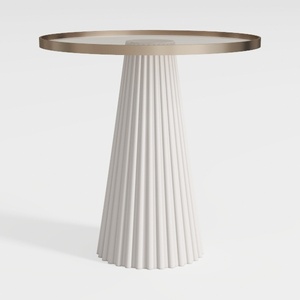
Modern Minimalist Fluted Base Glass Top Side Table 3D Model


Contemporary Brass Glass Acrylic Side Table 3D Model

Modern Walnut Glass Top Triangle Coffee Table 3D Model
Homestyler is an easy-to-use online platform offering powerful home design tools, stunning 3D renderings, inspiring design projects, and helpful video tutorials—perfect for creating and visualizing your dream interior with confidence.
تصميم الآن مجانا


















![Design [4]](https://hs-designs.homestyler.com/production/design/images/07c2de3a-88ec-4be8-8910-ff255b795bc2/1731419398293/7841697.jpg?x-oss-process=image/resize,w_502,m_mfit/format,webp)




![[For my dearest Sabrinik 🧡]](https://hs-designs.homestyler.com/production/design/images/3f463715-5ed6-4c49-9346-16d464510aa6/1714085722568.jpg?x-oss-process=image/resize,w_502,m_mfit/format,webp)


