


If you've ever worked with SketchUp, you're likely familiar with the common frustration — opening 3D Warehouse, typing in keywords for the furniture you need, receiving hundreds of results with widely varying quality, and then spending hours sifting through items one by one until you find the perfect match. Even after that, you still might face issues like oversized files, missing materials, or inaccurate dimensions.
You're not alone in this experience. Nearly every serious user of 3D Warehouse encounters similar challenges. Fortunately, there's a much more streamlined way to access high-quality 3D models that are ready for immediate use without the usual headaches.
Why Does 3D Warehouse Often Consume So Much Time?
3D Warehouse is a community-driven 3D model sharing platform developed by Trimble specifically for the SketchUp ecosystem. Its strength lies in volume — millions of models are added daily from contributors worldwide. However, this vast quantity also serves as its greatest weakness.
Due to a lack of stringent quality control, the models available vary greatly in quality. For every one model that is accurate in dimensions, complete with materials, and reasonably sized, there are dozens of others that are inaccurate, excessively heavy in file size, or even cause SketchUp to crash when imported. The only way to find the right one is essentially through trial and error.
Common Real-World Issues Faced by 3D Warehouse Users
Uncontrolled file size is the most frequent complaint. Models that look simple in preview may contain extremely high polygon counts — sometimes hundreds of thousands or even millions — which can drastically slow down SketchUp projects when loaded. Filling a room with multiple such models can easily balloon your project file to hundreds of megabytes and prolong rendering times.
Missing or faulty materials are another frequent problem. Many 3D Warehouse uploads lack properly assigned materials, or the material references are broken, resulting in plain grey models when opened. This forces users to spend extra time manually assigning materials — time that could be better spent on productive tasks.
Dependence on the SketchUp ecosystem is a fundamental limitation. 3D Warehouse is designed to function best within SketchUp, a platform with a steep learning curve and costly professional licenses. For users who don’t primarily use SketchUp, the benefits of 3D Warehouse shrink considerably.
Comparing 3D Warehouse with Homestyler’s Curated Catalog
Homestyler: A 3D Catalog Built for Efficiency
Homestyler takes a distinctly different approach from 3D Warehouse. Rather than being an open platform where anyone uploads anything, Homestyler offers a curated catalog — every model undergoes quality control to guarantee dimensional accuracy, complete materials, optimal file size, and consistent visual quality.
This results in a dramatically improved experience. You can search by keywords or filter by category, style, color, or size — and every result can be used immediately without the need to vet each one individually. There are no missing materials, excessive polygon counts, or inaccurate dimensions.
Perhaps the biggest advantage is that these models don’t require exporting, importing, or format conversions for rendering. Homestyler is accessible directly via browser or through desktop applications for Windows and macOS, featuring built-in 4K photorealistic rendering. From selecting models to viewing rendered results to presenting to clients, everything happens seamlessly within a single platform.
Who Benefits More from Homestyler Compared to 3D Warehouse?
Interior designers who need a fast, efficient workflow for client presentations will immediately notice the difference. Instead of spending half a day searching and half another day rendering with different software, the entire design-to-render process can be finished within a few hours.
Homeowners planning renovations without a technical background find Homestyler’s organized catalog and intuitive interface much easier to navigate than battling the steep learning curve of SketchUp and 3D Warehouse.
Contractors and real estate agents requiring quick visualizations for presentations will appreciate Homestyler’s ability to generate high-quality renders rapidly, without needing expensive rendering software or specialized technical skills.
When Is 3D Warehouse Still Relevant?
Honestly, 3D Warehouse remains indispensable for particular specialized needs that no other platform can fully satisfy. If you require exact models from a specific brand that uploads official products there, or niche models of buildings, vehicles, or other objects unavailable elsewhere, 3D Warehouse remains a valuable resource. Its massive ecosystem is unmatched for highly specific searches.
However, for everyday residential interior design needs — furniture, decorations, materials, and room elements — Homestyler provides a far more efficient experience with results ready for immediate use.
Getting Started with Homestyler’s Catalog
Access Homestyler through your browser or download the desktop app for Windows or macOS. Create a new project and input the dimensions of the room you want to design. In the furniture panel, search by keyword or filter by categories such as sofas, tables, cabinets, lighting, plants, and hundreds more. Each model in the search results is quality assured. Simply drag and drop items into your room, adjust their positions, and see the changes in a real-time 3D view. Once satisfied with your design, hit render and get a 4K photorealistic image within minutes, ready to present.
Conclusion
While 3D Warehouse is an impressive community achievement, it isn’t always the most efficient tool for every use case. For home interior design projects that require a fast workflow, high-quality results, and a hassle-free experience, Homestyler’s curated catalog paired with built-in 4K rendering offers a far better solution.
Try it yourself — explore Homestyler’s full catalog now via browser or desktop application on Windows and macOS.
Frequently Asked Questions
1. Is 3D Warehouse really free?
Yes, 3D Warehouse is free to access and download models. However, for the best experience, especially direct integration with SketchUp Pro, you still need a paid SketchUp license, which can be costly.
2. Why do models from 3D Warehouse often cause SketchUp to run slowly?
Because of a lack of strict quality controls, many models are uploaded with extremely high polygon counts and unoptimized file sizes. Homestyler optimizes every model in its catalog to ensure projects remain lightweight even when multiple models are used simultaneously.
3. Can I use models from Homestyler in SketchUp?
Homestyler is an all-in-one interior design platform that doesn’t require SketchUp. The entire process from design to 4K rendering happens within the Homestyler platform via browser or desktop applications for Windows and macOS.
4. How many furniture models are available on Homestyler?
Homestyler offers over 600,000 curated 3D furniture and decorative element models, all with complete materials, accurate dimensions, and optimized file sizes.
5. Does Homestyler provide photorealistic rendering without additional plugins?
Yes, Homestyler includes built-in 4K photorealistic rendering without the need for plugins or separate rendering software like V-Ray or Enscape, which are often required for high-quality renders in SketchUp.
6. Can models on Homestyler be used for commercial projects?
Models in Homestyler’s catalog can be used for commercial design projects within the platform. Refer to Homestyler’s usage policies for full details on model rights.
7. How fast is rendering on Homestyler compared to manual methods?
Homestyler’s 4K renderings typically complete within minutes thanks to cloud rendering technology — much faster than manual renders using V-Ray or other heavy software, which can take hours or longer for complex scenes.
8. Is Homestyler available on smartphones?
Homestyler can be accessed via browsers on laptops and computers, and through desktop apps for Windows and macOS. For full design features and 4K rendering, using a laptop or desktop is highly recommended.
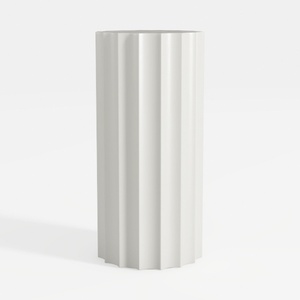
Minimalist White Fluted Cylindrical Side Table 3D Model
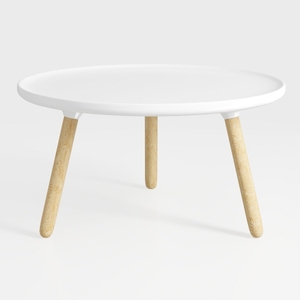

Minimalist White Solid Wood Round Coffee Table 3D Model
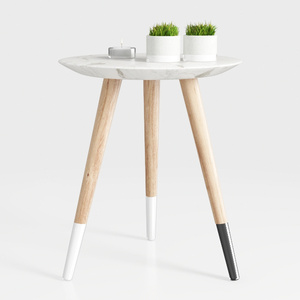
Modern Marble Top Solid Wood Legs Side End Table 3D Model
Homestyler is a user-friendly online home design platform offering powerful 3D rendering tools, a vast collection of interior design projects, and helpful DIY video tutorials. It makes visualizing and creating your dream space simple and inspiring for everyone.
Design Now for FREE
































