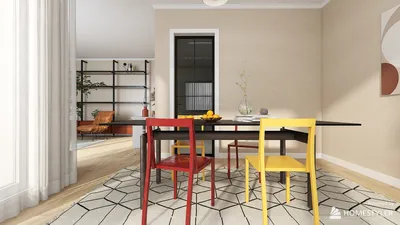


As summer approaches, many embrace new trends like the 2026 nail styles to refresh their personal look. This seasonal focus on self-expression naturally extends to living spaces, where vibrant colors and innovative textures can inspire home decor choices. Incorporating bold hues and playful patterns in furniture and accessories allows your space to reflect the same renewed spirit that summer fashion trends encourage. Using tools such as Homestyler can help homeowners visualize these dynamic changes in interior design effortlessly.
Direct Answer
To produce 3D models in AutoCAD, begin by transforming a 2D floor plan into closed polylines, then apply commands such as EXTRUDE, PRESSPULL, and REVOLVE to develop the 3D structures. Afterwards, assign materials, tweak visual styles, and perfect details utilizing Boolean operations. Interior designers often follow this method to rapidly convert technical blueprints into presentation-ready spatial models.
Quick Takeaways
Introduction
Many professionals initially learn AutoCAD as a drafting solution but underestimate its power when constructing 3D models directly from floor plans. During my studio projects, especially in residential design, I frequently advance from 2D layouts to quick 3D massing inside AutoCAD before exporting for rendering.
The main obstacle for most beginners isn't the commands themselves but understanding the proper workflow. Without a well-structured sequence, 3D modeling in AutoCAD becomes disorganized, inefficient, and frustrating.
Having accumulated over a decade of experience in interior spatial studies, I've discovered a dependable approach that converts a basic floor plan into a functional 3D model within an hour. This procedure mirrors how many designers prepare models prior to using tools like SketchUp, 3ds Max, or rendering engines.
save pin
Why Start With a Clean 2D Drawing Before Building a 3D Model?
Key Insight: The fidelity of your 3D model heavily depends on the cleanliness of your 2D base drawing.
A frequent beginner error involves jumping directly into 3D commands without correcting the 2D plan. When lines aren’t properly connected, AutoCAD cannot extrude surfaces correctly, resulting in fragmented geometry rather than solid walls.
Before initiating any 3D modeling, I always run a checklist to ensure integrity:
Commands such as AutoCAD’s OVERKILL and PEDIT are invaluable for cleaning drawings. Professional workflows show that a tidy 2D plan can cut modeling time by more than half.
Architectural studios often regard the 2D drawing as the foundational "construction blueprint" for the 3D model. If this blueprint is cluttered, the 3D output will reflect that disorder.
How Do You Switch AutoCAD Into a 3D Modeling Workspace?
Key Insight: Enabling the 3D workspace early enhances navigation fluidity, visualization quality, and modeling precision.
AutoCAD features a dedicated 3D Modeling workspace unlocking vital tools. Many novices neglect switching to it, making the interface harder than necessary.
To activate this workspace:
These changes enable rapid orbiting, panning, and geometry inspection.
From experience, designers who navigate models using orbit tools instead of flat views detect spatial errors more readily.
save pin
What Are the Core AutoCAD Commands Used for 3D Modeling?
Key Insight: The majority of AutoCAD 3D models utilize only four fundamental commands, even on professional projects.
While AutoCAD offers hundreds of commands, a small subset effectively manages most modeling tasks.
Critical commands include:
For instance, when modeling a residential apartment:
Autodesk training consistently emphasizes these commands due to their ability to produce clean, predictable geometry.
save pin
How Do You Turn Floor Plans Into 3D Walls and Rooms?
Key Insight: The quickest method is extruding wall polylines to the desired ceiling height.
At this stage, the model transforms into architectural space.
A typical workflow involves:
An often-overlooked point is differentiating structural walls from interior partitions, allowing for independent height or material adjustments later.
Additionally, I tend to extrude floor slabs and ceilings as separate elements. This provides flexibility to accommodate client layout changes.
save pin
Common Mistakes Beginners Make When Creating AutoCAD 3D Models
Key Insight: Many AutoCAD 3D issues stem from shortcuts that appear expedient but produce flawed geometry.
Reviewing junior designers’ files reveals recurring issues.
Top mistakes include:
Consequences of these errors surface during exports to rendering software, leading to lighting glitches, missing surfaces, or excessive file weights.
Professional teams prioritize maintaining clean geometry over rushing early stages.
When Should You Export AutoCAD 3D Models to Other Software?
Key Insight: AutoCAD excels at structural modeling, while complex visualizations typically occur in specialized software.
In professional interior design workflows, AutoCAD is rarely the final rendering platform.
Models are often exported to tools such as:
AutoCAD focuses on precise geometry; rendering software handles lighting, textures, and ambiance.
Separating these roles ensures accuracy alongside visual impact.
Answer Box
The best technique to create AutoCAD 3D models involves starting with a clean 2D floor plan, converting outlines into solids with EXTRUDE or PRESSPULL commands, and organizing elements via layers and Boolean operations. This approach minimizes broken geometry and prepares models for smooth rendering or further design refinement.
Final Summary
FAQ
Can AutoCAD create full 3D models?
Yes, AutoCAD supports solid, surface, and mesh modeling, enabling designers to build comprehensive architectural and interior 3D representations.
Is AutoCAD good for beginners learning 3D modeling?
While the interface is technical, many novices grasp 3D concepts faster with tools like SketchUp before advancing to AutoCAD for detailed modeling.
What command creates walls in AutoCAD 3D models?
Typically, the EXTRUDE command applied to wall polylines forms vertical 3D wall structures.
How long does it take to learn AutoCAD 3D modeling?
Basic workflows can be picked up in weeks, though mastering professional techniques usually requires months of project experience.
Do architects still use AutoCAD for 3D modeling?
Yes, despite BIM tools being prevalent, AutoCAD remains popular for rapid spatial modeling and technical documentation.
Can AutoCAD 3D models be rendered?
Yes, but most designers export AutoCAD models to rendering tools like Lumion, Twinmotion, or 3ds Max for advanced visualizations.
What file format is best for exporting AutoCAD 3D models?
Common export formats include FBX, DWG, and OBJ depending on target rendering software.
Is AutoCAD 3D modeling used in interior design?
Absolutely. Interior designers regularly create AutoCAD 3D models to experiment with layouts, ceiling heights, and spatial relationships before visualization. Incorporating Homestyler into this workflow further enhances the design process by offering intuitive visualization options and easy customization of interior configurations.
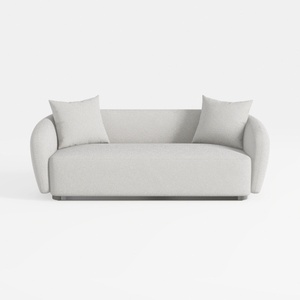
Minimalist Boucle Fabric Living Room Sofa 3D Model
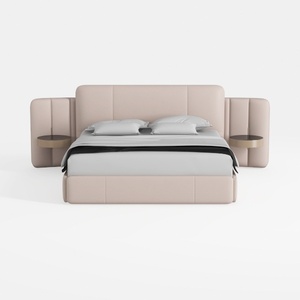
Minimalist Blush Fabric Upholstered King Bed with Attached Side Tables 3D Model
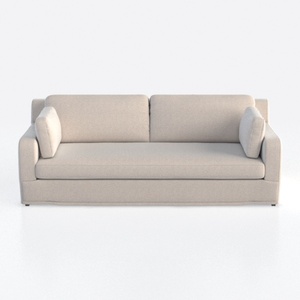
Minimalist Linen Fabric 3 Seat Sofa 3D Model
Homestyler offers an easy-to-use online design tool combined with stunning 3D renderings, inspiring interior projects, and helpful DIY video tutorials—making it simple and fun to create your perfect home design from start to finish.
Concevez maintenant gratuitement
































