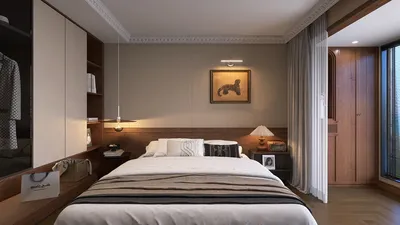


Incorporating influences from Amanda Seyfried’s elegant and timeless fashion style can inspire your living space to feel both sophisticated and inviting. Just as her wardrobe balances classic charm with modern trends, your home can blend traditional furniture pieces with contemporary accents. Thoughtful space planning allows for a flow that mirrors her effortless grace, creating a lifestyle environment where comfort meets understated luxury. Utilizing digital tools such as Homestyler empowers you to bring such refined designs to life with ease and precision.
Direct Answer
3D modeling software is a digital tool designed to generate three-dimensional depictions of objects, interiors, and environments. Architects, designers, and product developers rely on these tools to visualize concepts, experiment with layouts, and create lifelike renderings before any physical construction takes place.
Practically, such software allows professionals to investigate materials, lighting effects, scale, and spatial relationships with far more accuracy than conventional blueprints or sketches.
Quick Takeaways
Introduction
Early in my career at interior design studios in Los Angeles, presentations depended heavily on hand-drawn sketches and flat CAD diagrams. This shifted rapidly when 3D modeling software became integrated into daily design practices. Nowadays, almost every residential or commercial project I contribute to involves some form of digital 3D modeling.
The underlying reason is straightforward: visualization helps clients grasp spatial concepts much quicker than abstract drawings.
However, many newcomers believe that 3D modeling software is solely for producing attractive images. In reality, its main purpose centers on spatial problem-solving, layout validations, and enhancing communication among designers, builders, and clients.
This guide aims to clarify how these platforms function, the criteria professionals use to select them, and common misconceptions beginners hold when learning 3D modeling.
What Is 3D Modeling Software and How Does It Work?
Key Insight: 3D modeling software transforms geometric data into visual representations that correspond to real-world shapes, materials, and spatial configurations.
At the core, all 3D modeling applications construct objects using mathematical geometry. Elements like walls, furniture, lighting fixtures, and fabric textures are created through polygons, curves, or parametric surfaces.
From a design standpoint, such software typically accomplishes four primary tasks: spatial layout creation, material application, lighting simulation, and rendering realistic scenes.
In professional interior design settings, modeling usually begins with fundamental spatial geometry such as walls, floor heights, windows, and pathways. Subsequently, furniture and decorative pieces are incorporated to complete the environment.
One major reason for rapid technological progress is the enhancement of real-time rendering engines. Applications like Lumion, Twinmotion, and Unreal Engine can now simulate lighting scenarios in mere seconds rather than hours.
Why Do Designers Rely on 3D Modeling Instead of Traditional Drawings?
Key Insight: Utilizing 3D models minimizes expensive misunderstandings during design phases well before any construction begins.
Flat, two-dimensional drawings require interpretation that clients may find challenging. They often have difficulty comprehending proportions, scale, or how a space will genuinely feel.
After numerous residential renovation projects, I have identified three primary advantages of introducing 3D models early in the design process:
For instance, during a recent apartment redesign, the 3D model exposed that a pendant light’s position would interfere with ceiling beams—something that wasn’t apparent in flat plan views. Catching this early saved costly adjustments later.
Which 3D Modeling Software Is Most Popular Today?
Key Insight: No single solution dominates every workflow; professionals often combine 3D modeling applications with specialized rendering engines.
The interior design and architectural visualization industries rely on several standardized tools.
Typical software platforms in design studios include SketchUp, Blender, 3ds Max, and others.
In my workflow, SketchUp usually serves as the initial platform because it enables rapid exploration of spaces. For photorealistic rendering, models are transferred to engines like V-Ray or Lumion.
This multi-application process is common, though not always anticipated by novices.
What Beginners Often Get Wrong About Learning 3D Modeling Software
Key Insight: The core challenge is not mastering software interfaces but cultivating spatial reasoning skills.
Many beginners mistakenly believe proficiency with menus and tools directly results in proficient design output. Experienced practitioners recognize that software is merely a vehicle reflecting spatial perceptions.
Typical errors among beginners include unrealistic expectations about precision, neglecting proportions, and underestimating the importance of accurate measurements.
One effective exercise is to model an actual room from your home with precise dimensions. This approach accelerates understanding of scale and proportion beyond tutorials.
How Do 3D Models Improve Interior Design Decisions?
Key Insight: Using 3D modeling enables designers to experiment with ideas visually before investing in materials or construction labor.
Interior design constantly involves balancing lighting, circulation, storage, and aesthetics. Digital models facilitate evaluating these compromises swiftly and comprehensively.
Common questions answered using modeling include: optimal furniture size, lighting placement, and navigating space constraints.
In a recent kitchen project, comparing three island sizes through a 3D model revealed that just six extra inches significantly improved movement and flow.
Is Free 3D Modeling Software Good Enough for Professional Work?
Key Insight: Several no-cost tools provide sufficient functionality for professional visualization when integrated into appropriate workflows.
Open-source and freeware have matured dramatically over the past decade.
Noteworthy free options include Blender, SketchUp Free, and Tinkercad.
Blender, especially, has gained traction among architectural visualizers for its all-in-one capabilities encompassing modeling, rendering, and animation.
The primary limitation is not tool capability but the time investment necessary to achieve mastery.
Answer Box
3D modeling software enables professionals to conceptualize and validate spatial arrangements before physical work commences. By integrating modeling, materials, lighting, and rendering, these platforms convert abstract ideas into vivid digital representations.
Final Summary
FAQ
What is 3D modeling software used for?
3D modeling programs are designed to generate digital representations of objects or spaces for use in design, visualization, engineering, animation, and architectural purposes.
Is 3D modeling software difficult to learn?
Most novices can grasp basic modeling techniques within weeks, but mastering lighting, materials, and realistic rendering requires longer dedication.
Which 3D modeling software is best for beginners?
SketchUp, Blender, and Tinkercad are often recommended for beginners due to their user-friendly modeling processes.
Do interior designers use 3D modeling software?
Absolutely. Many interior designers depend on 3D modeling to visualize layouts, test furniture arrangements, and provide realistic client presentations.
Can 3D modeling replace traditional drawings?
No, most professional practices blend 3D models with technical drawings like CAD plans and construction documents.
Is Blender good for architectural visualization?
Yes, Blender has established itself as a powerful, cost-free option for architectural rendering and interior visualizations.
What computer is needed for 3D modeling software?
A modern processor, dedicated graphics card, and at least 16GB RAM are recommended to ensure smooth modeling and rendering operations.
How long does it take to learn 3D modeling?
Fundamental skills can be acquired within a few weeks, but complete professional proficiency typically requires several months of consistent practice.
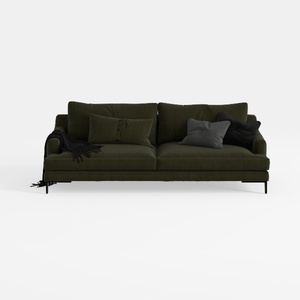
Modern Dark Green Fabric Upholstered 3 Seater Sofa With Throw Pillows 3D Model

Modern Chinese Style Solid Wood Living Room Furniture Full Set 3D Model
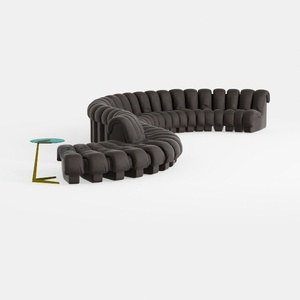
Modern Contemporary Leather Modular Sectional Sofa with Side Table 3D Model
Homestyler is an easy-to-use online platform that helps you design and visualize your home with stunning 3D renderings. Explore numerous interior design projects and learn through helpful DIY video tutorials to create your perfect space effortlessly.
Design Now for FREE
































