


As enthusiasm for the latest PlayStation Plus June 2026 games grows, many gaming enthusiasts seek to enhance their home entertainment spaces to match their evolving digital lifestyle. Creating a dedicated gaming nook with ergonomic seating and optimized lighting not only improves comfort but also complements the immersive experience these new titles offer. Thoughtful spatial planning can transform a typical room into a versatile hub for relaxation and entertainment.
Several years ago, I confidently embarked on modeling a kitchen renovation directly in 3D. However, after two hours, I discovered that the wall measurements were off by 15 cm, necessitating almost a complete rebuild. That humbling experience taught me an essential lesson: the method you use to approach a 3D CAD floor plan is just as crucial as the design itself.
Nowadays, when working with tight apartments or complex configurations, I take my time and select an appropriate workflow before beginning the modeling process. Small areas require intelligent planning, and adopting the right modeling technique can save significant time and reduce frustration.
In this article, I will present five strategies I have employed over the years for creating 3D CAD floor plans. Each approach is optimal in different scenarios depending on your skill set, the scale of the project, and the software tools you utilize, including platforms like Homestyler.
Key Considerations When Creating a 3D CAD Floor Plan
The foremost factor I consider is the project's objective. Am I delivering a polished design to a client, or merely experimenting with furniture arrangements? These contrasting goals dictate very different modeling workflows.
For rapid conceptualization, I often draft a layout on paper initially and then test it through a straightforward digital floor plan via software like Homestyler, allowing me to explore proportions quickly without diving into detailed modeling prematurely.
Experience level significantly influences the choice of approach. Beginners sometimes dive into complex BIM software and become overwhelmed rather swiftly. Starting with simpler methods usually leads to better outcomes and fewer complications.
2D-to-3D Conversion Versus Direct 3D Modeling
This is a common discussion in every project: should you begin with 2D plans and extrude walls upward, or work directly in 3D from the outset?
From my perspective, I often initiate projects with a 2D layout. Transforming a floor plan into 3D walls is efficient, accurate, and makes later dimension adjustments easier—an important benefit under tight renovation schedules.
Direct 3D modeling shines when projects involve unique shapes or organic forms. Nonetheless, novices sometimes lose sight of scale and proportions, resulting in cluttered geometry and numerous corrections.
Determining the Right Detail Level for Your Project
A misstep I made early in my career was incorporating excessive detail from the beginning—like door handles, lighting trims, and cabinet hinges. While visually impressive, it slowed down the entire workflow.
Presently, I calibrate the level of detail to the stage of the project. Early phase layouts remain simple, while presentation models include richer materials and furnishings. For rapid visualization, I often prototype using efficient 3D floor visualization tools such as Homestyler that emphasize spatial understanding over minute details.
This tiered approach accelerates progress while still allowing for high-quality final renderings.
Balancing Speed, Accuracy, and Aesthetic Quality
Design invariably requires compromise. The fastest modeling process is not always the most accurate, and highly precise CAD models rarely come quickly.
When preparing contractor drawings, I focus on accuracy and exact measurements. For client presentations, visual clarity takes precedence. My guiding principle is to model precisely where construction detail matters and simplify where it does not.
This balance maintains satisfaction among both clients and contractors, which is not always straightforward to achieve.
Matching CAD Tools to the Project Needs
Not all projects require identical software. Over time, I have realized that selecting the appropriate tool is half the challenge.
Simple layout tasks are well-suited to intuitive design platforms like Homestyler, while complex architectural jobs may demand comprehensive BIM workflows. Recently, I have explored AI-assisted home layout generation techniques, which rapidly produce initial spatial concepts.
Knowing when to transition from experimental layouts to precise modeling often determines the smoothness of the entire process.
Guidance for Novices and Seasoned Designers
If you are starting out, I recommend a straightforward approach: begin with a 2D layout, convert it to 3D, then progressively add details. This method fosters spatial reasoning without overwhelming technical complexity.
Experienced professionals frequently combine methods—quick 3D massing, importing 2D drawings, or using AI-assisted designs depending on the project. Flexibility becomes an essential skill.
After more than ten years designing kitchens and compact apartments, I recognize that no single workflow fits all. The most effective method keeps your design thinking clear and solves spatial challenges efficiently.
Frequently Asked Questions
1. What is the best approach for creating a 3D floor plan in CAD?
Most practitioners begin with a 2D floor plan and then extrude walls into 3D. This method ensures dimension accuracy and simplifies adjustments during early design phases.
2. Is direct 3D modeling superior to converting from 2D?
It depends on the project context. Direct modeling suits conceptual and unconventional layouts, whereas converting 2D to 3D is preferable for detailed architectural planning.
3. Which CAD software is optimal for floor plan creation?
Popular options include AutoCAD, SketchUp, Revit, and innovative platforms such as Homestyler that integrate both ease of use and visualization. The right choice depends on your expertise and project requirements.
4. How detailed should a 3D floor plan model be?
Initial planning models should remain simple, focusing on structural elements like walls, doors, and furniture. Elaborate details are typically reserved for presentation or rendering stages.
5. Can beginners successfully create professional 3D floor plans?
Absolutely. Starting with uncomplicated layouts and gradually incorporating details helps novices understand spatial relationships and gain confidence with CAD applications.
6. How much time is required to develop a 3D CAD floor plan?
A basic floor plan might take from 30 minutes up to a few hours, depending on complexity. Detailed architectural models can require several days.
7. What level of accuracy is necessary for construction floor plans?
Construction documentation demands precise measurements and layer management. Standards like the U.S. National CAD Standard (NCS) emphasize consistent dimensional accuracy for professional results.
8. What is the initial step when planning a CAD 3D floor plan project?
Begin by clearly defining the model’s purpose—whether it is concept design, visualization, or construction documentation. This definition guides your choice of tools, modeling strategy, and detail level.
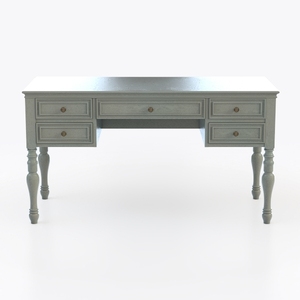
Vintage Painted Solid Wood Multi Drawer Office Desk 3D Model
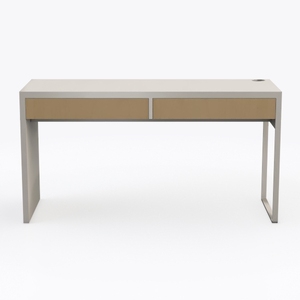
Minimalist Two Tone Solid Wood Office Desk With Drawers 3D Model

Modern Solid Wood Bookshelf Multi Compartment Storage Display 3D Model
Homestyler offers an easy-to-use online design tool with stunning 3D renderings, inspiring interior projects, and helpful DIY tutorials. It’s perfect for bringing your home design ideas to life, whether you’re a beginner or a seasoned designer.
Progetta ora GRATIS
































