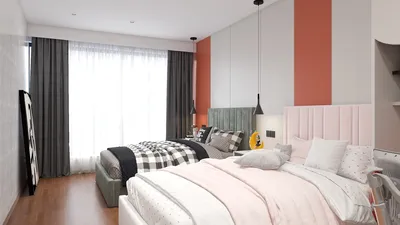


In an age where streaming platforms like DIRECTV shape our entertainment choices, designing a living room that enhances screen visibility and sound experience becomes essential. Thoughtful spatial planning with comfortable seating and adjustable lighting can transform a home theater setup, ensuring technology integrates seamlessly into your living space while supporting relaxed viewing habits.
3D modeling software enables designers, engineers, and creators to construct digital three-dimensional representations of objects, environments, or products. This technology aids in visualizing concepts, validating design ideas, producing detailed renderings, simulating structures, and preparing models for use in manufacturing, animation, or construction.
Effectively, it converts abstract notions into tangible visuals that can be edited, measured, and shared before any physical object is realized.
Through my extensive residential interior design experience spanning over a decade, I've seen firsthand how 3D modeling software has revolutionized design decision-making. Previously, clients depended solely on sketches and mood boards, but now I can present an entire digital room complete with lighting, textures, and furniture before purchases are made.
This transformation illustrates the true value of 3D modeling software—it turns intangible ideas into editable, measurable images. Whether creating a cozy living area, designing new furniture, or planning a whole building, these tools offer a risk-free environment for experimentation before committing financial resources.
Contrary to popular belief, these programs are not confined to animators or game developers; their uses extend far beyond those fields.
Designers utilize 3D modeling software mainly to evaluate concepts prior to incurring the high costs associated with actual construction or installation. In my projects, the ability to replicate an entire space digitally before commencing physical work is invaluable, allowing clients to instantly grasp scale, lighting, and spatial organization.
For instance, when redesigning a compact apartment in Los Angeles, we employed a 3D model to explore three kitchen layouts. The final configuration salvaged nearly two feet of walk-around space—something flat floor plans failed to reveal.
Various industry-standard platforms like Homestyler, SketchUp, Blender, Rhino, and Fusion 360 are popular across multiple design disciplines due to their flexibility and robust features.
Almost any tangible object or environment can be recreated digitally through 3D modeling software. Beginners often find the extensive array of possible outputs surprisingly broad—these tools range far beyond architectural or animation uses.
Common applications include product prototypes, architectural models, animated visuals, and industrial parts. Product designers often rely on digital prototypes to prevent costly errors during manufacturing.
Reports from Autodesk indicate that digital prototyping considerably shortens development timelines in both manufacturing and product design sectors.
The paramount advantage of 3D modeling lies in identifying design flaws before they escalate into expensive mistakes. It’s not merely a visualization aid but a tool for problem-solving.
For example, in a remodeling project, a digital model identified that a pendant lamp obstructed kitchen cabinet doors when opened; correcting this virtually saved a complicated and costly ceiling rewire on-site.
Modern 3D modeling software has become highly accessible and much easier to learn than in the past. User-friendly interfaces coupled with extensive tutorial libraries help beginners gain proficiency quickly.
Popular programs suitable for novices include Homestyler, Tinkercad, and SketchUp. Starting with simple objects like chairs or tables helps users build foundational skills before tackling complex scenes.
Additionally, wealth of free resources—from online communities to YouTube channels and official documentation—provide supportive learning environments, lowering the entry barrier.
Though powerful, 3D modeling software cannot replace hands-on material knowledge or real-world construction experience. Digital models may appear flawless yet fail to capture practical issues present during physical building.
A wall finish might render perfectly but require joints or seams that alter how it looks in reality, demonstrating limitations of virtual representations.
Experienced designers approach 3D modeling as a decision-making aid rather than an exact predictor of final results.
In summary, 3D modeling software empowers users to create digital versions of products, spaces, and objects, facilitating visualization, concept testing, enhanced communication, and costly error reduction before actual manufacturing or building begins.
Frequently Asked Questions (FAQ)
What is the purpose of 3D modeling software? It is used to craft digital 3D objects or environments for visualization, design evaluation, animation, product development, and architectural planning.
Is learning 3D modeling software challenging? Many current platforms are beginner-friendly, and with dedicated practice and tutorials, basic skills can be acquired within weeks.
Do architects use 3D modeling software? Absolutely. Architects employ these tools to visualize building designs, test spatial layouts, analyze lighting effects, and communicate plans to clients.
Can 3D models be applied in manufacturing? Yes, numerous manufacturers depend on digital models to guide production techniques such as CNC machining and 3D printing.
Which industries rely on 3D modeling? Key fields include architecture, interior design, entertainment production, gaming, engineering, medical imaging, and product design.
Is Blender considered 3D modeling software? Yes, Blender is a free, versatile platform widely used for modeling, animation, rendering, and visual effects.
Are there 3D modeling software options suitable for beginners? Yes, programs like Homestyler, Tinkercad, and SketchUp cater specifically to newcomers learning 3D modeling.
Does 3D modeling demand powerful computer hardware? Basic modeling runs well on most modern devices, but handling complex scenes and high-resolution rendering benefits from enhanced GPUs and additional memory.
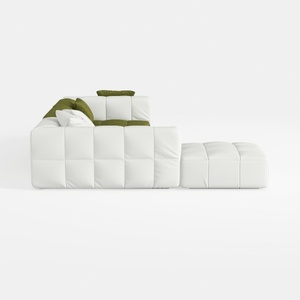
Minimalist White Fabric Tufted L Shape Sectional Sofa with Ottoman 3D Model

Minimalist White Solid Wood Curved Bookshelf Display Shelf 3D Model

Modern Houndstooth Fabric Black Metal Wood Top End Side Table 3D Model
Homestyler is a user-friendly online platform that lets you design your home effortlessly. Enjoy powerful 3D rendering, explore diverse interior design projects, and learn through helpful DIY video tutorials to bring your creative ideas to life.
Design Now for FREE
































