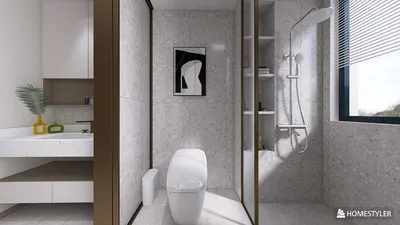


In today's smart homes, seamless integration of technology like the Nest app is key to managing comfort and security effortlessly. When the Nest app faces interruptions, it reminds us how crucial a reliable tech setup is in our living spaces. Designing furniture that accommodates smart devices while maintaining aesthetic harmony can enhance the overall functionality and atmosphere of any room, making technology a natural part of our home environment.
Executive Summary
Embarking on a single-room renovation is often the most manageable way to start a home improvement project, though it is also where expensive errors can happen quickly. Employing an AI-powered room design tool revolutionizes this process by moving beyond sketchy plans and vague descriptions to create dimensionally accurate layouts, test finish options, and validate furniture arrangements in 3D before any contractors get involved. This guide outlines a detailed workflow, from taking measurements and deciding on furniture reuse to finish selection and 3D model validation. While AI-generated outputs serve as useful concept and planning references rather than final engineering documents, they effectively bridge the gap between abstract ideas and concrete plans. For insights on multi-room or full-home renovations, consult our comprehensive AI renovation planning guide. Incorporating platforms like Homestyler can further enhance this process by providing intuitive design tools tailored for homeowners and professionals alike.
Why a Structured Approach Matters for Single-Room Renovations
Though a single room may appear straightforward, the intricacies involved are significant. Relocating a power outlet can trigger consequent drywall repair, repainting, and molding updates. Replacing a bathtub with a walk-in shower requires precise waterproofing, proper drainage gradients, and tile decisions—each with its own timeline. Homeowners often encounter mismatches between finish samples and actual lighting or discrepancies between furniture dimensions and available pathways without proper visualization.
AI-driven design platforms address these challenges by offering a rapid, interactive environment. Upload an image or sketch, and the AI produces a detailed 3D model that can be tested against realistic constraints. This doesn't substitute expert advice but rather enhances it, allowing you to present contractors with renderings instead of photos from magazines, thus streamlining communication and reducing misunderstandings. Utilizing tools such as Homestyler makes the design process even more accessible and precise.
When AI Integrates Seamlessly—and When It Falls Short
AI excels in the early stages of design: exploring layouts, establishing style directions, pairing finishes, and arranging furniture. However, it should not be expected to replace:
Consider AI-assisted remodeling as a catalyst for clearer design intentions, enabling professionals to concentrate on safe and accurate construction.
Step-by-Step Workflow for Single-Room Remodels with AI Assistance
This practical guide applies to any space, whether it's a bedroom, living room, bathroom, or home office.
Before engaging any AI tool, precise room measurements are necessary:
Utilize a laser measuring device for accuracy; smartphone AR apps can be convenient but may drift by 2 to 4 inches over longer distances. Record all data on a simple drawing—even a photo of a hand-sketched plan with dimensions noted will facilitate using AI platforms.
Reusing existing furniture is a major cost-saving strategy. Categorize all items in the space:
Photograph each piece from multiple perspectives, measure its footprint, and note finish colors. Many AI-powered design applications, including Homestyler, allow uploading reference photos or selecting similar items from built-in libraries, helping keep designs anchored in reality.
Identify each room’s intended function before selecting colors. For instance, a living room doubling as a workspace demands different considerations than a pure media room. Ask yourself:
These criteria guide your evaluation, preventing attachment to aesthetically pleasing but impractical designs.
This is where AI design platforms demonstrate their value. Using a solution like Homestyler, you can:
Generate at least three layout variations. Expect your first attempt to resemble the current setup; subsequent iterations will challenge your assumptions and introduce new possibilities.
Finishes often determine the success or failure of a remodel. AI tools allow previewing multiple finish combinations without purchasing expensive samples. Focus on key material categories:
Produce four to six finish options, narrowing down to two finalists. Crucially, order physical samples of these choices before committing, as real-world lighting significantly affects perceived color—something AI renders can only approximate.
Conduct a thorough walkthrough of the AI-generated 3D model before finalizing any decisions:
Log any issues, adjust designs accordingly, and revalidate. This iterative process—test, note, fix, retest—demonstrates AI’s advantage over static mood boards.
After perfecting the model, export key views and compile them into a concise brief:
This transforms subjective feedback ("Make it feel brighter") into concrete specifications ("Here’s the layout, finishes, and furniture plan—can you provide a quote?"). Utilizing Homestyler helps to easily generate such presentations.
For a more comprehensive discussion on design elements like style choice, color theory, and prompt strategies, refer to our AI room design guide.
Summary of Finish Selection Considerations
Avoiding Common Mistakes with AI Support
Mistake 1: Overlooking circulation space. Arrangements that appear spacious in two dimensions may feel tight in real life. AI-enabled 3D walkthroughs reveal pinch points before construction begins. Target main paths at 30–36 inches wide and secondary ones at 24 inches.
Mistake 2: Incorrect scale. Furniture that fits a showroom floor may overwhelm a personal room. AI platforms allow insertion of dimensionally accurate furniture models within exact room confines. Always input precise measurements.
Mistake 3: Excessive finishes. Introducing too many materials causes visual clutter. Apply the 60-30-10 rule—dominant color 60%, secondary 30%, accent 10%—and verify your palette in AI previews before finalizing.
Mistake 4: Ignoring ceiling height. This factor influences everything from pendant light drops to cabinet sizing. AI models with accurate vertical dimensions prevent floating fixture or oversized cabinet issues.
Mistake 5: Failure to document pre-renovation conditions. Take wide-angle, well-lit photos before starting, serving as vital references during AI planning and for contractor reviews.
Preparation Checklist for Input Data
Before beginning an AI-powered remodel session, ensure you have:
Realistic Expectations for AI Remodel Tools
As powerful as AI tools have become, understanding their limits avoids frustration:
When utilized as aids for planning and communication—not engineering—AI-driven remodel apps deliver tremendous benefits: accelerated decision-making, minimized surprises, and clearer directives for builders.
Frequently Asked Questions
Q: Can AI replace an interior designer?
A: No. AI excels at visualization and ideation but cannot replicate the spatial reasoning, material expertise, regulatory knowledge, and project oversight of a professional designer. Use AI to clarify your vision before engaging expert help to maximize their value.
Q: Is a floor plan necessary for AI remodel tools?
A: Not always. Many tools generate 3D models from photos, though providing accurate dimensions yields more realistic outcomes. The best results come from combining a photo for context with precise measurements for space accuracy.
Q: Are AI remodels appropriate for kitchens and bathrooms?
A: Yes, with caution. These spaces involve plumbing, wiring, ventilation, and waterproofing governed by codes. AI aids layout visualization and finish selections, but licensed professionals must review technical details. Use AI to define design intent before handing off to tradespeople.
Q: How long does planning a room with AI typically take?
A: Generating AI designs takes only seconds to minutes per option. The overall process—measuring, photographing, producing iterations, gathering feedback, refining, and preparing contractor briefs—usually spans a few focused evenings rather than weeks.
Q: Can existing furniture be reused in AI models?
A: Yes. Most AI platforms allow placement of furniture from extensive libraries adjustable by size and style. Exact matches may be rare, but approximations of footprint and visual weight suffice for layout validation.
Q: What differentiates AI room remodels from whole-home renovation planning?
A: While AI room remodels focus on one space—dimensions, finishes, furniture, and 3D validation—comprehensive renovation planning covers project sequencing across multiple rooms, budget management, and inter-space coordination. Both approaches complement each other, with room-level plans contributing to broader renovation strategies. Employing tools like Homestyler can streamline both single-room and larger project workflows.
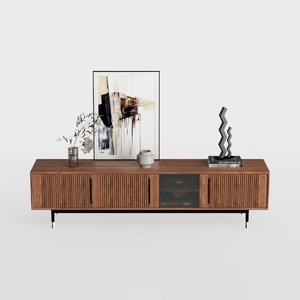

Modern Minimalist Walnut Fluted Door TV Cabinet 3D Model

Minimalist Solid Wood Round Coffee Table 3D Model

Modern Two Tone Fabric Sectional Sofa With Throw Pillows 3D Model
Homestyler offers an easy-to-use online design tool with stunning 3D renderings, a vast collection of interior projects, and helpful DIY video tutorials—making it simple and fun to create your perfect home design.
تصميم الآن مجانا
































