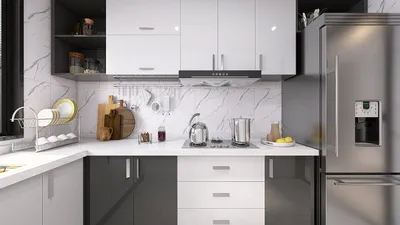


As enthusiasm for the latest PlayStation Plus June 2026 games grows, many gaming enthusiasts seek to enhance their home entertainment spaces to match their evolving digital lifestyle. Creating a dedicated gaming nook with ergonomic seating and optimized lighting not only improves comfort but also complements the immersive experience these new titles offer. Thoughtful spatial planning can transform a typical room into a versatile hub for relaxation and entertainment.
Executive Summary
The evolution of AI home design goes far beyond basic color selection tools. Modern AI interior design platforms, such as Homestyler, enable users to envision complete room makeovers — encompassing layout planning, furniture arrangement, layered lighting, and stylistic experimentation — all before making any purchases. This article curates inspiring ideas categorized into eight practical project types: compact living spaces, contemporary living rooms, cozy sleeping quarters, open-plan kitchens, home offices, rental apartments, commercial environments, and renovation plans. Each category offers actionable AI prompts, ideal usage scenarios, and an honest overview of AI’s capabilities and limitations, helping you confidently explore and settle on your perfect design direction whether starting with an empty room or reimagining a well-lived space.
Why Precise Prompts Are Key in AI-Powered Home Design
The output quality of AI design solutions largely depends on how precisely you communicate your needs. A generic prompt like "design a nice living room" yields broad, catalog-style suggestions that lack personalization. However, detailed prompts including room measurements, key focal points, functional priorities, and style guidelines guide the AI towards tailored layouts that truly reflect your lifestyle. Platforms like Homestyler harness these detailed instructions to produce more relevant, user-centered designs.
Successful AI home design concepts share three fundamental traits. Firstly, they clearly define the room’s purpose and primary use — a living room optimized for conversation and reading differs in furniture placement from one focused on watching movies. Secondly, they specify spatial parameters such as ceiling height, window location, and any immovable architectural elements. Thirdly, they establish a coherent aesthetic or color scheme to provide the AI with visual direction. Homestyler particularly excels when such detailed inputs are provided, streamlining the process.
Throughout these varied categories, a recurring workflow emerges: define the space, identify the focal point, list essential furniture pieces, and express the desired mood or atmosphere.
Idea Category Comparison at a Glance
1. Small Spaces: Optimizing Every Inch
Small living areas — such as studios, micro-apartments, and bedrooms under 150 square feet — present a unique challenge that AI excels at solving. The higher density of constraints means more variables intersect, and AI can test numerous furniture configurations rapidly. Homestyler’s layout tools thrive in these scenarios by generating multi-zone arrangements that demarcate living, sleeping, dining, and work areas using furniture placement rather than walls, preventing cramped or ‘dollhouse’ effects.
When to use: Prior to purchasing furniture for tight quarters like dorms or small guest rooms. Also beneficial when clutter seems persistent but the root cause is hidden, as AI can highlight obstructed focal points or unused nooks.
Prompt example: "Design a 200 sq ft studio with 9-foot ceilings. Include a sleeping zone with a full-sized bed, living area with a loveseat and small coffee table, dining space for two, and a compact desk. Apply a light Scandinavian color scheme with warm wood accents. Maintain 30-inch pathways and keep the north-facing window unobstructed."
Tip: Before finalizing, physically mark furniture footprints to verify actual fit, as AI renderings can sometimes create a false impression of spaciousness. If tight on screen, increase real-world clearance by at least 10%.
2. Modern Living Rooms: Creating the Social Focal Point
Often the multifunctional heart of the home, living rooms benefit from AI-assisted layouts that balance competing needs: conversational seating vs. screen viewing, open flow vs. delineated zones, and large pieces vs. space for movement. Homestyler’s interface encourages floating furniture concepts—pulling seating away from walls to encourage circular flow—and layered lighting plans rather than relying on a single overhead fixture. The AI focuses on the primary feature—be it a fireplace, TV wall, or expansive window—and arranges seating organically around it.
When to use: When replacing major furniture like sofas or media units, or after structural changes such as wall removals that open new design possibilities.
Prompt example: "Create a 250 sq ft modern living room with a fireplace on the east wall and two large south-facing windows. Arrange a three-seat sofa, two accent chairs, coffee table, and media console on the west wall. Use warm minimalist colors—cream, walnut, charcoal—and incorporate floor lamps for reading plus ambient cove lighting. Preserve 36-inch walkways between entries on the north and west walls."
Watch out for common AI pitfalls like furniture scale mismatches; always cross-check dimensions with your actual pieces.
3. Cozy Bedrooms: Prioritizing Rest and Comfort
Bedrooms require a unique set of design priorities centered on restfulness. Bed placement is the foundational decision: ideally placed against the longest uninterrupted wall facing the door to maximize comfort and functionality. AI tools, including Homestyler, assist with blackout curtain placement, unobstructed circulation, and the integration of soft textures. Mood descriptions such as 'restorative', 'hotel-inspired', or 'layered and cozy' sharpen the design focus.
When to use: If your bedroom feels chaotic or visually cluttered, or when repurposing a spare room into a bedroom with a workspace or nursery corner.
Prompt example: "Design a 150 sq ft cozy bedroom with a window centered on the north wall. Place a queen bed on the east wall with two nightstands illuminated by warm 2700K table lamps, a dresser on the south wall, and a reading chair by the window. Employ a soft, layered palette of warm greige, oatmeal bedding, walnut wood, and a wool rug under the bed. Include blackout curtains on the window and ensure no furniture blocks the closet door on the west wall."
For more detailed bedroom planning, Homestyler offers a comprehensive workflow covering measurement input through to refined layouts.
4. Open Kitchens: Mastering Work Triangle and Island Placement
Kitchens are highly function-driven spaces with fixed elements like cabinetry, appliances, and plumbing. Homestyler’s AI features help optimize the work triangle (sink, stove, refrigerator) and test island dimensions to maximize efficiency and flow. Ideal islands maintain at least 42 inches clearance on working sides and 36 inches for pass-through areas.
When to use: Prior to confirming island dimensions or reconfiguring kitchen layouts, especially in open-concept plans linking kitchen, dining, and living areas.
Prompt example: "Design an open kitchen within 200 sq ft adjacent to a dining area. Include an L-shaped counter with a sink under the window, 36-inch induction hob on the adjacent run, fridge on the east wall, and a 4×6 ft island with seating for three. Use matte white cabinets, light oak flooring, and brushed brass hardware with 4000K task lighting under cabinets. Maintain 42 inches clearance around island."
5. Home Offices: Balancing Desk Placement, Lighting, and Background
Home office layouts pivot on desk placement relative to windows to avoid glare while keeping natural light in peripheral vision. Homestyler’s AI supports layout choices that optimize video-call backgrounds, cable management, and ensure at least a 36-inch clearance zone behind chairs. Thoughtful design enhances productivity and comfort.
When to use: When converting a room or corner into a work area, or diagnosing discomfort or unproductivity in existing setups.
Prompt example: "Design a 10×10 ft compact home office with a window on the north wall. Position a 60-inch desk perpendicular to the window on the west wall, include an ergonomic chair with 36-inch clearance, a bookshelf on the east wall, and 4000K task lighting. The video-call background should be a clean wall with artwork. Use soft sage walls, a light wood desk, and a charcoal chair. Ensure no furniture blocks the south door."
6. Rental Apartments: Stylish Yet Impermanent Solutions
Rental spaces require decor updates that are reversible and do not risk forfeiting deposits. AI prompts including constraints for removable, deposit-safe options lead to solutions involving peel-and-stick wallpaper, plug-in lighting, modular furniture, and layered textiles that enhance aesthetics without permanent alterations. Homestyler can assist in visualizing such arrangements effectively.
When to use: Prior to renting a new apartment to experiment with furnishings within lease constraints, or to personalize an existing rental without permanent changes.
Prompt example: "Redesign this 500 sq ft rental living room using only removable, deposit-safe changes. Suggest sofa, coffee table, and media unit layout. Add plug-in wall sconces, a large area rug, peel-and-stick wallpaper on one accent wall, and layered textiles for warmth. Avoid painting, drilling, or fixture replacements. Style: warm contemporary with terracotta and cream."
7. Commercial Spaces: Organizing Flow, Zones, and Capacity
Commercial interiors like cafes, retail shops, salons, and coworking spaces require layout solutions that manage customer flow, service zones, waiting areas, and staff movement. AI design tools incorporate occupancy counts and accessibility needs, speeding exploration but do not substitute building code reviews. Homestyler supports visualization of such zones and path flows to optimize usage.
When to use: When planning new commercial fit-outs or remodeling existing spaces, testing business model feasibility before leasing.
Prompt example: "Design a 600 sq ft cafe seating 20 guests with a service counter and barista station on the north wall. Include a mix of two- and four-top tables, a communal table for six, and a retail display near the entrance. Maintain 36-inch walkways and clear queue path from door to counter. Style: warm industrial with exposed brick, black steel, light oak, and pendant lighting. One accessible restroom on the south wall."
8. Renovation Concepts: Visualize Changes Before Construction
Using AI tools, renovation projects can be conceptually previewed by creating layout options before committing to costly work. Visualizing wall removals, kitchen relocations, or garage conversions helps communicate plans to contractors or authorities. Homestyler can facilitate these early-stage visual explorations, but always consult licensed professionals for structural, electrical, and code compliance.
When to use: Prior to deciding renovation scope, generate multiple options and select candidates for professional assessment.
Prompt example: "Visualize a 12×15 ft kitchen opening up by removing the wall to the dining room. Show an open-plan kitchen-dining area with an island separating cooking and dining zones. Preserve existing oak floors. Adopt a modern transitional style with shaker cabinets, quartz counters, and pendant island lighting."
Turning Ideas into Reality
AI-generated design ideas are inspirational starting points rather than finished rooms. The development process follows a consistent pattern: accurate measurement input, iterative layout refinement, and photorealistic 3D visualization. Homestyler provides an integrated design environment where 2D plans and 3D models stay synchronized, helping transition from concept to liveable space efficiently.
Frequently Asked Questions (FAQ)
Can AI tools manage multifunctional rooms?
Absolutely, provided the prompt clearly states all intended uses and associated furniture. Homestyler can generate designs that define distinct zones within a multifunctional space, although manual refinement might be necessary to prevent overlap.
How many AI-generated layouts should one review before choosing?
A minimum of five for standard rooms and ten or more for irregular or open-plan spaces is recommended to explore a variety of viable solutions before committing.
Are AI-generated layouts measurement accurate?
Accuracy depends on the precision of your inputs—including room dimensions and furniture sizes. Homestyler’s layouts are reliable when fed exact data, but always verify dimensions to avoid mismatches.
Can AI help design rental apartments without risking security deposits?
Yes. Using prompts with constraints forbidding permanent changes ensures AI-generated plans focus on removable decor and furniture. Homestyler supports these reversible styling solutions.
Do AI tools consider building codes and structural safety?
No, AI platforms including Homestyler do not replace professional assessments for compliance with codes or structural integrity. They accelerate design exploration but professional oversight remains essential for renovations involving structural changes.
What distinguishes an AI design idea from a detailed AI room design plan?
An AI design idea offers visual inspiration and concept layouts, whereas a detailed AI room design plan includes validated furniture dimensions and clearance, suitable for guiding actual purchases or renovations.
Which room types gain the most from AI-assisted layouts?
Small, irregularly shaped rooms benefit greatly since manual planning is cumbersome. Homestyler’s efficiency shines in studios and micro-apartments under 300 square feet, cutting planning time dramatically.
Can AI assist if I lack a clear design style preference?
Certainly. Many AI platforms provide style libraries or can generate multiple style variants from the same prompt, such as Scandinavian, Japandi, industrial, mid-century modern, coastal, or transitional, enabling side-by-side comparisons to find your ideal aesthetic.
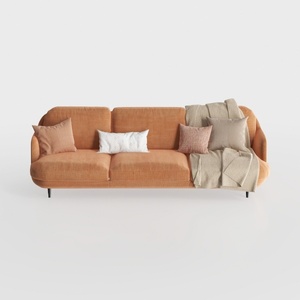

Modern Minimalist Orange Fabric Three Seater Sofa With Throw Pillows 3D Model
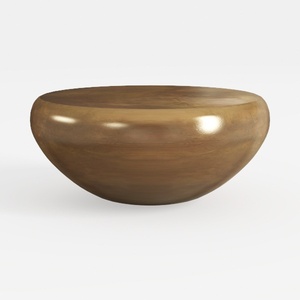
Minimalist Solid Wood Round Coffee Table 3D Model

Modern Black Oak Arched Glass Display Cabinet 3D Model
Homestyler offers an easy-to-use online design tool, stunning 3D renderings, and a vast collection of interior projects. Plus, its DIY video tutorials make it simple to create and visualize your dream home, no matter your skill level. Give your space a fresh new look today!
Concevez maintenant gratuitement
































