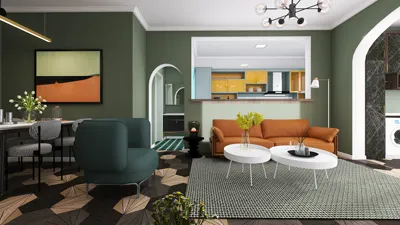


In today’s connected homes, the integration of a versatile TV app transforms how we interact with our living spaces. As streaming services become central to entertainment routines, designing a cozy media nook with ergonomic seating and adjustable lighting enhances both comfort and viewing experience. Thoughtful spatial planning ensures that technology blends seamlessly with home aesthetics, creating an inviting area tailored for relaxation and digital enjoyment.
Executive Overview
The fundamental question that drives furniture retail is: "Will this piece complement my home?" Traditionally, retailers relied on catalogs, fabric samples, and sales staff assurances—methods that did not display the furniture within the customer's unique environment. Homestyler-powered AI design bridges this divide by converting floor plans and photographs into photorealistic, fully decorated room visuals within minutes. This enables customers to visualize a sofa in their living room or an office chair in their workspace before making a purchase. This article explores practical AI design workflows for furniture retailers including creating contextualized room scenes from product catalogs, testing style options, building visual SKU libraries, and embedding AI visuals into sales and e-commerce channels. AI outputs serve as aids for visualization and sales support, complementing rather than replacing traditional measures like dimension checks or professional interior design consultations.
The Challenge Solved by AI Design in Furniture Sales
Furniture retailers often observe a familiar scenario: customers browse online, add items like sofas to carts, but hesitate to complete purchases. Or they may adore showroom displays yet struggle to envision those pieces fitting within their own rooms, considering different flooring, wall colors, or limited space. Such uncertainties often lead to abandoned carts, reduced sales conversions, and increased product returns.
AI visualization tackles these issues by allowing retailers to showcase actual inventory in customer-accurate room contexts, rendered in realistic scale and lighting, eliminating the need for customers to rely solely on imagination.
The AI-driven process is straightforward: retailers upload product images or 3D models, select a customer’s floor plan or pick from room templates, and receive furnished scenes with precise proportions and illumination. Tasks that once demanded professional photoshoots or lengthy 3D rendering sessions now occur swiftly, enabling visualization for all SKUs instead of just flagship items.
How AI Room Scenes Translate Products into Contextual Experiences
Understanding the operational pipeline helps retailers select suitable AI solutions. Typically, AI design platforms utilize automated workflows to convert inputs—such as floor plans and product data—into photorealistic room scenes without requiring complex software installations or specialized modeling teams. Homestyler exemplifies this approach, offering browser-based tools that support high-volume scene generation for both residential and commercial product catalogs.
Applications by Furniture Category
Different types of furniture necessitate tailored visualization strategies. Here's how AI room scenes apply across key furniture segments retailers frequently address.
Sofas often serve as the centerpiece of a living room, commanding high costs and defining style. Misjudgments usually result in expensive returns. AI allows retailers to create multiple styled room variations—for example, showcasing the same sofa in beige, navy, or compact loveseat forms—helping customers compare options side by side and reducing purchase hesitation.
Apartments pose unique challenges such as open layouts and space constraints. AI visualization demonstrates spatial relationships clearly, showing how items like six-seat dining sets realistically fit within tight 10×12-foot zones rather than large studio spaces.
Bedroom furnishings involve coordinated pieces (bed frames, nightstands, dressers) that must harmonize within defined footprints. AI-generated scenes displaying entire bedroom sets accelerate buying decisions and promote higher average order values.
Office furniture now caters not only to corporations but also at-home workers requiring functional setups in corners or spare rooms. Visualization assists in showcasing adjustable desks, modular shelves, and compact workstations to optimize fit and appeal.
Constructing a Visual SKU Library Using AI
AI tools enable furniture retailers to systematically compile visual product catalogs, delivering major efficiency advantages over traditional photoshoots. While a lifestyle photo session might take several hours and thousands of dollars per product, AI-based rendering generates multiple styled variants in minutes at negligible cost.
Such flexibility supports timely trend adaptations—when new styles emerge, retailers can quickly refresh entire visual catalogs via AI without repeat photography.
Leveraging AI Room Scenes in Sales Interactions
AI room scenes enhance the sales dialogue whether in-store, remotely, or online. Sales associates can dynamically create room mockups during consultations, shifting conversations from uncertain promises to visual confirmations. For remote clients, scenes generated from photos support interactive video consultations, a method rapidly adopted for mid-to-high-ticket items.
On e-commerce platforms, integrating AI-generated visuals on product pages enables shoppers to view furniture within varied contexts like living rooms, bedrooms, or compact apartments, enriching the decision-making process.
Marketing campaigns employing room scenes see improved engagement across emails and social media ads by conveying compelling narratives rather than isolated product images.
A Replicable Approach for Furniture Brands
Widespread adoption of AI design doesn’t demand comprehensive overhauls. Retailers often begin with selected categories and expand gradually, following tested onboarding journeys that minimize risk while maximizing impact.
Rapid Style Testing and Reducing Buyer Indecision
AI-powered style comparisons allow customers to view a single product across multiple decor themes simultaneously, transforming abstract choices into tangible options—which significantly accelerates decisions and builds confidence.
Avoiding Common Pitfalls in AI Room Scene Utilization
While powerful, AI room scenes must be used thoughtfully. Overly polished renders risk setting unrealistic buyer expectations. Clear disclaimers regarding actual product dimensions, finishes, and variations should accompany visuals.
Validating renders against true measurements prevents scale distortions that could mislead customers. Lighting differences between generic studio setups and customer environments should also be transparently noted.
Carefully organizing the generated image library via structured naming conventions is essential to prevent catalog chaos.
Moreover, AI visuals should augment—not replace—sales expertise and product knowledge within customer interactions.
Frequently Asked Questions
How does AI furniture visualization differ from augmented reality (AR) apps?
Unlike AR, which overlays 3D models over live camera views requiring physical presence, AI visualization creates standalone photorealistic room images based on photos or floor plans, supporting asynchronous sharing and remote sales. Both have roles, but AI excels in remote selling and scalable catalog creation.
Do you need 3D models to use AI room scenes?
While some platforms function from 2D images alone, 3D models often yield more precise results, especially for complex shapes and reflective surfaces. Investing in 3D models enhances visual quality and catalog longevity.
Can custom furniture be visualized?
Yes. Given quality product photos or 3D models, AI platforms like Homestyler can integrate bespoke pieces into virtual room scenes matching standard catalog items.
How long does rendering a room scene take?
Initial renders typically complete in under two minutes. Refinement for furniture layout or lighting adds a few additional minutes. Batch rendering of many SKUs may run concurrently without user intervention.
What room information should customers provide?
Ideally, a clear corner photograph showing two walls and the floor or a dimensioned floor plan. When unavailable, approximate measurements and descriptive style or lighting notes suffice for useful renderings.
Can AI-generated scenes be used in paid ads?
Yes, with transparent labeling and accuracy assurances. Many retailers deploy AI-created imagery in social media and search ads, provided product representations reflect actual available inventory to avoid misleading customers.
Does AI visualization help reduce furniture returns?
Evidence indicates that displaying products in realistic room contexts before purchase lowers return rates by minimizing expectation mismatches.
How do AI room scenes compare with traditional lifestyle photography?
Traditional shoots are costly and time-intensive, producing singular images. AI delivers rapid, scalable visualizations for numerous products at far less expense, though with minor trade-offs in tactile realism.
Is this technology accessible to small retailers?
Absolutely. Cloud-based AI platforms like Homestyler offer affordable, subscription-based usage that scales with inventory size, enabling even small businesses to create full visual catalogs without prohibitive investment.
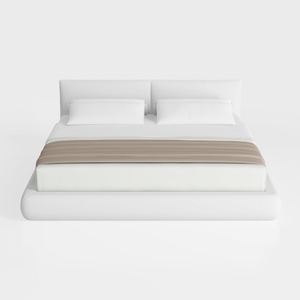
Minimalist Modern White Fabric Platform Bed 3D Model

Minimalist White Solid Wood Open Wardrobe 3D Model
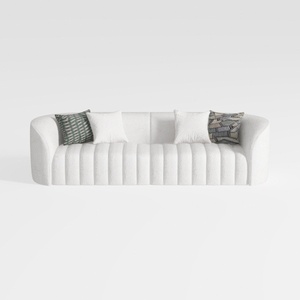
Minimalist Boucle Fabric Channel Tufted Sofa 3D Model
Homestyler is an easy-to-use online home design platform offering powerful 3D rendering, extensive design projects, and helpful DIY video tutorials. It lets you create and visualize beautiful interiors quickly, whether you're a beginner or a design enthusiast.
Design jetzt kostenlos
































