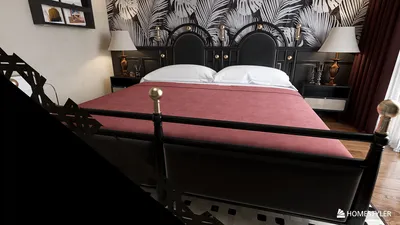


In today's smart homes, seamless integration of technology like the Nest app is key to managing comfort and security effortlessly. When the Nest app faces interruptions, it reminds us how crucial a reliable tech setup is in our living spaces. Designing furniture that accommodates smart devices while maintaining aesthetic harmony can enhance the overall functionality and atmosphere of any room, making technology a natural part of our home environment.
Executive Summary
Embarking on a home renovation without a clear visual guide often results in unexpected expenses, miscommunication, and prolonged timelines. AI renovation planners offer a solution by transforming vague ideas into organized layouts, 3D visualizations, and side-by-side comparisons—all before commencing physical work. This article outlines a practical, room-by-room renovation planning process that integrates AI-generated layouts, photorealistic render reviews, and budgeting awareness. You'll discover how to prepare inputs for an AI renovation planner, assess AI outputs against real-world constraints, and grasp the capabilities and limitations of AI remodeling planners. Whether updating a single bathroom or redesigning an entire floor, this guide equips you with checkpoints to confidently advance from concept to contractor-ready plans using tools like Homestyler.
What an AI Renovation Planner Actually Does
An AI renovation planner is a software tool that produces room layouts, 3D visualizations, and design variations based on user-supplied data such as floor plan measurements, room photographs, style preferences, and functional needs. Unlike conventional design programs that need manual drafting, AI-powered platforms interpret design intentions and deliver multiple layout possibilities within minutes.
Core capabilities of a modern renovation planner AI include:
These technologies have rapidly evolved. Whereas early AI visualizers generated blurry approximations, current platforms—such as Homestyler—offer sharp, spatially accurate renders reflecting real product dimensions and room-scale limitations. This advancement makes them invaluable in homeowner-contractor communications, moving beyond mere inspiration to practical design tools.
The Renovation Planning Workflow: A Step-by-Step Guide
Following a structured workflow distinguishes casual exploration from actionable planning. Below is the detailed sequence for employing an AI remodeling tool to create a renovation brief suitable for contractors or personal use.
Define the scope of your renovation before launching any software. Are you reconfiguring a single room, combining areas, or refreshing finishes within an existing footprint? Establish your main objective: increased storage, improved flow, enhanced accessibility, rental appeal, or aesthetic update.
Document:
AI performs optimally with clear visual direction. Gather 5 to 10 reference images that embody your preferred style, colors, and materials. Take well-lit, straight-on photos of every relevant room. If original floor plans or rough sketches with measurements exist, scan or photograph these as well.
Upload your dimensions and constraints into an AI remodeling planner like Homestyler. Allow the tool to generate 3 to 5 layout alternatives. At this stage, concentrate on spatial reasoning—does the furniture arrangement function effectively? Is circulation space sufficient? Are key work zones, such as kitchen work triangles or bathroom clearance, properly addressed?
A thorough layout evaluation includes:
After a layout passes spatial assessment, apply your selected finishes—flooring type, wall color, cabinetry style, countertop materials, tile patterns, and hardware. Generate photorealistic 3D renders from several angles. This is where AI visualization excels; advanced rendering engines produce lighting-accurate previews, showcasing material interactions realistically.
Conduct a detailed evaluation of each render:
Side-by-side before-and-after renders are especially valuable in discussions with contractors. They reduce ambiguity and prevent mid-project surprises such as "this isn't what I envisioned."
Export chosen layouts, renders, and a concise written scope summary into one document. Such a brief should include:
This document serves as a tool to request consistent contractor bids—comparing proposals against identical visual references promotes uniform cost estimates.
Budget Awareness: What AI Can and Cannot Estimate
Many AI renovation planners now incorporate cost estimation features, but their accuracy varies depending on data sources and project specifics. Most extract information from regional material and labor databases to propose approximate ranges. Here's what to bear in mind:
AI-generated budget figures are primarily planning tools—assisting with scope prioritization and assessing if ambitions align with financial resources—but they should not be treated as definitive construction budgets. Always gather at least three contractor quotes before making firm commitments.
Limitations: What AI Renovation Planners Cannot Do
It's important to understand what AI renovation planners cannot replace. Their outputs are conceptual aids and planning tools, not substitutes for:
Nonetheless, when used early as a "what if" scenario generator prior to professional involvement, an AI renovation planner significantly shortens the iteration period between vague ideas and practical briefs. This is their core advantage: enabling quicker, better-informed decisions in pre-construction phases.
How AI Renovation Planning Fits Into a Broader Remodel Strategy
AI renovation planning is most effective as the initial phase of a methodical remodeling approach. The AI-driven phase—creating, comparing, and refining layouts and finishes—feeds into subsequent professional design development and contractor engagement.
A typical sequence includes:
Throughout, AI-generated renderings act as a constant visual reference, ensuring homeowners, designers, and contractors remain aligned on project goals.
Preparing Effective Inputs for Better AI Outputs
The caliber of AI-generated results depends heavily on input quality. Follow these preparation tips:
Dimensions: Accurately measure each room’s length and width at multiple points. Record ceiling heights. Mark all windows, doors, radiators, and fixed plumbing along with their measurements.
Photos: Capture images in natural daylight at eye level. Take straight-on shots of each wall plus one corner-to-corner photo per room. Avoid fisheye or wide-angle distortion as AI interprets geometry literally.
Style articulation: Be specific; instead of "modern kitchen," describe "flat-panel walnut cabinets, white quartz countertops, matte black fixtures, and large-format porcelain tile in warm grey tones." Specificity leads to actionable renders, while vagueness results in generic visuals.
Functional requirements: List routines and pain points precisely. For example, "a dedicated coffee station separate from the main cooking area" is clearer than "a nice kitchen."
FAQ
Can an AI renovation planner replace architects or interior designers? No. While AI accelerates concept development and visualization, it cannot substitute professional expertise in code compliance, structural integrity, material suitability, or construction detailing. Use AI to prepare detailed briefs that enhance professional efficiency.
How accurate are AI-generated renovation budgets? Material cost estimates, tied to product catalogs, can be fairly precise (±10–15%), but labor cost estimates are more variable due to local market differences. Always add a 15–20% contingency and obtain contractor bids for final numbers.
Do AI renovation planners create permit-ready drawings? No. Permit documents require technical annotations, structural specifications, and code references that AI tools do not produce. Licensed professionals must prepare these for submission.
How should I prepare my space for AI renovation planning? Take precise room measurements, capture high-quality, well-lit, straight-on photos, collect 5–10 reference images matching your style goals, and document all fixed elements like windows, doors, and plumbing. Meticulous inputs yield superior AI outputs.
Can AI renovation planners handle multi-room or entire home projects? Yes. Most platforms support multi-room workflows, typically proceeding room by room. For whole-house renovations, maintaining consistent style across rooms and involving professionals for any structural changes is crucial.
Is home data secure when using cloud-based AI renovation tools? Trusted platforms encrypt all uploaded images and plans during transfer and storage. Review privacy policies and ensure data is not used for AI training without consent.
Key Takeaways for a Successful AI-Powered Renovation

Minimalist Fabric Loveseat Sofa with Round Decorative Pillows 3D Model



Colorful Patchwork Fabric Tufted Modern Sofa 3D Model
Homestyler offers an easy-to-use online design tool with rich 3D rendering features. Explore numerous interior design projects and learn through helpful DIY video tutorials to create and visualize your dream home effortlessly.
Design jetzt kostenlos
































