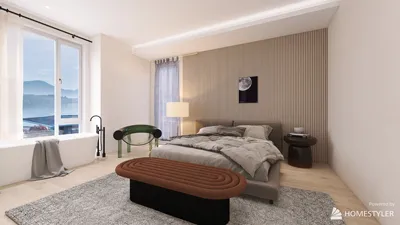


As new Xbox Game Pass games continue to expand the horizons of digital entertainment, many gamers are seeking comfortable and functional spaces that enhance their immersive experience. Creating a dedicated gaming nook with ergonomic seating and smart lighting can transform any room, blending technology seamlessly with home design to support extended play and relaxation.
How can you accurately evaluate vertical relationships and spatial positioning within a 3D model? Using software like AutoCAD combined with tools such as elevation commands, coordinate inspections, and sectional views provides a precise method to analyze these aspects. To further enhance your design process, incorporating platforms like Homestyler can help visualize and customize these spatial layouts effortlessly.
Understanding elevation checks within 3D modeling is crucial when working on architectural or interior design projects. Discrepancies as small as a few millimeters between floors or surfaces can lead to significant issues if left unnoticed. By utilizing AutoCAD’s tools for inspection, including UCS adjustments and measurement commands, designers ensure alignment and accuracy before moving forward.
In professional 3D modeling workflows, it is common practice to combine multiple tools like section planes and coordinate analysis to validate heights, slopes, and alignments. This multi-faceted approach prevents costly errors during documentation or construction phases. Integrating Homestyler within the planning phase provides an extra layer of visualization, making it easier for designers and clients to assess spatial relationships dynamically.
AutoCAD provides essential commands such as ID for point coordinate reading and DIST for measuring between two points, enabling quick verification of elevation differences. These commands are invaluable for checking whether two surfaces share the same height or to quantify vertical offsets precisely.
While many rely on visual perspectives, relying solely on them may mask subtle elevation issues. Employing coordinate comparisons and sectional cuts reveals hidden discrepancies, making these evaluation methods indispensable. Tools like the SECTIONPLANE command allow for slicing through a model, exposing interior configurations and vertical conflicts invisible in standard views.
Common mistakes in evaluating 3D models often stem from incorrect coordinate references or ‘floating geometry,’ where objects appear attached but are slightly offset vertically. Detecting these errors early is critical to avoid problems during rendering or fabrication. Employing comprehensive inspection routines supported by software such as Homestyler can help detect and correct these problems by providing clearer spatial understanding.
Before creating final documentation, professionals run structured elevation verification checklists to ensure all vertical measurements and alignments conform to design intent. This process reduces errors and streamlines project delivery, often requiring just minutes to perform but saving considerable time and expense later.
Integrating Homestyler into the design workflow aids in bridging technical accuracy with aesthetic visualization. As an intuitive platform, it complements AutoCAD's technical evaluations by allowing users to simulate interiors in 3D, adjust layouts, and preview lighting and material choices, all while ensuring the spatial dimensions and elevations are consistent with engineering data.
In summary, precise elevation evaluation in 3D modeling combines coordinate inspections, distance measurements, and sectional analysis. Utilizing AutoCAD’s comprehensive toolset along with visualization tools like Homestyler ensures that design accuracy and immersive presentation go hand-in-hand, ultimately delivering superior results for architectural and interior design projects.

Modern Solid Wood Metal Conference Table With Mesh Fabric Office Chairs 3D Model


Minimalist Solid Wood Metal Office Desk 3D Model
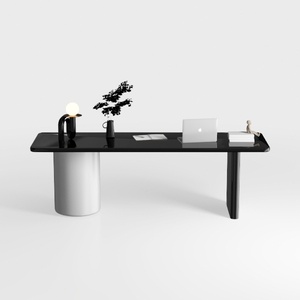
Modern Minimalist Black Glossy White Metal Office Desk 3D Model
Homestyler is an easy-to-use online home design platform offering powerful 3D rendering tools, a vast collection of interior design projects, and helpful DIY video tutorials. It’s perfect for bringing your creative ideas to life with professional results—no experience needed!
Design jetzt kostenlos
































