

For more than ten years, I have been perfecting the design of spaces where advanced technology seamlessly integrates into our daily lives. Utilizing voice-assistant systems like Siri involves more than merely issuing commands; it requires careful consideration of elements such as lighting, sound, ergonomic placement, and behavioral patterns to ensure your home responds intuitively to your requests. The advantages are clear: according to WELL v2, employing circadian lighting and ensuring acoustic comfort are linked to enhanced sleep quality and reduced stress levels. Furthermore, research from Steelcase indicates that environments with well-regulated noise and user-friendly controls can significantly boost productivity and lower cognitive load. In my designs, I find that voice control effectively minimizes interruptions—those minor disruptions that can disrupt your focus, especially in high-traffic areas like kitchens and living rooms where hands-free options are essential.
Effective smart design relies on data rather than the latest tech fads. The IES suggests maintaining ambient lighting levels between 300 and 500 lux in living areas; insufficient light can strain the eyes, while excessive brightness may cause discomfort. Herman Miller's research demonstrates that varying posture and correct monitor positioning can alleviate musculoskeletal discomfort, a principle that easily applies to home offices equipped with voice-adjustable desks and tailored scenes. If you're working on arranging furniture or circulation paths that involve voice interactions, using a layout simulation tool can help visualize acoustic properties and microphone effectiveness. For comprehensive insights into acoustic and wellness approaches, the WELL v2 guidelines are an excellent resource.
Voice-Centric Design: The Behavioral Aspect
Siri influences how we interact with our surroundings: the positions we adopt when addressing the assistant, how we navigate between different areas, and our activities during those interactions. I identify "voice nodes," which are prime locations for issuing commands, and strategically align them with device locations, microphone orientation, and flow of movement. In kitchens, these nodes typically gather around preparation areas and cooktops, whereas in living rooms, they are found near seating areas like sofas and reading chairs. Although clear sightlines are not essential for voice activation, maintaining acoustic clarity is crucial; utilizing soft materials in proximity to these nodes can help diminish echo and enhance voice recognition.
Crafting Lighting Scenes for Daily Routines
Begin by establishing layers of ambient, task, and accent lighting. Position ambient lighting at levels of 300–500 lux; task lighting for workspaces should range from 500–1,000 lux and be dimmable to minimize glare as evening approaches. Warmer color temperatures (2700–3000K) are conducive to relaxation, while cooler tones (3500–4000K) help maintain alertness in active areas. I develop Siri-controlled scenes that align with daily activities: "Morning Reset" opens the shades, adjusts the kitchen lighting to 3500K, and sets the HVAC for a fresh atmosphere; "Focus" mode in the office boosts task lighting to 700–800 lux while keeping ambient light low; the "Evening Soft" scene lowers brightness to 30% at 2700K and activates acoustic masking. Ensure glossy countertops placed under direct lights are avoided to prevent excessive glare, which can lead to eye strain.
Acoustic Clarity for Effective Voice Interaction
Voice-activated systems perform best in acoustically balanced environments. Aim for a reverberation time (RT60) between 0.4 and 0.6 seconds in living spaces to ensure speech remains intelligible. Incorporating area rugs, upholstered furniture, and acoustic panels near voice nodes is advisable, as well as disrupting parallel surfaces to curtail flutter echo. It’s also important to position noisy appliances away from microphones. Employing "scene-driven sound" in conjunction with Siri—implementing soft background noise around 40–45 dBA in bedrooms—can mask disruptive sounds without hindering voice recognition.
Ergonomics: Sightlines, Reach, and Comfort
Smart home design fundamentally respects human ergonomic principles. For kitchens, situate primary preparation areas at heights of 34–36 inches to limit shoulder strain; heavier items should be stored at waist level. In a Siri-enabled home office, ensure monitors are positioned at eye level, with the upper third just below the line of sight and frequently used devices placed within a 20–24 inch range. Voice commands can reduce the need for physical interaction, but optimal placement still facilitates intuitive usage, such as charging stations near seating, touchpoints by entryways, and unobstructed pathways surrounding voice nodes.
The Intersection of Color Psychology and Voice Control
Color choices create a foundational mood for spaces, which lighting scenes can enhance. Shades of blue and soft greens promote focus and recovery, while warmer neutral tones encourage social interactions. Coordinate colors with your designated scenes: use cooler shades in task-oriented areas and warmer tones in relaxation zones. Studies from Verywell Mind affirm that blue hues can bolster calmness and concentration, aligning perfectly with my "Focus" and "Reading" scenes to support a peaceful mental state.
Strategic Layout: Zoning for Voice Commands
Divide the room by function and evenly distribute microphones and speakers to ensure command coverage without overlap. In open-concept designs, implement micro-zones with rugs, distinct lighting areas, and furniture arrangements, each linked to a specific Siri scene. For instance, the dining area can activate a "Gather" scene with ambient lighting and music, while the living area triggers a "Cinema" scene that dims the lights to 20%, adjusts to 2700K, and narrows the audio focus. If you're in the testing phase for furniture placement, using an interior room planner can assist in visualizing coverage and potential sound reflection points.
Device Positioning and System Integration
Position HomePods or compatible speakers at ear level within social spaces, steering clear of corners that may amplify bass and distort speech. One microphone should be placed near the entryway for "Arrive" and "Leave" scenes, while another should be situated in the kitchen for optimal hands-free interaction. Utilize Shortcuts to create multi-room sequences involving lighting, HVAC, shades, and appliances, orchestrating a comprehensive response from a single command. Ensure there's redundancy in your setup to maintain functionality even if ambient noise exceeds tolerable levels at one location, allowing another device to capture the command effectively.
Choosing Materials and Sustainable Practices
Select matte, low-VOC finishes to minimize glare and enhance indoor air quality. Natural materials such as wool rugs and cotton or linen drapes contribute to sound absorption and provide tactile warmth. Opt for engineered wood with a matte urethane coating for a balance of durability and finish. Emphasize sustainable options by integrating high-efficiency LED fixtures, recyclable acoustic panels, and smart plugs that decrease standby energy consumption. Here, sustainability is more than a trend; it's about efficiency—reducing the number of devices while maximizing their function and avoiding over-lighting or excessive cooling.
2024-2025 Trends: Emphasizing Voice-First Comfort over Complexity
The prevailing trend is not about increasing technology but rather fostering a seamless living experience. I observe a rise in compact voice nodes that work harmoniously with user-centered scenes, discreet sensors that adapt lighting levels, and smaller multifunctional spaces designed for both quiet focus and social interactions. The importance of wellness-oriented lighting, soft acoustic environments, and ergonomic details is surpassing that of screen-focused designs. The most effective Siri-integrated spaces evoke tranquility and predictability, balancing just enough automation to enhance comfort without causing distractions.
Examples of Siri Scenes You Can Implement Now
• Morning Reset: elevate shades, set ambient lighting to 3500K at 60% brightness, and play soft news at a low volume while adjusting HVAC to 72°F.
• Prep & Cook: set task lighting to 800–900 lux, turn off accent lights, run the exhaust fan on high, and ensure timers are displayed on the smart screen.
• Focus: adjust office task lighting to 700–800 lux, keep ambient lighting low, provide soft background noise, and display the calendar on the screen.
• Cinema: lower ambient light to 20%, set accent lighting to 10%, add bias lighting behind the TV, and switch sound mode to a narrow focus.
• Wind Down: set lighting to 2700K at 30% brightness, adjust HVAC to 70°F, turn off audio, and implement gentle masking at 40 dBA.
• Arrive/Leave: set entry lights to 50% for five minutes, conduct a door check, and adjust the thermostat to eco mode.
Frequently Asked Questions
Aim for 300–500 lux in ambient lighting with adjustable layers. This recommendation aligns with standard IES guidelines, ensuring comfort and clarity of speech.
Warm lighting in the range of 2700–3000K encourages relaxation in the evening while pairing effectively with lower ambient lighting levels to mitigate blue light exposure and promote calmer routines.
Position microphones at ear level within social areas, distancing them from corners and reflective surfaces. Adding a microphone in the kitchen and near the entryway enhances hands-free interactions during arriving, cooking, or leaving.
Utilize rugs, upholstered furniture, curtains, and textured wall panels to lower RT60 towards 0.4–0.6 seconds. Alter parallel wall configurations to diminish flutter echoes.
Certainly. Pairing "Focus" scenes with cooler task lighting (700–800 lux), minimal ambient light, and proper monitor positioning is ideal. Research from Herman Miller highlights the benefits of varied posture and ergonomic alignment to lessen strain.
No, prioritizing acoustic quality is key compared to sightlines. Keep noise sources clear of microphones and incorporate soft surfaces in proximity to voice nodes.
Establish micro-zones with distinct lighting and sound profiles. Employ Shortcuts to link specific scenes per zone, ensuring commands trigger the appropriate setups.
Utilize finishes that are matte and low-VOC, in addition to LED lighting, wool rugs, and recycled acoustic panels. These contribute to glare reduction, improved air quality, and enhanced vocal clarity.
Maintain consistent sound masking between 40–45 dBA if necessary. This level is conducive to sleep while effectively obscuring intermittent noise without hindering voice command recognition.
Design scenes focused on user behavior rather than features. Start with configurations for Morning, Focus, Cinema, and Wind Down; gradually fine-tune intensity levels to keep spaces predictable.
Originally incubated at Autodesk, Homestyler has grown into one of the most widely adopted home design platforms in the world, now trusted by over 18 million users. Whether you're a homeowner exploring ideas or a professional designer delivering client-ready renders, Homestyler brings industry-leading 3D technology to your fingertips — no experience required.
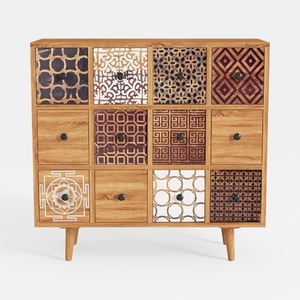
Bohemian Solid Wood Multidrawer Accent Cabinet With Patterned Fronts 3D Model

Modern Minimalist Fabric U Shaped Sectional Sofa 3D Model
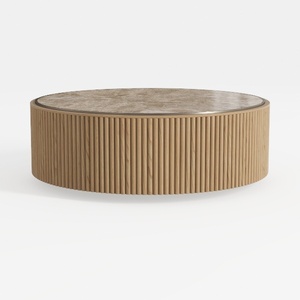
Modern Fluted Solid Wood Marble Top Round Coffee Table 3D Model
Homestyler is your go-to online home design platform, perfect for all skill levels! With its user-friendly design tool, stunning 3D renderings, diverse design projects, and helpful video tutorials, you can effortlessly transform your home into a masterpiece. Start creating today!
Design Now for FREE
































