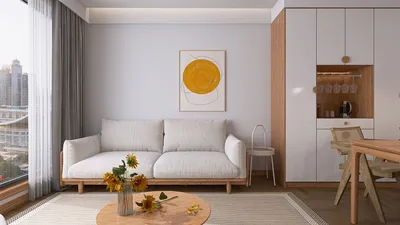


Designing a home no longer demands the expertise of architects, costly software, and extensive planning. Nowadays, innovative home design software empowers everyone—from casual homeowners to seasoned interior designers—to generate floor plans, experiment with various layouts, and visualize interiors in stunning 3D formats, especially with tools like Homestyler.
With the increasing popularity of cloud-based platforms, users can now effortlessly create comprehensive home layouts, style rooms, and produce high-quality photorealistic renders directly from their web browsers.
This guide delves into the top home design software options available in 2026, comparing their essential features and assisting you in selecting the ideal tool based on your specific design aspirations.
What Exactly Is Home Design Software?
Home design software serves as a digital solution that enables users to draft floor plans, design interior layouts, and visualize spaces in either 2D or 3D prior to commencing construction or renovation.
These platforms are frequently employed by:
Today's advanced home design tools come packed with features such as creating floor plans, placing furniture, customizing materials, and delivering high-quality 3D renderings.
By allowing users to test design alterations digitally, these tools significantly mitigate mistakes, enhance planning precision, and streamline the design process.
Quick Overview: Which Home Design Software Is the Best?
Choosing the best home design software hinges on your level of experience and specific design requirements. Nonetheless, several platforms consistently rank high due to their ease of use, rich features, and impressive visualization capabilities.
Here are a few of the most sought-after tools in use today:
Each platform caters to a different audience, from homeowners dabbling in layout design to professionals tackling intricate interior projects.
Comparing the Best Home Design Software
When it comes to selecting home design software, ease of use, quality of rendering, diverse furniture libraries, and device compatibility are typically the primary concerns for users.
1. Homestyler
Homestyler has established itself as one of the leading modern home design platforms for visualizing interiors and planning layouts.
In contrast to traditional design tools that necessitate large installations, Homestyler operates entirely in the browser, allowing users to dive into their designs without delay.
Key features encompass:
These functionalities make the platform particularly appealing to interior designers, real estate agents, and homeowners aiming to visualize spaces rapidly.
A major benefit of using Homestyler is its speed in rendering. Users can produce high-quality images of interiors in mere seconds, which greatly expedites the design workflow.
For individuals exploring contemporary interior layouts, tools like Homestyler effectively bridge the gap between creative imaginations and realistic visualization.
2. SketchUp
SketchUp is renowned for being a professional-grade 3D modeling tool heavily utilized in architecture, product design, and interior planning.
The platform offers robust modeling capabilities and an expansive array of plugins that enhance its usability.
Core features include:
With its advanced control over modeling, SketchUp is typically favored by architects and experienced designers.
Nevertheless, novices might find its learning curve to be steeper compared to more user-friendly home design tools.
3. Planner 5D
Planner 5D emphasizes user-friendliness and simplicity, making it a top choice for newcomers eager to delve into interior design concepts.
Users can quickly create layouts and furnish rooms through an intuitive drag-and-drop interface.
Features include:
Planner 5D proves especially useful for homeowners who want to experiment with renovation concepts or strategize room layouts without needing advanced technical skills.
4. RoomSketcher
RoomSketcher is a design tool that prioritizes accurate floor planning and layout visualization.
It is predominantly utilized by real estate professionals, contractors, and interior planners who require precise measurements and detailed layout diagrams.
Key features include:
RoomSketcher excels in assisting users visualize how spaces interconnect within a residential setting.
5. Sweet Home 3D
Sweet Home 3D is an open-source application for interior design that enables users to create basic room layouts and try out various furniture placements.
Notable advantages include:
Although it may lack advanced rendering capabilities and contemporary design libraries, Sweet Home 3D remains a favored option for those seeking a cost-free design solution.
How to Choose the Ideal Home Design Software
Selecting the perfect design tool hinges on several key factors.
Beginners often benefit from tools that offer templates, drag-and-drop functions, and user-friendly controls.
Realistic 3D rendering aids users in grasping how materials, lighting, and furniture will appear in a completed space.
A broad array of model libraries allows designers to explore diverse interior styles and layouts.
If renovations or new builds are on your agenda, having precise measurement tools is crucial.
Quick rendering enables designers to rapidly iterate and experiment with multiple layout concepts.
How to Design a Home Using Design Software
Most design platforms follow a fairly standard workflow when it comes to creating a home layout.
Begin by sketching the walls and defining the room structure. Ensuring accurate dimensions makes the design faithfully reflect actual spatial constraints.
Openings influence the entrance of natural light and the arrangement of furniture within the space.
Utilize drag-and-drop functions to add furniture models and investigate various room layouts.
Experiment with flooring options, wall colors, and textures to align with the desired interior style.
Render your design to visualize how the room will appear under realistic lighting and materials.
This workflow empowers users to refine their ideas before committing to any real design decisions.
Best Home Design Software for Specific Needs
Different tools shine in unique contexts.
Simple tools requiring minimal technical background are perfect for homeowners.
Recommended tools include:
Design professionals often necessitate high-quality visualization and expansive furniture libraries.
Recommended tools encompass:
Users emphasizing layout accuracy should consider tools specifically tailored for floor planning.
Recommended tools should be:
Users seeking free options might evaluate:
Future Trends in Home Design Software for 2026
The realm of home design technology is advancing at a rapid pace. Numerous trends are shaping the future of digital design tools.
AI technologies are now capable of generating floor plans based on room dimensions and design objectives.
Cloud rendering technologies enable designers to create realistic visuals within seconds.
Extensive digital furniture catalogs provide users the chance to experiment with thousands of design elements for their interiors.
Modern cloud platforms eliminate the requirement for heavy software installations, allowing design tools to be usable on any device.
These advancements are revolutionizing the manner in which individuals visualize and strategize their living spaces.
Commonly Asked Questions
Platforms such as Planner 5D and Homestyler are often recommended for beginners due to their intuitive interfaces and straightforward layout tools.
Absolutely! Numerous contemporary home design tools operate on the web, enabling users to craft floor plans and visualize interiors directly through their browsers.
Yes, Sweet Home 3D and the free version of Planner 5D provide basic design functionalities.
However, premium platforms generally offer enhanced rendering and design features.
Interior designers frequently employ a combination of tools to suit their workflow needs. Some utilize advanced modeling applications like SketchUp in conjunction with visualization platforms for realistic rendering and furniture options.
Final Thoughts
Home design software has made interior planning remarkably accessible for everyone. Whether you're redesigning a single room or conceptualizing an entire home, digital tools facilitate experimentation with layouts, materials, and furnishings prior to implementing real-world changes.
As design technology continues to advance, cloud-based platforms and AI-infused tools are simplifying the process of generating realistic interior visualizations and exploring fresh design possibilities.
By selecting the right home design software, both homeowners and professionals can confidently and creatively bring their visions to life.
Originally incubated at Autodesk, Homestyler has grown into one of the most widely adopted home design platforms in the world, now trusted by over 18 million users. Whether you're a homeowner exploring ideas or a professional designer delivering client-ready renders, Homestyler brings industry-leading 3D technology to your fingertips — no experience required.

Natural Green Vine Wall Panel Decorative 3D Model

Minimalist Tan Leather L-Shaped Sectional Sofa 3D Model
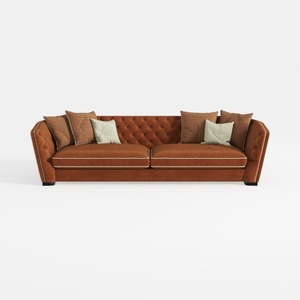

Contemporary Tufted Brown Velvet Extra Large Sofa 3D Model
Homestyler is your go-to platform for transforming home design dreams into reality. With its user-friendly online design tool, stunning 3D renderings, and a wealth of inspiring projects and tutorials, you can effortlessly create beautiful spaces that reflect your style. Dive into design today!
Дизайн сейчас бесплатно
































