

I design smart homes that prioritize people over technology. The foundation of my approach is a well-structured rooms chart, which serves as a comprehensive matrix detailing spaces, their functions, interrelationships, technological needs, and environmental specifications. When this chart is meticulously crafted, elements such as wiring, sensors, acoustics, and layouts align seamlessly, ultimately saving costs and mitigating future complications. According to Gensler’s 2023 research, 42% of residents highlight the importance of layout and lighting quality for their comfort and productivity, emphasizing that the essence of smart homes is rooted in spatial planning rather than a mere catalog of applications. WELL v2 supports this concept by linking cognitive comfort to the management of light, thermal, and acoustic factors, which ought to be defined during the planning phase instead of being retroactively addressed.
Lighting standards play a significant role in this meticulous planning. The Illuminating Engineering Society (IES) suggests light levels of approximately 300–500 lux for kitchens and work areas, and 150–300 lux for living rooms, while enforcing rigorous glare management through a combination of ambient, task, and accent lighting—information that I incorporate into the rooms chart to direct fixture quantities and sensor placements. Additionally, the psychology of color shows that warmer shades can enhance social interactions, while cooler tones may improve concentration in work areas, as highlighted by research compiled by Verywell Mind. Including these ambient targets in the rooms chart allows technology—such as presence sensors, tunable LEDs, and HVAC zoning—to support a human-centered design framework instead of dictating it.
Defining the Rooms Chart
My rooms chart serves as a definitive guide listing all areas—entry, living room, kitchen, bedrooms, bathrooms, utility space, home office, media room, and outdoor areas—capturing their purpose, usage patterns, adjacency requirements, lighting standards, acoustic needs, thermal zones, material specifications, smart device integration, network necessities, and automation principles. This dynamic tool evolves alongside user behaviors and routines, effectively preventing smart-home chaos and ensuring cohesive integrations.
Start with Behavioral Mapping
The process begins with mapping out daily activities: morning routines, meal preparation, work periods, family interactions, and winding down. Research from Steelcase links improved cognitive function to clarity and control in spaces; at home, this translates to straightforward pathways and intuitive systems within frequently used areas. Identifying peak use times and potential noise sources (like kitchens and media rooms) helps isolate focus areas from busy zones. For those exploring different layouts or furniture arrangements, a room layout tool such as Homestyler can visualize pathways and spatial clearances prior to finalizing wiring and device placements.
Environmental Targets by Room
Living Room: Target 150–300 lux for ambient lighting, 2700–3000K warm white for a cozy feel, dimmable features, and accent lighting that minimizes glare. Acoustic comfort can be enhanced with soft furnishings (rugs, upholstered chairs, drapes) and bookcases serving as sound dampeners. Include presence sensors for customizable welcome scenes and window treatments to harness natural light.
Kitchen: Design for 300–500 lux over work surfaces, employing 3500–4000K neutral white for true color representation and low glare task lights under cabinets. Avoid drafting by positioning HVAC returns away from cooking zones, adding noise-reducing materials where needed, and ensuring leak sensors are installed near sinks and dishwashers.
Bedrooms: Aim for 50–150 lux for ambient lighting, using 2700K for relaxing moods, and localized task lights for reading. Ensure sound insulation at doors, comfortable flooring, and blackout shades for better sleep quality. Automate lighting patterns to complement natural sleep cycles, including gentle wake-up lighting and guidance for nighttime navigation.
Home Office: Ensure task lighting of 300–500 lux, utilize 3500–4000K for focus, and include front-fill lights for video conferencing. Keep echo low using sound-absorbing panels or curtains. Ergonomics are essential: ensure chair height is adjustable, monitors are positioned at eye level, and arm support is provided to alleviate strain.
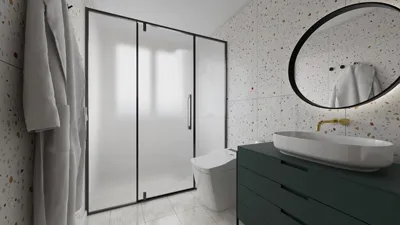
Bathrooms: Provide ambient illumination of 200–300 lux, increasing to 300–500 lux at mirrors for facial accuracy. Use moisture-resistant lights, materials that prevent slips, and humidity sensors linked to exhaust systems.
Adjacency and Zoning Logic
Group related activity zones (like kitchen, dining, and living spaces) for streamlined lighting and shared sensor functionality. Separate quiet zones (bedrooms and study areas) with sound barriers and tailored HVAC controls. The chart should detail optimal adjacencies (e.g., mudroom near entryway, laundry close to bedrooms) and ensure circulation remains clear, preventing bottlenecks near high-traffic zones. Such zoning not only minimizes energy waste but also aligns with WELL principles for comfort and acoustic management.
Lighting Strategy Embedded in the Chart
Each room's specifics include lux targets, color temperature guidelines, dimming preferences, and control setups. Natural light availability guides how sensors are arranged and how shades react. IES illuminance standards shape the baseline light levels, while tunable lighting allows adjustments according to the time of day: cooler hues foster productivity, whereas warmer shades create a relaxed atmosphere. Managing glare through design strategies—like shielding angles, utilizing indirect light sources, and adopting matte finishes—enhances visual comfort. The chart should also include maintenance notes regarding bulb lifespan and compatibility of lighting controls.
Acoustic and Privacy Considerations
Document sound sources and establish desired noise criteria (NC) ranges for each room. Hard surfaces may amplify sound; balancing them with soft furnishings can minimize reverberation. To optimize smart voice controls, position microphones away from noisy appliances and reflective areas to reduce false activations. And don’t overlook the importance of quality doors and seals—bedroom privacy hinges on effective sound transmission class (STC) ratings and proper thresholds.
Thermal Zoning and Energy
Document temperature setpoints for each room, incorporating seasonal variations and window orientations. Smart thermal zoning should adapt to usage patterns: bedrooms might require lower temperatures at night, whereas kitchens need rapid recovery post-cooking. Document shading tactics—both manual and automated—and illustrate where radiant heating or additional heat sources are appropriate, which can lighten the load while maintaining comfort levels.
Materials and Sustainability
Materials featured in the chart include VOC ratings, slip resistance (especially for bathrooms), durability, and acoustic qualities. Preference should be given to low-emission paints, FSC-approved wood, and fabrics that can be washed easily. For those monitoring embodied carbon, highlight priorities such as long-lasting materials, modular elements, and easy-to-repair fixtures. Smart design doesn’t equate to disposability—think maintenance and longevity.
Network, Power, and Device Mapping
Every room includes a listing of devices: sensors, switches, hubs, shades, speakers, security cameras, and air or water quality monitors. Mark power circuits, Power over Ethernet (PoE) devices, cable routes, and Wi-Fi coverage areas. Keep crucial automations wired where feasible; record backup mechanisms and manual overrides within the chart.
Automation Rules by Scenario
I establish automation rules based on real-life scenarios: Welcome Home (entry lights at 30%, pathway lights at 20%, and HVAC pre-cooling), Cooking (task lighting at full brightness, island pendants at 60%, and exhaust systems activated), Focus Mode (office lights at 4000K with notifications off), and Movie Night (ambient lighting in the media room reduced to 10% with bias lights behind screens). The rooms chart ensures these scenes are tailored to specific spaces and operate without conflicts.
Future-Proofing the Chart
Reserve conduits, leave extra capacity in electrical panels, and record firmware details. Highlight interoperability issues and plans for updates. This chart becomes a living document, easily updated as life changes or new technology emerges.
How to Build Your Rooms Chart
1) Catalog rooms and their functions. 2) Map out daily routines and spatial relationships. 3) Set environmental goals (lux levels, color temperatures, acoustic conditions, thermal needs). 4) Select materials based on sustainability factors. 5) Position devices and establish networks. 6) Define automation scenes and schedules. 7) Analyze layouts with simulation tools like Homestyler before finalizing wiring. This method aids in validating furniture placements, traffic flow, and sightlines.
FAQ
Aim for work surfaces to have 300–500 lux, paired with neutral 3500–4000K task lighting and appropriate glare management. Start with IES illuminance guidelines, then layer ambient and accent lights for versatility.
The 2700–3000K color temperature creates a welcoming ambiance that promotes relaxation. Combine warm ambient light with dimmable accents to tailor the atmosphere for gatherings or peaceful nights.
Leverage soft finishes (like rugs and curtains), with bookshelves used as sound diffusers, and carefully strategized zoning to isolate noisy areas from tranquil spaces. Ensure bedroom and study doors are sound-sealed for enhanced STC efficiency.
Focus on essential areas, such as entryways, hallways, bathrooms, and utility rooms, where hands-free control is beneficial. In living and sleeping areas, blend presence sensing with manual controls to avoid accidental activations.
For effective video calls, utilize 300–500 lux task lighting with 3500–4000K, complemented by front-fill lighting to eliminate shadows. Manage glare from screens and mitigate reverberation with absorbing materials.
Position microphones away from reflective areas and noisy devices. Utilize room-specific wake words or adjustable sensitivity settings, documenting these details in your rooms chart.
Opt for low-VOC paints, formaldehyde-free cabinetry, and textiles that can be easily cleaned. Compile VOC ratings in the rooms chart and ensure adequate ventilation during the installation process.
Design room-specific scene settings (like Welcome Home, Cooking, Focus, Movie Night) with clear objectives and backup plans. Test automation sequences, documenting triggers, durations, and adjustments within the chart.
Implement thermal zoning according to occupancy patterns, control shades on sun-facing windows, and maintain efficient setpoints for each room. Automations should gradually adjust to uphold comfort standards.
Document spare conduit runs, ensure ample panel capacity, and favor hardwired setups for critical devices. Maintain detailed firmware and integration notes within the chart for easier future updates.

Discover the creativity of home design with Homestyler! This user-friendly platform offers an online design tool, stunning 3D renderings, and a wealth of DIY video tutorials. Perfect for anyone looking to transform their space effortlessly. Unleash your interior design potential today!
Projete agora para LIVRE
































