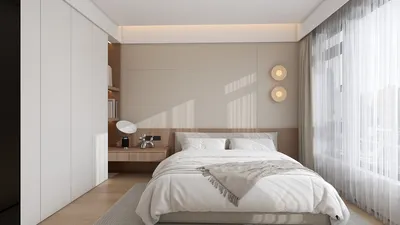


Clutter not only consumes valuable time but also diverts your attention. Maintaining a clear room inventory—detailing what items you possess, their specific locations, and upkeep routines—can transform chaos into an intuitive and frictionless environment. According to the Gensler U.S. Workplace Survey (2020), employees waste up to 14% of their workday searching for tools and information; a thoughtfully organized inventory with proper labeling can significantly reduce this search time, thereby enhancing task efficiency. In home environments, the National Kitchen & Bath Association (NKBA) recommends at least 48 inches of aisle clearance in kitchens to facilitate smooth movement; effective inventory mapping can help ensure these clearances are maintained while optimizing storage and circulation.
The quality of lighting and visibility is crucial for the fast retrieval of items. The Illuminating Engineering Society (IES) recommends general lighting levels between 300–500 lux for everyday tasks, and up to 750 lux for intricate work. By aligning these lighting levels with your storage areas—using high-intensity task lighting for labeled shelves and general lighting for storage zones—you can enhance quick access to needed items. Additionally, color psychology plays a vital role; research from Verywell Mind indicates that muted, low-gloss neutrals can minimize visual distractions, while targeted accent colors can help emphasize important areas or safety gear.
What Constitutes a Room Inventory?
A room inventory serves as a dynamic catalog of your items, furniture, supplies, and equipment, all linked to specific locations and usage instructions. It is structured in three layers: the physical items (including SKUs, quantities, and dimensions), their spatial assignments (defined zones, shelves, drawers), and the associated behavioral patterns (usage frequency and safety considerations). The ultimate goal is to create a space where you can easily locate items, replace them without hassle, and prevent unnecessary purchases.
Fundamental Concepts: Zoning, Ratios, and Rhythm
Effective inventory management begins with proper zoning, categorizing areas into active (for daily use), reference (for weekly or monthly tasks), and archive (for infrequently accessed items). Ensure that items in active zones are easily reachable, while heavier archive items are placed lower to reduce ergonomic strain. Maintain spatial ratios of approximately 60–70% for storage capacity and 30–40% for circulation clearance to avoid congestion and keep pathways clear. Establishing a visual rhythm through consistent label placement, uniform container sizes, and repetitive color schemes can enhance item recognition.
Creating Your Layout
Before applying labels, take the time to map your room’s layout. Identify key points within your work triangle, such as the entryway, work surface, and sink/printer. Experiment with different arrangements to avoid cramped spaces and blind spots. For a quick way to prototype zones and paths, consider utilizing a room layout simulation tool. To prioritize ergonomic integrity, respect designated reach envelopes by keeping frequently used items within 28–48 inches from the floor, leaving extreme heights for light, seldom-used items.
Lighting, Color, and Glare Management
The visibility of your inventory heavily depends on adequate lighting. Aim for ambient light levels of 300–500 lux with a color temperature of 4000–4500K to accurately render label colors. Incorporate task lighting on shelves that hold small parts while also shielding fixtures to reduce glare and reflections from glossy storage bins. Deliberately apply color psychology: calming neutrals (like warm grey or soft taupe) can ease background distractions; a single accent color can indicate priority areas or emergency supplies, and it’s wise to avoid overly bright schemes that could compete with label clarity.
Labeling System: Designing for Quick Retrieval
Implement a hierarchical labeling system structured as follows: Zone → Sub-zone → Shelf → Bin → Item. Use sans-serif fonts in sizes of 18–24pt for shelves and 14–16pt for bins, ensuring high contrast (black text on matte white background). Align labels to the left for quicker scanning. Incorporating QR or NFC tags can link to digital inventories, while having a master index that reflects the physical organization will facilitate seamless updates.
Ergonomics and Human Considerations
Your inventory setup should aim to reduce both physical effort and cognitive load. Store heavy items at knee to hip height to minimize strain; avoid twisting motions by placing tools symmetrically at workstations on the left and right. For desk drawers, utilize a shallow-to-deep layout—daily essentials in the front and backups behind. Consider behavioral tendencies: position the most frequently used item where your hand naturally lands following the previous task to minimize delays.
Acoustics and Material Selection
Since inventory zones often see movement, consider incorporating soft-close hardware, felt liners, and rubber feet to dampen noise and enhance focus. Opt for materials with matte finishes to reduce glare and the appearance of fingerprints. If sustainability is a priority, choose recycled polypropylene bins, FSC-certified shelving, and modular components that can be reconfigured rather than discarded.
Integrating Workflow
An inventory only remains effective with consistent maintenance practices. Establish simple routines such as a 5-minute end-of-day reset, weekly consumable counts, and monthly reorganization of zones based on usage statistics. Setting par levels (minimum and maximum thresholds) can trigger automatic restock orders; placing restock cards in bins simplifies this process.
Strategizing Room-by-Room Inventory
• Kitchen: Organize by function—prep, cook, serve, clean. Position knives, cutting boards, and bowls in the prep area next to the work surface. Follow NKBA clearances and store frequently used tools within the first 24 inches of drawer space.
• Living Room: Categorize media, remotes, chargers, and blankets in labeled compartments within closed storage to minimize visual clutter. Implement a unified color scheme for cable management for quick identification.
• Bedroom: Rotate seasonal clothing into archive bins on higher shelves, keeping daily wear at mid-level. Store accessories in modular trays organized by category (belts, jewelry, glasses).
• Home Office: Centralize printer paper, toner, and cables at one supply station. Use color-coded file bands—blue for finance, green for personal matters, red for urgent tasks—to speed up triage.
• Workshop/Garage: Group tools by category (fastening, cutting, measuring). Use robust shelving at waist height; magnetic boards can display metal tools, while clear bins with bold labels help manage consumables.
Digital Inventory: Creating a Hybrid Layer
Complement your physical inventory system with a digital index. Each zone can serve as a folder with sub-entries for shelves and bins. Capture photographs of each bin’s contents and schedule review reminders. Ensure your digital map stays in sync with the physical labeling system to prevent discrepancies.
Maintenance: Regular Audits and Adjustments
Conduct quarterly mini-audits to assess capacity utilization, check for damaged containers, worn labels, and misplaced items. Update your categorization as new items are added; demote seldom-used categories to archive. Monitor item velocity to differentiate what is used daily versus monthly, and reconfigure zones based on this data.
Common Mistakes and Their Solutions
• Over-labeling: Too many labels can create confusion; keep your hierarchy simple and avoid redundant tags.
• Inconsistent container sizes: Standardize on two or three bin types to maintain visual rhythm.
• Concealed frequently used items: If an item is used daily, ensure it has a prime location and clear visibility.
• Neglecting proper lighting: Dim corners can lead to clutter; extend task lighting into storage areas as needed.
One-Day Reset Strategy
Morning: Define zones, declutter surfaces, and establish circulation paths.
Midday: Sort items into keep, toss, or archive categories; measure shelf spaces and select standardized containers.
Afternoon: Label, arrange, and photograph bins, and set revised par levels for inventory.
Evening: Test workflow and adjust placements as necessary; schedule weekly and monthly inventory maintenance activities.
Resources and Guidelines
For lighting and wellness standards applicable to storage and task settings, refer to recommendations from the IES and WELL v2 guidelines for optimal visual comfort. Check resources like the WELL Building Standard for light quality and glare management, utilizing IES lux specifications to accurately size lighting fixtures.
Frequently Asked Questions
Q1: How much lighting should I provide for storage areas?
A: Target an ambient lighting level of 300–500 lux, and consider additional task lighting up to approximately 750 lux for detailed retrieval tasks, in line with IES standards.
Q2: What is the most effective way to organize frequently accessed items?
A: Keep these items within the active zone at a reachable height (around 28–48 inches off the ground), ensuring they are front-facing and clearly labeled with high-contrast tags for ease of identification.
Q3: How do I determine appropriate container sizes?
A: Opt for two or three standard sizes to maintain visual consistency; use transparent bins for smaller items and opaque ones for larger or less appealing items.
Q4: How often should I review my inventory?
A: Conduct weekly checks for consumables and quarterly mini-audits to evaluate layout, label conditions, and capacity utilization.
Q5: What color strategy is most effective for enhancing retrieval?
A: Employ neutral backgrounds to minimize visual noise and introduce a single accent color to signify priority or safety areas; this approach uses attention and memory cues effectively.
Q6: How can I mitigate noise in active storage locations?
A: Implement soft-close mechanisms, use felt or rubber linings, and keep noisy tools isolated from focused work zones to reduce disturbances.
Q7: What par levels should I establish for inventory?
A: Determine minimum and maximum thresholds for each consumable (such as paper and batteries); once the minimum level is reached, automatically trigger a restock order, and keep a restock card within the bin.
Q8: How can I maintain order among cables and tech accessories?
A: Designate a central tech station, label chargers as per their devices, and manage cables with color-coded ties; store duplicate items in the archive zone.
Q9: Is it essential to have a digital inventory?
A: While not mandatory, a digital index is highly beneficial; combine it with QR labels and a straightforward folder system mirroring your physical organization for quick updates, possibly through tools like Homestyler.
Q10: What ergonomic mistakes should I avoid?
A: Avoid placing heavy items either too high or low; prevent excessive twisting by organizing paired tools and supplies symmetrically within easy reach.
Q11: How should I plan circulation paths to prevent clutter accumulation?
A: Reserve 30–40% of your floor space for movement and keep passageways clear of temporary storage; base your drop zones on the mapped workflow to maintain order.
Q12: Can these principles be adapted for small apartments?
A: Absolutely—utilize vertical storage, shallow modular bins, and wall-mounted peg systems for organization; ensure active items are within mid-height reach while archiving seasonal items up high.
What began as an Autodesk innovation has evolved into a design platform used by more than 18 million people around the globe. Homestyler combines powerful rendering, an intuitive editor, and a vast furniture library to help you turn inspiration into photorealistic designs — whether you're redesigning a single room or planning an entire home.
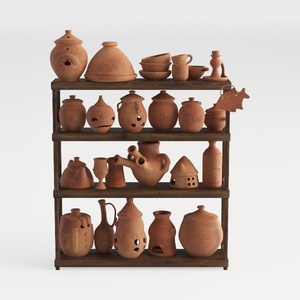
Rustic Terracotta Decorative Pottery Set with Wooden Shelf 3D Model

Minimalist Solid Wood Fluted Round Dining Table 3D Model

Homestyler is a fantastic online home design platform that empowers you to create stunning spaces effortlessly. With its intuitive design tool, impressive 3D renderings, and a wealth of inspiring video tutorials, you can bring your dream home to life, regardless of your experience level!
Design Now for FREE
































