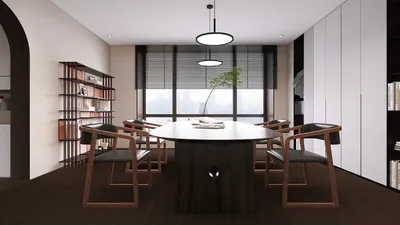


I have implemented and optimized the Cisco Room Kit Plus across a range of environments, from intimate huddle spaces to larger boardrooms accommodating up to 20 individuals. While this hardware is quite robust, the setting it occupies significantly influences call quality, attendee comfort, and overall meeting success. The objective is straightforward: enable the technology to blend into the background so that participants can think clearly, make decisions effectively, and connect seamlessly without interruptions, much like utilizing the Homestyler for effortless design enhancements.
The importance of space planning and adjusting the environment cannot be overstated. Acoustic reverberations exceeding 0.6 seconds can muddle speech clarity, while glare issues can diminish camera capabilities, making faces appear shadowy against bright windows. Data from Gensler’s U.S. Workplace Survey shows that environments that foster both focused work and collaboration significantly enhance performance. Additionally, the WELL v2 framework outlines standards for clearer speech and glare management, both crucial for a comfortable video conferencing experience. Steelcase's research also confirms that when teams have the choice of using well-appointed spaces, they experience higher engagement and improved collaboration quality, echoing my observations in various projects.
Concrete metrics play an essential role in guiding design choices. I target desktop horizontal illuminance levels between 300 and 500 lux with a correlated color temperature (CCT) of 2700 to 4000K, which helps in presenting flattering skin tones while minimizing shadows—the recommendations align with guidelines from IES and WELL v2 for lighting standards. For acoustic clarity, it is vital to maintain background noise levels around NC-25 to NC-30 and keep RT60 in the range of 0.3 to 0.5 seconds in small to medium-sized rooms. This ensures that Cisco's beamforming microphones and speaker tracking function optimally. According to Steelcase's findings on hybrid collaboration, the primary factor affecting perceived meeting quality is clear audio; muddled communication can hinder engagement, regardless of the camera's capabilities.
Optimizing Room Size for Cisco Room Kit Plus
The Room Kit Plus excels in small to medium settings, accommodating roughly 4 to 12 participants and has the potential for expansion into larger areas with additional microphones and speakers. The number of seats is crucial, as microphone sensitivity, camera tracking, and screen dimensions must align with both sightlines and speech intelligibility. I recommend maintaining a view distance-to-display height ratio of about 3 to 4:1 for comfortable visibility of text and faces. If you're assessing various layouts or furniture arrangements, consider utilizing a room layout tool to virtually model chair spacing, camera placements, and ADA clearance zones, which can prove to be beneficial in conjunction with tools like Homestyler.
Camera Positioning, Sightlines, and Lighting Adjustment
The effectiveness of auto-framing is contingent upon the camera's perspective. Position the main camera at eye level, aligned with the average seated participant, and avoid positioning it against bright backlighting. Strive for consistent vertical lighting on participants' faces at 200 to 300 lux to avoid harsh shadows. Enhance overhead lighting with diffused forward key lighting set at a 30 to 45-degree angle. Ensuring consistent color temperature throughout the room prevents skin tones from shifting under different lighting. If daylight is a factor, opt for dimmable solar shades with moderate visible transmittance, allowing for views while reducing contrast, ultimately improving the codec's handling of dynamic range.
Microphone Strategy, Echo Time, and Background Noise Control
The microphones within the Room Kit Plus perform exceptionally well when the room's acoustics are physically optimized rather than depending solely on digital signal processing (DSP) to resolve reflections. Combine sound-absorbing ceiling tiles (with a noise reduction coefficient of 0.7 or higher), wall panels at first reflection points, and soft flooring materials to reduce RT60 to a 0.3 to 0.5 seconds for small and medium rooms. Aim for background noise levels between NC-25 and NC-30; ensure door seals are tight, use quiet HVAC diffusers, and eliminate any rattling or decorative elements that might generate noise. Proper acoustic zoning is essential to keep outside conversations from infiltrating the meeting.
Ergonomics and User-Centric Design in Furniture
Chairs designed with lumbar support and adjustable armrests help participants maintain stillness and align with microphone pickup, thus reducing ambient noise caused by fidgeting. The depth of the table should accommodate laptops without obstructing faces, ideally between 900 to 1050 mm for collaborative tables and 600 to 700 mm personal space per user. Use rounded corners on tables to prevent the camera from capturing harsh foreground edges. Avoid glossy finishes that might reflect overhead lights into the camera's view. Effective cable management is also vital, as visual clutter can elevate cognitive load and distract remote participants.
Specifications for Displays and Visual Comfort
Ensure that display sizes are proportionate to room dimensions. For distances of 10 to 14 feet, a display size ranging from 75 to 86 inches often offers optimal readability. Keep peak luminance levels around 250 to 350 nits in controlled illumination settings, as exceeding these levels may cause underexposure of faces on camera. Position displays so their centerlines align closely with seated eye levels to mitigate neck strain. When using dual screens, ensure that both monitors have matching brightness and color temperatures, while also keeping bezels minimal to diminish visual disruptions across content that spans both screens.
Considerations for Networking, Power, and Backup Plans
Quality of Service (QoS) within the network is mandatory for stable, low-latency video streaming. Implement dedicated circuits and uninterruptible power supplies (UPS) for the codec, displays, and switchers. Label all connections clearly and maintain a quick-start guide on the wall for new users. I advocate for a one-button meeting join process along with a straightforward cabling solution for content sharing as a backup plan if wireless options fail. Having redundancies in place, like extra HDMI cables or a spare remote control, can help prevent disruptions.
Understanding Color Psychology and Material Use
Backdrops that face the camera should utilize desaturated mid-tones (Light Reflectance Value of 30-50) to stabilize auto-exposure and flatter skin tones. Insights from Verywell Mind about color psychology reflect my experiences: muted shades of blue and green promote calm focus, whereas vivid reds can appear aggressive and skew exposure readings. Apply matte finishes on back walls and table surfaces to avoid glare. Integrate sustainable materials such as low-VOC paints, forest stewardship-certified wood, and recycled PET acoustic panels to enhance occupant well-being, reducing complaints about odors during commissioning.
Room Layout and Non-Verbal Cues
Establish a clear ‘camera zone’ characterized by uniform lighting and uninhibited, subtle art. Position writable surfaces away from the camera's direct line of sight to prevent glare and clarity issues; should you need to capture handwritten content, specify a matte finish for whiteboards and ensure cross-lighting from both sides. Consider creating a small ‘tech shelf’ for adapters, providing a sanitizing station, and placing a coat hook near the entrance to keep movement out of the camera frame.
Finalization Checklist and Performance Metrics
Upon project completion, I conduct straightforward assessments: measure RT60 at frequencies between 500 and 1000 Hz, confirm background noise levels during peak HVAC activity, document vertical and horizontal lux readings at seating positions, and record test footage with varied exposure settings. It's important to check microphone ranges and camera tracking capabilities when the room is at full occupancy. Save user-friendly presets for different setups, whether it's a full table configuration, focusing on the speaker, or content-sharing frames. The space should feel intuitive to use upon the first interaction.
Sustainability and Lifecycle Considerations
Design with durability and maintenance simplicity in mind. Choose fabrics that resist stains, use replaceable acoustic panels, and design cable pathways for modular accessibility. Implement occupancy sensors to dim lights and automatically put the system in sleep mode when not in use. This approach leads to lower energy use, reduced wear, and a better return on investment.
When to Utilize a Layout Simulation Tool
Utilize a layout simulation tool whenever you're reorganizing seating, incorporating a second display, or shifting the camera to an adjoining wall. This allows for quick modeling of sightlines, ADA clearances, and lighting adjustments before you commit to any physical changes, saving time and effort in renovations, much like engaging with Homestyler for effective space planning.
Trusted Research to Support Design Decisions
For lighting design, both the WELL v2 Light guidelines and IES office lighting recommendations provide substantial targets regarding glare management and adequate facial illumination. For insights into workplace behaviors and trends in hybrid collaboration, the research conducted by Gensler and Steelcase offers practical guidance that directly impacts the performance of video conferencing rooms. These references are essential for maintaining design integrity and ensuring measurable outcomes.
Frequently Asked Questions
Aim for 200 to 300 lux of vertical illumination on participants' faces, accompanied by 300 to 400 lux on the tabletop surfaces. Maintain CCT between 3000 to 4000K to preserve natural skin tones and consistent camera exposure throughout the meeting.
Target RT60 measurements of approximately 0.3 to 0.5 seconds in small to medium rooms. Employ strategies such as ceiling absorption, wall panels at key reflection points, and a soft flooring layer to achieve these standards.
Utilize dimmable solar shades, balance ambient light with directed key lighting, and avoid orienting the camera towards unshaded windows to maintain optimal lighting conditions. Strive to keep the subject luminance at least ten times the background luminance.
Tables with trapezoidal or soft rectangular shapes featuring rounded edges maintain clean sightlines and prevent dominant foreground presence. Ensure that the seats nearest to the camera are positioned no closer than 1.0 to 1.2 meters away to provide clear visibility.
For larger rooms exceeding 12 seats or those with particularly challenging acoustics, consider adding table or ceiling microphones to guarantee uniform audio pickup. Always prioritize fixing room acoustics before applying DSP adjustments.
Apply a viewing distance to image height ratio of roughly 3 to 4:1. For example, at a viewing distance of 12 feet, a display size between 75 to 86 inches typically offers optimal readability, greatly enhancing the experience with tools like Homestyler.
Choose low-sone diffusers, line ducting where practical, and ensure proper sealing of door frames to limit sound leakage. Strive for background noise levels of NC-25 to 30 to facilitate better clarity in conversations.
Desaturated mid-tones, such as muted blues, greens, or warm grays with an LRV of 30 to 50, are ideal for stabilizing exposure and enhancing skin tone on camera. It is wise to avoid reflective finishes and vibrant reds behind speakers.
Dual display setups prove useful when both content sharing and gallery views are crucial. Ensure that the brightness and color temperatures are uniform across both screens and verify that the camera framing does not awkwardly split the tabletop area.
Consult a layout simulation tool to experiment with chair arrangements, ADA clearances, and the camera’s field of view before physically moving any furniture. This approach is quicker and minimizes the risk of needing to redo work later on.
Capture a brief meeting with full participation, share materials, and assess audio consistency from seat to seat while monitoring any fluctuations in exposure or glare. Adjust lighting levels and microphone placement as needed for optimal results.
Utilize cooler CCTs (around 4000K) to promote alertness on camera, while warmer tones (3000K) create a welcoming feel. It's essential to select one temperature range and maintain consistency to avoid color variation between camera shots.
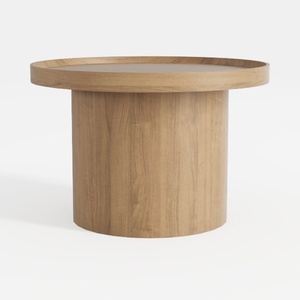

Modway EEI-6401-IVO Oasis Upholstered Fabric Sofa,
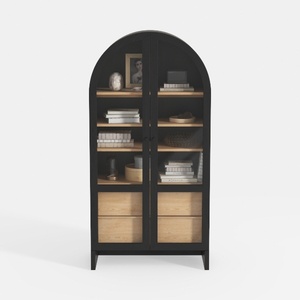
Modway Evie Arched Display Cabinet in Black Oak -
Homestyler is your go-to online home design platform! With its user-friendly design tool, stunning 3D renderings, and a wealth of DIY video tutorials, you can easily transform your design ideas into reality—making home decoration both fun and inspiring!
Design jetzt kostenlos
































