

Unity has emerged as a leading platform for game development, celebrated for its versatility in accommodating various 3D model file formats. Selecting the appropriate file format is vital for optimizing performance, efficiently managing resources, and ensuring seamless integration into your Unity projects. Primary 3D model formats compatible with Unity include FBX, OBJ, DAE (Collada), and the native BLEND format from Blender. Each format presents unique pros and cons, serving different workflows and requirements.
FBX (Filmbox), created by Autodesk, stands out as the most frequently used file format for 3D models in Unity. It is particularly adept at supporting intricate features such as animations, embedded materials, skeletal rigs, and morph targets. FBX files ensure compatibility across major 3D modeling applications, making them perfect for both static and dynamic assets.
OBJ files are favored for their simplicity and widespread use. These files store vertex, texture, and normal data, but lack native animation and rigging functions. As such, OBJ is best suited for static geometries like props, environments, and straightforward assets.
DAE (Collada) represents an open-standard file format that effectively handles mesh data, textures, and basic animations. Although it is not as commonly used as FBX, the interoperability of DAE across various software platforms can be beneficial for asset pipelines that demand generalized compatibility.
Unity allows for native import of Blender’s BLEND files, provided Blender is installed on your system. This facilitates a smoother workflow; however, exporting to FBX is advisable for direct asset portability and to mitigate versioning issues.
In addition to the aforementioned formats, Unity supports 3DS, DXF, and SketchUp (.SKP) formats, though these are utilized less frequently due to their limitations in feature support and workflow integration.
As an interior designer, it's essential to prioritize efficiency and scalability in your projects. Effective interior design necessitates that imported 3D models are not only realistic in appearance but also structured for quick editing, optimal lighting setups, and visualization. I often advise testing your 3D models using a 3D Floor Planner before importing them into Unity. This helps you evaluate geometric complexity, identify texture issues, and anticipate hardware performance impacts—ultimately saving time and effort during later design phases.
Tips 1:
To achieve the best results in Unity, always verify the polygon count and texture resolution of your 3D model files. Excessively high values can negatively affect game speed and user experience. Ensure that your assets have clean UV mapping, and consider baking lighting and shadows for improved realism.
FAQ
Q: What is the best 3D file format to use for Unity?
A: FBX is typically the preferred format for Unity, due to its comprehensive support for animations and textures, along with its broad compatibility with various modeling software.
Q: Can Unity read Blender’s native BLEND files?
A: Yes, Unity can import BLEND files assuming Blender is installed, but it’s advisable to export to FBX for easier asset management.
Q: Does converting OBJ to FBX improve animation compatibility?
A: Since OBJ does not natively support animations, converting it to FBX won't automatically embed animations; you will need to rig and animate the model before the export.
Q: Are textures embedded within FBX files?
A: While FBX files can embed textures, it’s best practice to keep textures as separate files to avoid potential compatibility issues.
Q: What are the best strategies for optimizing 3D models for Unity workflows?
A: To optimize, reduce polygon count, utilize efficient texture resolutions, tidy up mesh topology, and select file formats that preserve animation and material data for streamlined importing.
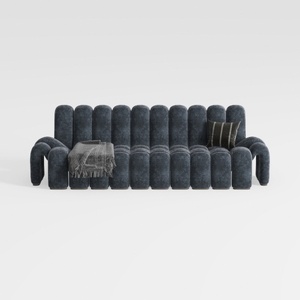

Modern Dark Blue Fabric Channel Tufted Oversized Sofa 3D Model

Rustic Solid Oak Square Coffee Table with Geometric Inlay Pattern 3D Model
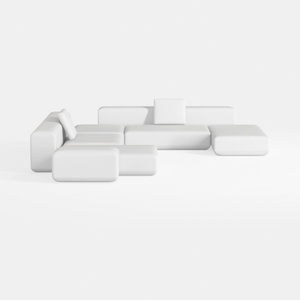
Minimalist Modern White Fabric Modular Sectional Sofa 3D Model
Homestyler is your go-to online home design platform, perfect for anyone looking to bring their interior vision to life. With a user-friendly design tool, stunning 3D renderings, diverse design projects, and helpful video tutorials, creating your dream space has never been easier!
Projete agora para LIVRE
































