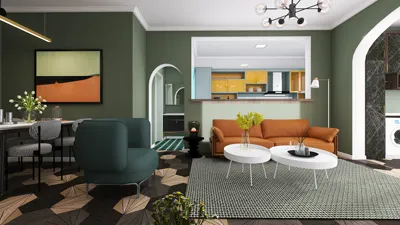


I have calibrated countless small living areas and home offices, and with the right placement, a 5.1 audio system can create a spacious sound without overwhelming the space. The key to achieving balance in limited areas involves ensuring precise imaging, tight bass, and ergonomically comfortable setups while also maintaining functional pathways and furniture arrangements.
Essential Principles for Compact Spaces
To promote healthy listening levels, the WELL v2 standards suggest background noise should be kept to around 35 dBA in occupied areas, which aids in improving clarity and minimizing listening fatigue. Additionally, the IES stresses the importance of managing glare and achieving a balance in ambient lighting; this is crucial as reflective surfaces and overly bright lighting can distract from audio quality. Research from Herman Miller indicates that proper head alignment and posture correlate with audio perception accuracy; ensuring your ear level is close to the tweeter height (around 36–42 inches when seated) enhances imaging and minimizes neck strain during extended listening sessions. For further design insights, documents from the WELL Building Standard and IES detail parameters for sound quality, lighting uniformity, and comfort (refer to WELL v2 and IES guidelines).
Room Dimensions, Listening Points, and Ergonomic Seating
For a small room (approximately 9–12 feet in width), it is advisable to position the main listening area at a distance of 1.0 to 1.2 times the width of the screen, which helps avoid exaggerated sound reflections while maintaining coherent audio imaging. Be sure to align ear height with the front left/right tweeters; subtly angling them towards the listening area can improve the center image. Insights from Herman Miller reveal that maintaining a neutral spine and stable head positioning can help reduce fatigue, so select seating with adequate lumbar support and position the screen's center at eye level to prevent tilting the head, which can alter the ear's alignment with the speakers.
Front L/R and Center Speaker: Accurate Placement and Angles
Position the left and right speakers to form a 22° to 30° angle relative to the listening position; aiming for 30° typically yields enhanced stereo width without sacrificing center clarity. Ensure that the tweeters are at ear level and positioned 6 to 18 inches away from the front wall to effectively balance boundary reinforcement and early reflections. The center speaker should be aligned with the vertical midline of the screen and slightly angled upwards or downwards toward ear height. If the center speaker is situated within furniture, utilize isolating pads to lessen cabinet resonance.
Surround Sound in Limited Spaces
In smaller environments, side surround speakers should be placed 90°–110° from the listening position, ideally 12–24 inches above ear height to allow for diffusion. If walls are close together, consider using dipole or bipole surround speakers or wall mounts with a slight toe-in to avoid sound hot spots. If space constraints necessitate near-field placement, tilting the speakers down slightly can help distribute sound evenly across all seating areas.
Subwoofer Placement: Achieving Clean Bass without Overpowering
Begin by positioning the subwoofer near the front third of the room, then utilize the crawl test: place the sub in your seating position, play bass-heavy tracks, and crawl along the perimeter to identify the spot with the smoothest sound response—this is where the sub should be placed. In ultra-small rooms, a single subwoofer is often more effective than having two, due to the complexities of room modes, but if there is both room and budget, two subs can help even out bass peaks.
Controlling Sound Reflections: Utilizing Panels, Rugs, and Bookshelves
Reflections from the sidewalls and ceiling can distort audio transients. Employ absorption panels at the points of first reflection (from ear level to tweeter line) and lay a thick rug between the speakers and the seating area. Including a lightly packed bookshelf behind the listening area introduces some diffusion. Be careful not to overdo treatment; in smaller rooms, excessive absorption can lead to a lifeless sound—aim for a composition of 60–70% soft acoustic elements and 30–40% reflective surfaces within the listening area.
Calibration Essentials: Adjusting Levels, Delays, and Crossovers
Run the room correction feature on your AVR, then make manual adjustments as necessary. Set all speakers to ‘small’ with an 80 Hz crossover as a standard; if your surround speakers are compact, consider increasing their crossover to 90-100 Hz. Ensure levels fluctuate no more than ±0.5 dB at the listening point. Measuring distances (delays) with a tape measure will help avoid phase issues in the crossover zone. If vocals sound overly full, lower the crossover for the center speaker or move it away from large surfaces.
Lighting and Visual Comfort While Listening
Excessive glare can lead to increased cognitive strain and diminish perceived detail. Adhering to IES guidance for balanced ambient lighting is essential: opt for indirect lamps placed behind or beside the screen, with color temperatures of 2700–3000K for evening use. Utilizing layers that are dimmable helps keep the pupils comfortable and lowers eye strain, which can indirectly affect auditory focus. Avoid placing bright downlights directly overhead of the listening position.
Furniture Arrangement and Pathway Clarity
Ensure there is clear circulation space around the seating and equipment stands. I recommend maintaining 30 to 36 inches for walkways to prevent unintentional bumps into furniture. If you're experimenting with different furniture layouts, using an interior layout planner can assist in visualizing clearances and speaker placements efficiently: consider using a room layout tool such as Homestyler.
Creating Effective Sound in Small Rooms
When symmetrical speaker placement isn’t feasible, focus on maximizing the alignment of the center line between the left and right speakers, ensuring that the center speaker is directed towards the listening area. Slightly angle speakers inward to compensate for off-center seating arrangements. In rooms filled with reflective surfaces, opt for speakers that feature controlled directivity (like waveguides) to help reduce audio reflections from the walls.
Material Selections for Vibration Control and Eco-Friendliness
Using sturdy stands, isolating pads, and solid furniture can help minimize resonances. Choose finishes with low VOCs and durable fabrics; sustainable wool rugs can serve as both decorative elements and acoustic absorbers. Soft window treatments can help reduce high-frequency flutter while still allowing daylight to enter. Be sure to keep cables raised above power lines to reduce interference.
Playback Test Playlist: Quickly Identify Issues
Select tracks featuring clear central vocals, broad sound panning, and precise kick or bass notes. Sweep pink noise around the room to pinpoint tonal issues and move through the space to identify any bass-heavy areas that could influence subwoofer placement. Watching movie segments with distinct surround sound cues can also validate speaker angles and delays.
Setup Summary Checklist
Frequently Asked Questions
Maintaining a distance of approximately 1.0 to 1.2 times the screen width ensures coherent imaging while limiting early reflections in compact environments.
Aim for 22° to 30° angles from the listening area; capturing 30° is a dependable reference to achieve robust stereo separation without compromising the center image.
Indeed. Positioning surround speakers 12–24 inches above ear height enhances immersiveness while decreasing sound localization in smaller settings.
This is a widely accepted standard. If your satellite speakers are small, adjusting surrounds to 90–100 Hz can be advantageous; larger bookshelves might be tested at 70 Hz for the front speakers.
Utilize the crawl test to pinpoint the optimal location for the subwoofer, avoid placing the primary seating at the center of the room, and consider adding light bass traps in corners to smoothen out response.
Focus on the first reflection points on the side walls and possibly the ceiling. A combination of absorption and diffusion (through rugs, bookshelves) helps maintain a natural liveliness in sound.
Choose a warm color temperature range of 2700–3000K, with the use of indirect lighting positioned beside or behind the screen. Adhering to IES lighting recommendations helps minimize glare and distractions.
Absolutely. Consult for symmetrical positioning and ensure equal distances from the left and right speakers to the listening position; mild EQ can help mitigate tonal variations caused by uneven boundaries.
Ensure the center speaker is at the front edge of its stand, decoupled using isolators, and tilted appropriately towards ear level to avoid reflections off surrounding furniture surfaces.
Often true—when situated in front corners or on mid-wall locations, they can help balance modal peaks, but a single strategically placed sub can suffice in particularly small spaces.
Keep average sound levels at or around conversational loudness, managing background noise to approximately 35 dBA as per WELL v2 guidelines to ensure clarity.
Start by aligning the speakers to aim just behind the primary listening position; adjust their placement until the center image stabilizes, avoiding overly bright sounds from off-axis angles.


Homestyler is your go-to online platform for home design! With its user-friendly design tool, stunning 3D rendering, diverse design projects, and helpful video tutorials, creating your dream space has never been easier or more enjoyable. Unleash your creativity today!
지금 무료로 디자인하세요
































