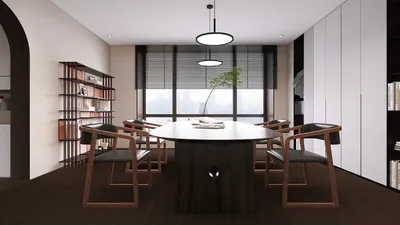


I have crafted numerous compact conference spaces, ensuring that each square foot maximizes its potential. A well-designed mini conference hall can create an atmosphere that feels spacious, productive, and ready for the future when aspects like lighting, acoustics, seating layout, and flow are harmonized as a cohesive system rather than handled as separate elements.
In various workplaces, meeting areas are among the most valuable assets. Recent studies by Gensler reveal that in-person collaboration is still a top priority, having conference and project spaces high on the list of requests for hybrid work models. Additionally, the WELL v2 standard emphasizes the importance of measurable health indicators—such as light levels, glare management, and sound levels—that significantly affect alertness and cognitive function in meetings. I always ensure my designs align with the WELL Light and Sound criteria, adapting my layouts accordingly to support both the content and the individuals involved. For more information, visit wellcertified.com.
Setting lighting standards establishes a foundation for clarity and comfort within the venue. I aim for a brightness range of 300–500 lux on work surfaces for general meeting tasks, while ensuring that vertical illumination is evenly distributed for those on camera. Following IES guidelines, appropriate lighting levels and uniformity can mitigate visual fatigue and enhance comprehension in presentation settings; achieving this balance in a small room is crucial to avoiding excessive brightness or dark spots that can cause glare.
Establishing the Room’s Purpose Prior to Planning
Every square foot of the space should have a specific intention. Will the hall host board updates, workshops, hybrid presentations, or small training sessions? I outline potential uses in relation to capacity and technology needs before selecting furniture: whether it's presentation-oriented (focus forward), roundtable interactive (prioritizing eye contact), or hybrid (balanced views of both people and screens). This determined focus directs screen arrangement, camera placement, and seating configurations.
Importance of Proportions and Sightlines
Proportions play a vital role in small rooms, often more than actual dimensions. I strive to maintain a depth-to-width ratio between 1.2:1 and 1.6:1 wherever feasible; this promotes improved sightlines to a singular front focal wall. For setups featuring a single screen, the farthest viewer should be seated no more than six times the height of the image away; for content that requires detail, I reduce this distance to four times the height for optimal visibility. Cameras should be positioned at eye level and minimally offset from the centerline of the display to prevent disconnection between remote participants and the group's focus.
When I require quick visualizations for tight spaces—adjusting screen dimensions, row spacing, or table configurations—I utilize a layout simulation tool to confirm visibility angles and traffic pathways. An effective way to prototype different layouts is through an interior layout planner, such as Homestyler, which helps visualize these variations.
Seating Arrangements and Density Planning
Creating a comfortable seating density helps prevent the cramped feeling that can hinder engagement. I plan for 24–30 inches of space per seat at shared tables, maintaining at least 36 inches for aisles, and 42–48 inches where two-way passage is likely. Employing curved or chevron-shaped seating angled at 10–15 degrees can enhance sightlines without extending depth, while trapezoidal tables facilitate slight toe-in positioning so participants can face each other and the focal point effectively.
Enhancing Acoustics in Smaller Spaces
Compact venues often struggle with echo and early reflections that muddle speech clarity. I aim for reverberation times (RT60) of approximately 0.4–0.6 seconds for enhanced speech understanding, strategically distributing absorption materials (like fabric wall panels and upholstered seating) alongside diffusion elements (textured wall surfaces and shelving with varied depths) to prevent excessive damping. Incorporating soft, high-backed seating against side walls also serves as acoustic treatment. If budgets are limited, covering about 25–35% of the wall space with Class A absorptive panels near the initial reflection points can significantly boost clarity.
Developing Lighting Layers and Managing Glare
I implement three essential lighting layers: uniform ambient lighting, glare-reduced task and face illumination, and presentation lighting. Ambient lighting should feature dimmable indirect or lens-diffused fixtures at 300–500 lux. Face lighting is aimed at achieving vertical illumination of 150–250 lux on participants, using color temperatures of 3000–3500K to maintain natural skin tones for video. Presentation lighting includes perimeter wall washers to enhance contrast around the display while minimizing luminance disparity on-screen. I integrate glare shields, matte finishes around the display walls, and maintain low UGR to alleviate eye strain during prolonged sessions.
Understanding Color Psychology and Material Choices
In smaller conference rooms, color selection is critical for creating a soothing environment while energizing focal areas. I opt for desaturated mid-tone colors (such as soft greens and blues, or taupe) to diminish visual noise and perceived disorder. Bright colors should be focused on the facilitator's wall or used sparingly to draw attention without becoming distracting. Utilizing semi-matte finishes helps to avoid glare; high-chroma upholstery should be used carefully to prevent color reflections on faces during video calls.
Focusing on Ergonomics and Human Comfort
Chair designs with 16–18 inch seat depths, adequate lumbar support, and seat heights ranging from 17–19 inches ensure comfort during sessions lasting 60–120 minutes. Armrests should be designed to avoid interference when chairs are pushed in, leading me to often choose armless variants for tighter spaces while reserving some armrest option for outskirts. Tables should be set at 28–29 inches high with a knee clearance of 10–12 inches to accommodate laptops comfortably without causing shoulder strain. Incorporating cable management within the table foundations keeps the floor space clear for safe movement.
Integrating Hybrid Technology Effectively
The smallest conference rooms necessitate the smartest audiovisual configurations. I focus on placing a single dominant screen at eye level, employing ultra-short-throw projectors or laser devices when ceiling heights are limited, along with beamforming microphones to minimize clutter on the table. The cameras should capture a slightly wider angle of the front rows without distortion, ideally maintaining a 60–70-degree field of view in these tight spaces. Speakers should be situated at ear level or distributed across the ceiling to maintain coherence between the audio and visual source, enhancing the overall experience.
Ensuring Airflow, Temperature, and Lighting Comfort
Comfort is particularly sensitive in smaller areas. I target a fresh air supply of 20–30 CFM per person during busy sessions, maintaining a temperature range of 72–75°F with stable air movement below 40 FPM at seated height to avoid drafts. I use tunable white lighting (3000–4000K) that adapts from warm tones conducive for collaboration to cooler tones that promote alertness during data-intensive reviews. Local dimming options allow for note-taking while preserving clarity on the screen.
Planning for Circulation, Storage, and Flexibility
Consider a layered approach: a dedicated focal wall, adaptable seating arrangements, and peripheral areas for storage and technology. I position mobile whiteboards and nesting tables against the rear wall, recommending stackable chairs to enable swift transitions between presentation and workshop formats. If multiple setups are anticipated, I prototype movement paths and turning radii using tools like Homestyler to avoid congestion at doors and power points.
Emphasizing Sustainability and Longevity
Compact does not equal wasteful. I choose low-VOC materials, FSC-certified wood where relevant, and durable, cleanable fabrics that withstand at least 100,000 double rubs for high-use areas. Utilizing LED lights with high efficacy and long-lasting L70 ratings helps lower operational costs. Modular carpet tiles or resilient floorings with acoustic underlays minimize noise and allow for easy replacement following high-traffic events.
My Preferred Layouts for Mini Halls
• Chevron rows with a narrow central aisle for presentation-focused agendas.
• U-shape with narrow tables for engaging leadership discussions (maintaining a shallow setup for depth management).
• Dual-row horseshoe with a free presenter zone for interactive workshops.
• Theater seating alongside a bar-height ledge at the back for supplementary laptops without obstructing views.
Checklist for an Efficient Small Conference Space
• Sightlines: Ensure 4–6H viewing distances, eye-level camera setup, avoiding extreme off-axis seats.
• Acoustics: Maintain RT60 at 0.4–0.6 seconds, using a mix of absorptive and diffusive materials with soft surfaces at first reflection points.
• Lighting: Target ambient levels of 300–500 lux, maintain vertical lighting of 150–250 lux on faces, minimizing glare, with temperature settings of 3000–3500K.
• Ergonomics: Ensure seat widths of 24–30 inches, aisles of 36–48 inches, supportive seating, and secure cable routing.
• Air and Thermal Management: Fresh air should match peak occupancy, with stable temperatures and minimal drafts.
• Flexibility: Include nesting tables, stackable seating, mobile boards, and organized storage solutions.
Frequently Asked Questions
I typically design for 12–30 seats depending on the primary use-case. Rooms focused on presentations can handle denser groups, while interactive workshops perform better with a capacity closer to 12–18 to facilitate mobility and eye contact.
Aim for 300–500 lux ambient lighting on tables, incorporating local dimming or scene controls. Keep vertical illumination around 150–250 lux on faces, and employ wall washers near displays to control contrast, consistent with IES standards for presentation environments.
Combine ceiling absorption, fabric wall panels at initial reflection zones, and soft furnishings for acoustic management. Target RT60 values around 0.4–0.6 seconds for spaces emphasizing speech, spreading treatments to avoid excessive damping.
Follow the 4–6H rule: the furthest viewer should be seated within four to six times the height of the image. For information-rich slides, getting closer to 4H is preferable; 6H is adequate for simpler visuals.
Position seats at a 10–15 degree angle toward the focal wall, locate the camera at eye level on the display centerline, and avoid deep seating rows. A shallow chevron or U-shape keeps participants visible to both the camera and one another.
Select neutral, semi-matte finishes with controlled accent colors. Avoid bold hues on side walls to deter color reflection on participants. Implement lighting with a temperature of 3000–3500K to ensure faithful skin tones during video calls.
Incorporate nesting tables, stackable chairs, and hidden cable management systems. Stow mobile boards and extra seats along the rear wall. Utilize tools like an interior layout planner or a layout simulation tool for clearance checks before finalizing furniture purchases.
Aim to deliver 20–30 CFM per individual for fresh air whenever feasible, keeping temperatures at 72–75°F, while ensuring stable airflow under 40 FPM at seated height to prevent drafts.
Utilizing beamforming ceiling or table microphones decreases clutter while providing even sound coverage in compact seating arrangements. Pair these with spatially-placed speakers to create a natural audio presence tied to the display area.
Incorporate low-VOC paints when possible, opt for FSC wood where suitable, select durable upholstery (100,000+ double rubs), and employ LED lighting with extended L70 lifetimes, along with modular carpet tiles featuring acoustic backing for longevity and noise control.

Monarch Specialties 7657 Computer Desk, Home Offic

Zoe Ash Medium Record Storage Console
Huuger Computer Desk, 55 Inch Home Office Desk
Discover the creative freedom with Homestyler! This user-friendly platform offers a robust online design tool, stunning 3D renderings, and a plethora of design projects. Plus, with informative video tutorials, you’ll have all the inspiration and guidance you need to transform your space effortlessly!
今すぐ无料でデザイン
































