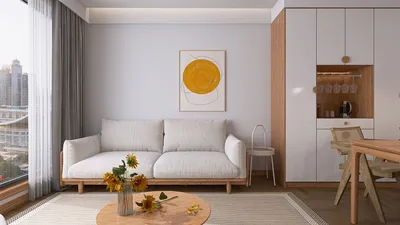


Compact workspaces require multifunctional furniture that supports posture, enhances focus, and adapts to various tasks while keeping walkways clear. In my latest projects covering less than 120 sq ft, the most effective approaches focus on appropriately sized tables with built-in cable management, flexible chairs that boast true ergonomic adjustments, and layouts that respect human movement and sightlines. The WELL v2 guidelines for seated work emphasize the importance of adjustable task seating and convenient controls for comfort. Research from Steelcase highlights that well-fitted seating and adjusted postures lead to significant reductions in musculoskeletal discomfort and fatigue. In essence, a smaller office space doesn't imply a loss of functionality—every square inch can serve a purposeful role when designed right with tools like Homestyler.
Achieving the right size is crucial for compact offices to either thrive or falter. Steelcase’s findings reveal that varying posture throughout the day can enhance cognitive performance and minimize discomfort, making features like adjustable seat height, lumbar support, and armrests essential in limited spaces. When it comes to lighting, I adhere to IES task lighting recommendations, which suggest maintaining illuminance within the typical office range of 300-500 lux while managing glare—especially important when monitors are close to sightlines. Regarding workspace psychology, Verywell Mind recommends incorporating soft neutral tones with a cool bias to facilitate concentration, complemented by touches of saturated colors to uplift mood without creating visual clutter. For those strategizing their layouts or assessing traffic paths, a layout simulation tool can be invaluable in visualizing reach zones, chair rotations, and clearances prior to making purchases.
Tailoring the Work Environment, Not Just the Space
Begin with the tasks at hand. A desk measuring 39 to 47 inches (100 to 120 cm) in width can accommodate a laptop, a secondary monitor, and a compact docking station without encroaching on elbow space. A depth of 24 inches (60 cm) keeps screens comfortably distanced for viewing without squandering valuable floor space. Should your work involve substantial paperwork, a safer depth of 30 inches (76 cm) ensures proper eye-to-document ergonomics while allowing for knee clearance.
Essential Ergonomics for Space-Saving Chairs
In smaller office settings, chair specifications play a pivotal role beyond just the brand. Essential features include seat heights that adjust from approximately 16 to 21 inches to align with desk heights; lumbar support that offers vertical adjustments; backrest recline with tension control; and height and width adjustable armrests to avoid contact with the desk edges. A study by Steelcase on sit-stand dynamics and posture variability underscores the value of micro-movements; even within a purely seated setup, reclining and adjusting armrests encourage task shifts without the need to leave seating.
Space and Movement Considerations
Aim for at least 30 inches (76 cm) of unobstructed space behind the chair when possible; I often settle for a minimum of 24 inches (61 cm) when walls are nearby, ensuring chair casters don’t obstruct. If a door swings inward, confirm that its arc doesn't interfere with the seated area. Utilizing a straightforward interior layout planner can help avoid desk corners from obstructing pathways— highlight how Homestyler can assist with visualizing these layouts before finalizing designs.
Effective Lighting in Smaller Spaces
Compact rooms often amplify glare. Maintain general illumination within the 300-500 lux standard according to common office practices while incorporating a targeted task light with a warm-neutral color temperature of 3500-4000K for reading. Position lights offset to the screens to prevent reflections; although matte monitor finishes help mitigate this, aim the task light to illuminate paper without causing glare on the display. If a window is nearby, adjustable shades can enhance visual comfort during peak daylight hours.
Strategizing Color and Material Usage
In smaller areas, visual lightness paired with tactile warmth is beneficial. Utilizing palettes of soft greys, muted blues, and warm whites can alleviate visual stress; color psychology insights from Verywell Mind suggest that cooler shades can bolster concentration while warm highlights add friendliness without contributing to visual clutter. Material finishes are important: light, low-gloss laminate surfaces on desks can minimize glare; breathable woven fabrics prevent heat build-up; recycled PET felt panels enhance acoustic quality while softening visual appeal. For necessary storage, vertical wall-mounted units are advantageous to keep floors unobstructed and sightlines clear.
Maximizing Acoustic Comfort
Smaller rooms can amplify noise levels. Install thin-profile acoustic panels at primary reflection points (behind the desk and along primary walls), and felt pinboards can help absorb sound. A low-noise desk fan can be useful if airflow creates additional sound. Placing a soft rug beneath the workstation can dampen footfall noise, and it's essential to check the compatibility of chair casters with carpet to avoid dragging issues.
Adaptable Tables: Solutions for Every Need
Nesting tables are ideal for dual-functional spaces—stack them when not in use and easily pull out for meetings. Folding wall-mounted desks (drop-leaf styles) provide a full working surface that can quickly disappear, but it's imperative to ensure the mounting height fits your chair requirements while allowing for knee space. Cable management trays installed under slim desks are crucial for maintaining tidy floor areas; this is particularly vital in small offices where stray power sources can become tripping hazards.
Optimal Layout Strategies for One or Two Users
For individual use: position the desk along the longest wall, centered to allow for storage on both sides. Slightly offset the monitor to align with the dominant hand’s reach for peripherals. For dual users: consider a back-to-back setup with a shared cable raceway to save wall space—opting for alternating task lights to mitigate cross-glare. If the room exceeds 7 feet (213 cm) in width, a side-by-side arrangement with narrow privacy screens can maintain individual space without blocking natural light.
Addressing Human Factors: Behavioral Patterns and Micro-Zones
Establish zones even within compact areas—a focus seating spot, a standing space for quick calls, and a small reference shelf can work wonders. Behavioral signals, such as locating the task light on the focus side and placing the charging dock in the stand zone, can reduce clutter spread. I prefer slim pedestals on wheels to allow for paper mobility rather than accumulating disorganization across the desk.
Effective Storage Solutions
Utilizing closed storage structures ranging from ankle to knee height helps maintain visual lightness at eye level. Open shelves above desk height should be kept shallow (8–10 inches / 20–25 cm) to prevent deep shadows from obscuring the workspace or crowding headroom. Position frequently accessed items within arm’s reach to ensure a neutral posture and minimize repetitive strain injuries.
Budgeting and Sustainable Choices
In smaller offices, fewer items mean that quality becomes paramount. Seek out chairs featuring replaceable components and third-party performance testing. For surfaces, opt for laminates or veneers with verified low-VOC finishes. Recycled felt and aluminum frames support sustainability while remaining lightweight for easier adjustments and configurations.
Fast Configuration Ideas
- Focus Nook: 43×24 inch desk, compact ergonomic chair, single monitor arm, under-desk cable management tray, wall-mounted task light.
- Dual-Use Studio: 47×30 inch desk on locking casters, nesting side table, swivel chair with foldable arms, portable acoustic panel.
- Micro Team Room: two 40×24 inch desks set back-to-back, slim privacy screens, shared power raceway, chairs equipped with adjustable arms and lumbar support.
Common Questions
A depth of 24 inches (60 cm) works well for setups with a laptop and monitor; opt for 30 inches (76 cm) if you often handle printed documents to ensure an optimal viewing distance and ample elbow room.
Aim for a minimum of 30 inches (76 cm) for comfortable movement. In tighter spaces, 24 inches (61 cm) is feasible if doors and cabinet fronts don’t intrude on the seated area.
Adjustments for seat height, lumbar support, backrest tension, and the height and width of armrests. These allow for postural changes without needing to reposition far from the desk.
General lighting should remain within the 300-500 lux range, paired with a task light set at 3500-4000K positioned offset from the monitor. Utilize adjustable shades to manage window glare.
Absolutely—consider back-to-back desks with a shared cable raceway, or a side-by-side layout with narrow privacy screens, ensuring at least 24 inches (61 cm) of walkway remains clear.
Cool, muted colors (such as soft blues and greys) facilitate concentration while small warm accents enhance approachability without adding visual clutter.
Opt for minimal closed storage and shallow open shelves placed above desk height. Make use of vertical wall-mounted units and under-desk storage to keep the floor space clear.
Wall-mounted desks can be beneficial when installed at ergonomic heights using stable brackets and secure cable management. Pair them with a compact chair that conveniently fits under the desk when folded.
Utilize thin-profile acoustic panels, pinboards, and a rug beneath the chair's space to help manage sound, especially from mechanical sources. Small adjustments often lead to noticeable comfort.
The dimensions of 39-47 inches (100-120 cm) provide ample space for devices and documents without making the workspace too cramped.
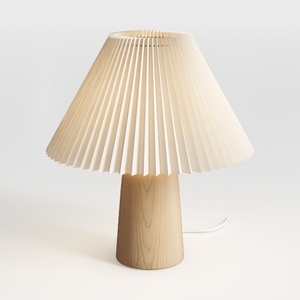
NUOBESTY 1Set Nordic Pleated Desk Lamp for Bedroom
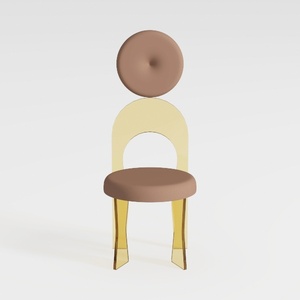

Tov Furniture Carmel Round Upholstered Chair (Velv
Homestyler is your go-to online home design platform! With its easy-to-use design tool, stunning 3D renderings, and a wealth of DIY video tutorials, you can effortlessly create and visualize your dream spaces. Transform your home today with Homestyler!
Projete agora para LIVRE
































