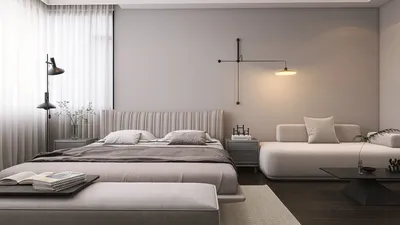


When visualizing your designs, utilizing Homestyler can elevate your presentation through exceptional white model rendering. This technique highlights the architecture and form of your design without the interference of color and texture. This guide will walk you through essential strategies and tips for crafting stunning white model renders using Homestyler.
An Insight into White Model Rendering
White model rendering serves as a strategy employed by designers to display their creations in a refined, minimalist manner. This approach enables viewers to concentrate on the architectural aspects and design features, making it perfect for presentations and meetings with clients.
Configuring Your Scene in Homestyler
To create a successful white model render, begin with proper scene setup in Homestyler. Here are the vital steps to consider:
Choose a simple white or light grey backdrop. This selection isolates your model, enhancing the perception of depth and dimensionality.
Employ soft, uniform lighting to eliminate harsh shadows. Utilizing Homestyler's lighting tools can help you achieve a balanced effect.
Apply a matte white finish to your model. Ensure that the reflective properties are kept low to avoid distracting highlights, maintaining the focus on the design's shape.
Camera Adjustments for Best Results
The camera configurations in Homestyler can considerably influence your white model render. Here's how to adjust them:
Set your exposure appropriately, ensuring the model appears bright but not overly exposed. A recommended starting point for exposure is between 12-15.
Think about utilizing a shallow depth of field to emphasize specific features of your model while softly blurring the background elements.
Enhancing Your Renders with Post-Processing
After your render is complete, some post-processing can greatly refine your final image:
Leverage software tools such as Photoshop or Lightroom to adjust brightness and contrast, ensuring your model is distinct and prominent.
Add a shadow underneath the model to anchor it and create a sense of realism.
Final Thoughts
Crafting impressive white model renders using Homestyler can be straightforward. By leveraging the correct setup, lighting techniques, and post-processing strategies, you can effectively highlight your designs in a professional way. Begin experimenting with these techniques now to enhance your rendering abilities!
Frequently Asked Questions
Q: What advantages does white model rendering offer? A: This technique emphasizes the design and structure without distractions, making it excellent for client presentations.
Q: How can I enhance lighting in my renders using Homestyler? A: Utilize a gentle light source and tweak the intensity for an even illumination across your model.
Q: Is post-processing essential for white model renders? A: While it isn’t strictly necessary, post-processing can significantly improve the overall aesthetic and professionalism of your render.
Welcome to the leading Home Design Software!
Дизайн сейчас бесплатно
































